https://github.com/bbecquet/leaflet.magnifyingglass
A plugin to add a customizable magnifying glass tool to a Leaflet map.
https://github.com/bbecquet/leaflet.magnifyingglass
Last synced: about 1 year ago
JSON representation
A plugin to add a customizable magnifying glass tool to a Leaflet map.
- Host: GitHub
- URL: https://github.com/bbecquet/leaflet.magnifyingglass
- Owner: bbecquet
- License: mit
- Created: 2013-12-15T13:11:51.000Z (over 12 years ago)
- Default Branch: master
- Last Pushed: 2019-03-08T14:31:11.000Z (over 7 years ago)
- Last Synced: 2025-03-28T10:11:40.171Z (about 1 year ago)
- Language: JavaScript
- Size: 567 KB
- Stars: 105
- Watchers: 8
- Forks: 24
- Open Issues: 9
-
Metadata Files:
- Readme: README.md
- License: LICENSE
Awesome Lists containing this project
README
Leaflet Magnifying Glass
========================
This plugin allows you to add a "magnifying glass" effect to a Leaflet map, able to display a portion of the map in a different zoom (and actually display different content).
See it in action:
* [Default behavior, following mouse movement](http://bbecquet.github.io/Leaflet.MagnifyingGlass/examples/example.html)
* [Activated with a control button](http://bbecquet.github.io/Leaflet.MagnifyingGlass/examples/example_button.html)
* [Multiple fixed glasses, with different map looks](http://bbecquet.github.io/Leaflet.MagnifyingGlass/examples/example_multi.html)
Support
-------
The development version of the plugin (on the `master` branch) is targeted at the 1.* version of Leaflet.
For a version of the plugin compatible with the 0.7.* Leaflet releases, use the `leaflet-0.7.2` branch.
Not tested on mobile browsers.
Screenshot
----------
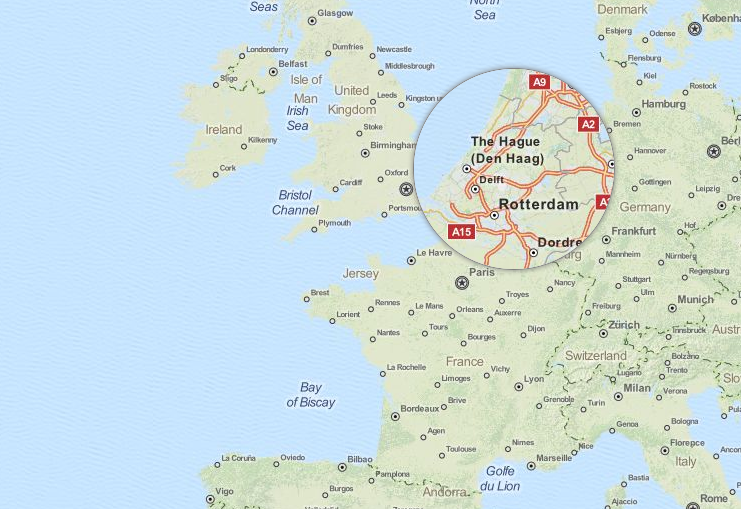
Default look of the magnifying glass, using the same tile background as the main map and a zoom level offset set to 3.
Usage
-----
* Add the style sheet and script file to your page;
* Instantiate a magnifying glass and add it to the map like any other layer:
```javascript
var magnifyingGlass = L.magnifyingGlass({
layers: [ ... ]
});
map.addLayer(magnifyingGlass);
```
### Inner layers
For it to display something, you need to pass layers to the constructor. You can simply give a `L.TileLayer`, but any other type of layers too.
Leaflet layer objets can't be shared between maps. So, __don't re-use layer objects already in use by the main map__. For example, if you want to use the same tile background on your main map and in the magnifying glass, you need to instantiate two different `L.TileLayer` objects:
```javascript
// Share the same tile url...
var tileUrl = 'http://{s}.tile.openstreetmap.org/{z}/{x}/{y}.png';
// but use two independant TileLayer objects
var mapTiles = L.tileLayer(tileUrl),
magnifiedTiles = L.tileLayer(tileUrl);
var map = L.map('map', {
center: [0, 0],
zoom: 5,
layers: [ mapTiles ]
});
var magnifyingGlass = L.magnifyingGlass({
layers: [ magnifiedTiles ]
}).addTo(map);
```
### Options
| Option | Type | Default | Description |
| --- | --- | --- | --- |
| `radius` | `Integer` | `100` | The radius of the magnifying glass, in pixels. |
| `zoomOffset` | `Integer` | `3` | The zoom level offset between the main map zoom and the magnifying glass. |
| `fixedZoom` | `Integer` | `-1` | If different than `-1`, defines a fixed zoom level to always use in the magnifying glass, ignoring the main map zoom and the `zoomOffet` value. |
| `fixedPosition` | `Boolean` | `false` | If `true`, the magnifying glass will stay at the same position on the map, not following the mouse cursor. |
| `latLng` | `LatLng` | `[0, 0]` | The initial position of the magnifying glass, both on the main map and as the center of the magnified view. If `fixedPosition` is `true`, it will always keep this position. |
| `layers` | `ILayer[]` | `[]` | Set of layers to display in the magnified view. These layers shouldn't be already added to a map instance (see note above). |
### Methods
| Method | Description |
| --- | --- |
| `getMap()` | Returns the `L.Map` instance used by the magnifying glass. You can use it for example to add/remove magnified layers on the fly. |
License
-------
MIT.