https://github.com/bcomnes/sublime-standard-format
:sparkles: Runs standard --fix against the javascript in your ST3 window on save or manually.
https://github.com/bcomnes/sublime-standard-format
Last synced: about 1 year ago
JSON representation
:sparkles: Runs standard --fix against the javascript in your ST3 window on save or manually.
- Host: GitHub
- URL: https://github.com/bcomnes/sublime-standard-format
- Owner: bcomnes
- License: mit
- Created: 2015-03-15T03:55:09.000Z (over 11 years ago)
- Default Branch: master
- Last Pushed: 2023-12-23T22:24:40.000Z (over 2 years ago)
- Last Synced: 2024-12-12T14:24:23.204Z (over 1 year ago)
- Language: Python
- Homepage: https://packagecontrol.io/packages/StandardFormat
- Size: 297 KB
- Stars: 60
- Watchers: 6
- Forks: 21
- Open Issues: 3
-
Metadata Files:
- Readme: README.md
- Funding: .github/funding.yml
- License: LICENSE
Awesome Lists containing this project
README
# Standard Format
[](https://github.com/bcomnes/sublime-standard-format/actions/workflows/tests.yml)
A Sublime Text 3 plug-in that runs [standard --fix](https://github.com/feross/standard) against the javascript code in your ST3 window on save or manually. Can be toggled on or off. Includes a few settings that let you tweak your search path to favor local dependencies over global ones.
Supports any tool that accepts a `stdin` and `stdout` formatting API. The following tools are used by default:
```
standard --fix
semistandard --fix
```
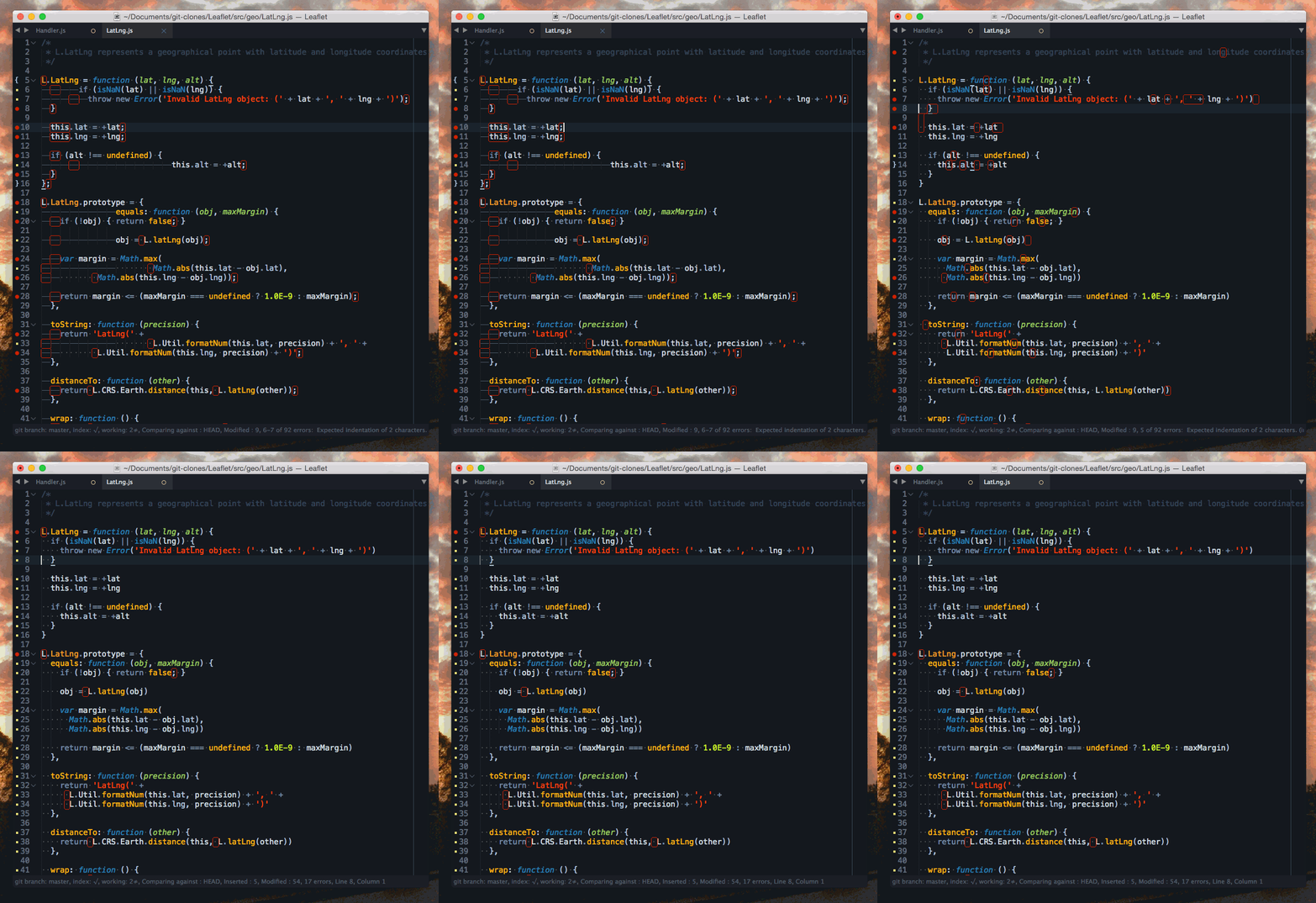
## Installation
Install Standard Format using [Package Control](https://packagecontrol.io/).
```sh
# In the command palate
- package control install
- standard format
```
Standard Format (the Sublime Text Plug-in) requires that you install [`standard`](https://github.com/feross/standard) either locally to your project or globally. It is recomended to save it to your local project.
```sh
$ npm install standard@latest --save-dev
```
## Configuration
You can find Standard Format settings in the `StandardFormat.sublime-settings` file.
Standard Format is agressive about finding your developer dependencies. The search path that it uses by default are in the following order:
- User added paths: you can add an array of paths in your settings file. You shouldn't need to do this unless you are doing something weird.
- Any `node_modules/.bin` paths found above the current file. Disable with `use_view_path`
- If your current view isn't saved to disk, any any folders in the project will be walked towards root searching for `node_modules/.bin` to add to the path here. Disabled with `use_project_path_fallback`.
- The global user path is then used if nothing else is found. This is calculated by starting a bash instance and calculating the real user path, including `.nvm` shims.
### Other settings:
- `format_on_save`: Boolean. Runs Standard Format on save when set to true. Use the command pallet to quickly toggle this on or off.
- `extensions`: String Array. An array of file extensions that you want to be able to run Standard Format against.
- `command`: **Optional** String Array. Customize the command and flags that **Standard Format** runs against. Can expand certain pre-defined placeholders (such as `{FILENAME}`).
Default:
```json
{
"commands": [
["standard", "--stdin", "--fix"],
["semistandard", "--stdin", "--fix" ]
["ts-standard", "--stdin", "--fix", "--stdin-filename", "{FILENAME}" ]
]
}
```
- `loud_error`: Boolean. Specifies if you get a status bar message or error window if the subprocess encounters an error while formatting.
- `log_errors`: Boolean. Lets you log out errors encountered by the formatter. Mainly used to suppress noisy formatting errors.
### Project local settings
If the default/user settings isn't fined grained enough, you can set project specific settings in `.sublime-project` project specific settings. See [sublime project docs](https://www.sublimetext.com/docs/3/projects.html) for more details.
```json
{
"settings": {
"standard_format": {
"format_on_save": true,
"commands": [
["eslint_d", "--stdin", "--fix-to-stdout"]
]
}
}
}
```
## Hints
Windows is now supported. Please open any issues that you come across.
## Linter
Standard Format pairs nicely with the Sublime Text `standard` linter:
- [Flet/SublimeLinter-contrib-standard](https://github.com/Flet/SublimeLinter-contrib-standard)
## References
- https://github.com/piuccio/sublime-esformatter
- https://github.com/ionutvmi/sublime-jsfmt
- https://github.com/enginespot/js-beautify-sublime
- https://github.com/jdc0589/JsFormat/commits/master
- https://github.com/akalongman/sublimetext-codeformatter
- https://github.com/DisposaBoy/GoSublime
- https://github.com/Flet/SublimeLinter-contrib-standard