https://github.com/bcorfman/highscoregui
Web frontend to my containerized HighScore database service
https://github.com/bcorfman/highscoregui
anvil frontend gui python rapid-development webapp
Last synced: about 2 months ago
JSON representation
Web frontend to my containerized HighScore database service
- Host: GitHub
- URL: https://github.com/bcorfman/highscoregui
- Owner: bcorfman
- License: mit
- Created: 2023-10-17T18:15:06.000Z (almost 3 years ago)
- Default Branch: master
- Last Pushed: 2024-04-02T01:53:22.000Z (over 2 years ago)
- Last Synced: 2024-04-02T02:42:52.706Z (over 2 years ago)
- Topics: anvil, frontend, gui, python, rapid-development, webapp
- Language: CSS
- Homepage: https://highscore-web-gui.anvil.app/
- Size: 30.3 KB
- Stars: 0
- Watchers: 2
- Forks: 0
- Open Issues: 0
-
Metadata Files:
- Readme: README.md
- License: LICENSE.txt
Awesome Lists containing this project
README
# About This [Anvil](https://anvil.works/?utm_source=github:app_README) App
### Build web apps with nothing but Python.
The app in this repository is built with [Anvil](https://anvil.works?utm_source=github:app_README), the framework for building web apps with nothing but Python. You can clone this app into your own Anvil account to use and modify. The backend is my [database microservice](https://github.com/bcorfman/highscore-micro-two), also on GitHub.
Below, you will find:
- [How to open this app](#opening-this-app-in-anvil-and-getting-it-online) in Anvil and deploy it online
- Information [about Anvil](#about-anvil)
- And links to some handy [documentation and tutorials](#tutorials-and-documentation)
## Opening this app in Anvil and getting it online
### Cloning the app
Go to the [Anvil Editor](https://anvil.works/build?utm_source=github:app_README) (you might need to sign up for a free account) and click on “Clone from GitHub” (underneath the “Blank App” option):
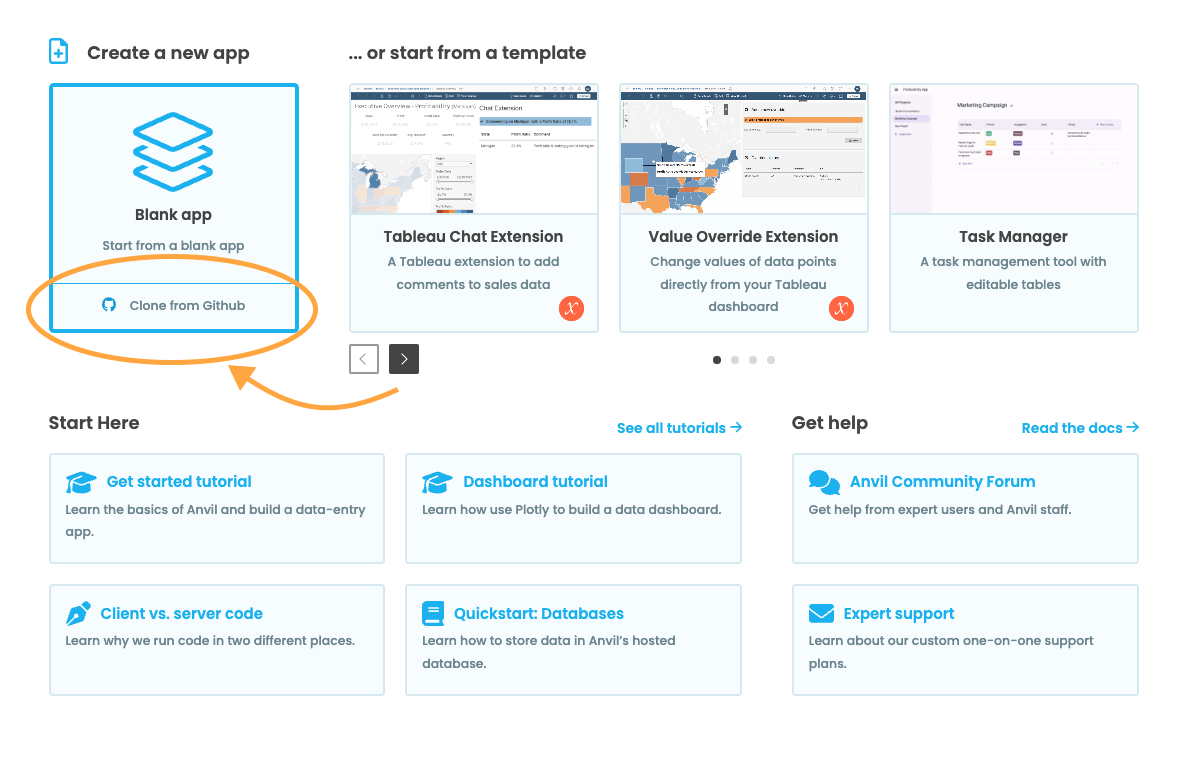
Enter the URL of this GitHub repository. If you're not yet logged in, choose "GitHub credentials" as the authentication method and click "Connect to GitHub".
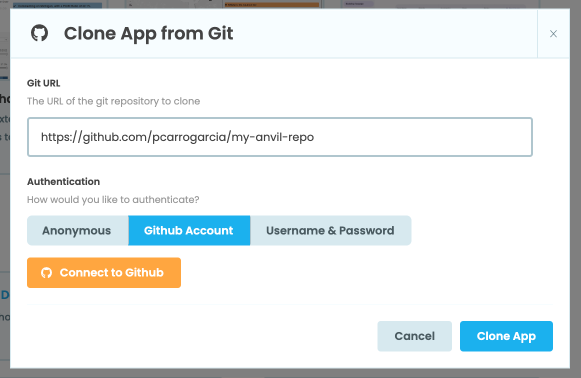
Finally, click "Clone App".
This app will then be in your Anvil account, ready for you to run it or start editing it! **Any changes you make will be automatically pushed back to this repository, if you have permission!** You might want to [make a new branch](https://anvil.works/docs/version-control-new-ide?utm_source=github:app_README).
### Running the app yourself:
Find the **Run** button at the top-right of the Anvil editor:

### Publishing the app on your own URL
Now you've cloned the app, you can [deploy it on the internet with two clicks](https://anvil.works/docs/deployment/quickstart?utm_source=github:app_README)! Find the **Publish** button at the top-right of the editor:

When you click it, you will see the Publish dialog:
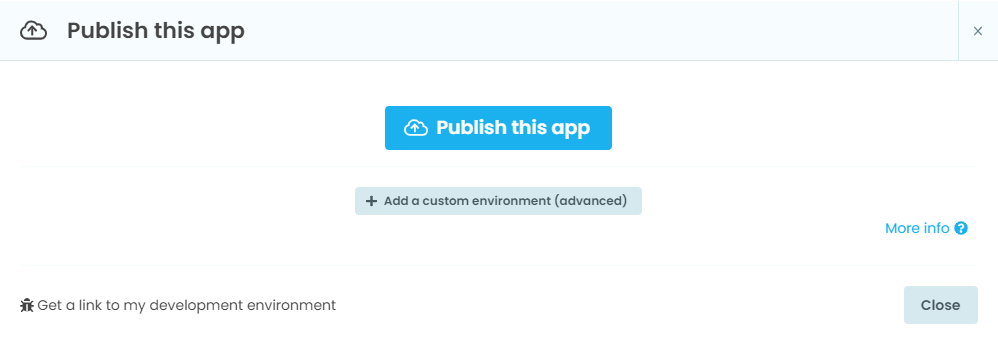
Click **Publish This App**, and you will see that your app has been deployed at a new, public URL:
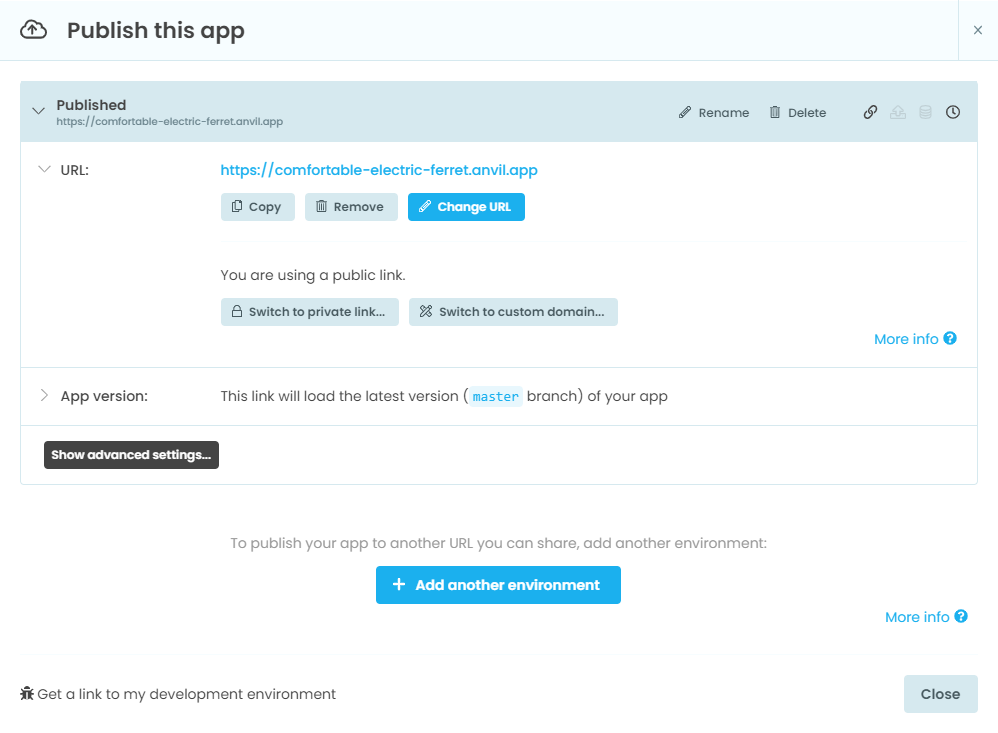
That's it - **your app is now online**. Click the link and try it!
## About Anvil
If you’re new to Anvil, welcome! Anvil is a platform for building full-stack web apps with nothing but Python. No need to wrestle with JS, HTML, CSS, Python, SQL and all their frameworks – just build it all in Python.
Learn About Anvil In 80 Seconds👇

[](https://anvil.works?utm_source=github:app_README)
To learn more about Anvil, visit [https://anvil.works](https://anvil.works?utm_source=github:app_README).
## Tutorials and documentation
### Tutorials
If you are just starting out with Anvil, why not **[try the 10-minute Feedback Form tutorial](https://anvil.works/learn/tutorials/feedback-form?utm_source=github:app_README)**? It features step-by-step tutorials that will introduce you to the most important parts of Anvil.
Anvil has tutorials on:
- [Building Dashboards](https://anvil.works/learn/tutorials/data-science#dashboarding?utm_source=github:app_README)
- [Multi-User Applications](https://anvil.works/learn/tutorials/multi-user-apps?utm_source=github:app_README)
- [Building Web Apps with an External Database](https://anvil.works/learn/tutorials/external-database?utm_source=github:app_README)
- [Deploying Machine Learning Models](https://anvil.works/learn/tutorials/deploy-machine-learning-model?utm_source=github:app_README)
- [Taking Payments with Stripe](https://anvil.works/learn/tutorials/stripe?utm_source=github:app_README)
- And [much more....](https://anvil.works/learn/tutorials?utm_source=github:app_README)
### Reference Documentation
The Anvil reference documentation provides comprehensive information on how to use Anvil to build web applications. You can find the documentation [here](https://anvil.works/docs/overview?utm_source=github:app_README).
If you want to get to the basics as quickly as possible, each section of this documentation features a [Quick-Start Guide](https://anvil.works/docs/overview/quickstarts?utm_source=github:app_README).