https://github.com/beavailable/share
Share and receive files effortlessly over HTTP
https://github.com/beavailable/share
Last synced: 5 months ago
JSON representation
Share and receive files effortlessly over HTTP
- Host: GitHub
- URL: https://github.com/beavailable/share
- Owner: beavailable
- License: mpl-2.0
- Created: 2021-05-20T01:58:23.000Z (about 5 years ago)
- Default Branch: main
- Last Pushed: 2026-01-12T11:48:23.000Z (5 months ago)
- Last Synced: 2026-01-12T19:14:27.114Z (5 months ago)
- Language: Python
- Homepage:
- Size: 1.73 MB
- Stars: 51
- Watchers: 2
- Forks: 4
- Open Issues: 1
-
Metadata Files:
- Readme: README.md
- License: LICENSE
Awesome Lists containing this project
- fucking-awesome-cli-apps - share - Share and receive files effortlessly over HTTP. (Files and Directories / File Sync/Sharing)
- awesome-cli-apps - share - Share and receive files effortlessly over HTTP. (Files and Directories / File Sync/Sharing)
README
# share
This is a command-line file sharing tool, which has just a single file and is easy to use.
## Features
- Crossing multiple platforms
- Sharing directories, files and texts
- Receiving files and texts
- Password sharing
- Basic authentication support
- Range request support
- TLS support
- Zstd compression support (requires [python-zstandard](https://github.com/indygreg/python-zstandard), optional and not needed on Python 3.14+)
- QR code support (requires [python-qrcode](https://github.com/lincolnloop/python-qrcode), optional)
## Usage
```
usage: share.py [-b ADDRESS] [-p PORT] [-s] [-r] [-a] [-z] [-t] [-P [PASSWORD]] [-R RULE]
[-q] [-h] [-v] [--certfile CERTFILE] [--keyfile KEYFILE]
[--keypass KEYPASS]
[arguments ...]
positional arguments:
arguments a directory, files or texts
general options:
-b, --bind ADDRESS bind address [default: 0.0.0.0]
-p, --port PORT port [default: 8888]
-s, --share share mode (default mode)
-r, --receive receive mode, can be used with -s option (only for directory)
-a, --all show all files, including hidden ones (only for directory)
-z, --archive share the directory itself as an archive (only for directory)
-t, --text for text
-P, --password [PASSWORD]
access password, if no PASSWORD is specified, the environment
variable SHARE_PASSWORD will be used
-R, --auth-rule RULE a rule for authentication, can be used multiple times [default: *]
-q, --qrcode show the qrcode
-h, --help show this help message and exit
-v, --version show version number and exit
tls options:
--certfile CERTFILE cert file
--keyfile KEYFILE key file
--keypass KEYPASS key password
```
### Auth Rules
An auth rule consists of two components: a pattern and an optional comma-separated list of HTTP methods, separated by a `:`.
Here are a few examples:
- `*`, `*:GET,POST,PUT` or `/*:GET,POST,PUT` matches all paths for `GET`, `POST` and `PUT`
- `/foo/*:GET` matches paths start with `/foo/` and the path `/foo.tar.zst` for `GET`
- `*bar:POST,PUT` matches paths end with `bar` for `POST` and `PUT`
- `/foo[ab]*:GET` matches paths start with `/fooa` or `/foob` for `GET`
For full documentation on the pattern syntax, please see [fnmatch](https://docs.python.org/3/library/fnmatch.html).
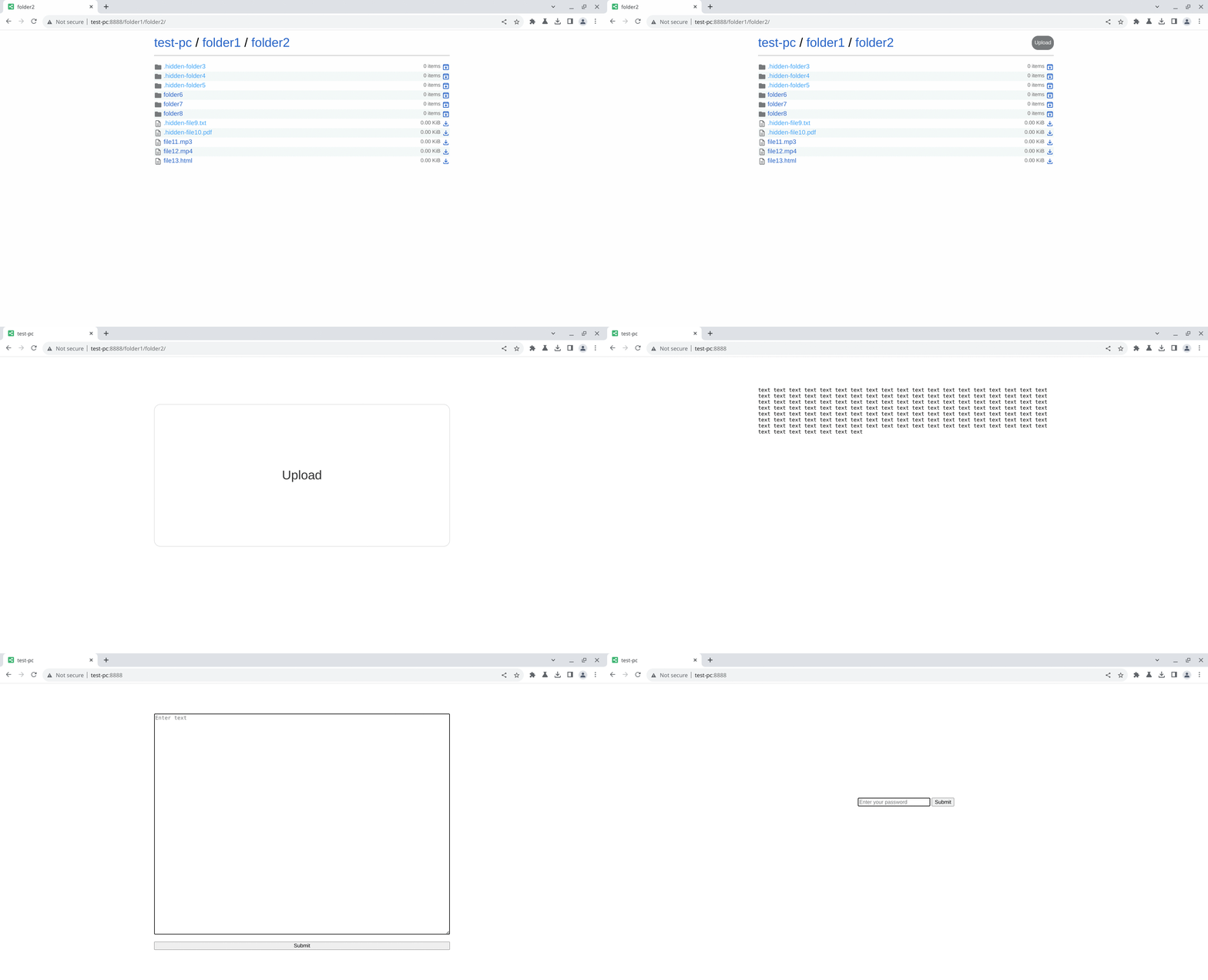
## Screenshot
## Installation
### Windows
You can download the latest release from the [Release page](https://github.com/beavailable/share/releases).
### Debian & Ubuntu
Install via the OBS repo (see [obs-repo](https://github.com/beavailable/obs-repo) for setup).
### Other Distros
Just [download](https://raw.githubusercontent.com/beavailable/share/refs/heads/main/share.py) the script.
## Tips
- If you're sharing just one file, you can use the shortcut name `file` to access it:
```bash
http://{host}:{port}/file
# to save with the original filename
wget --content-disposition http://{host}:{port}/file
curl -OJ http://{host}:{port}/file
```
- To get an archive of a folder, you can add the `.tar.zst` extension to the url:
```bash
http://{host}:{port}/any/folder.tar.zst
```
- If you want to upload files to the sharing server with `curl`, you can use:
```bash
# POST
curl -F file=@/path/to/file http://{host}:{port}
# create new folders at the same time
curl -F file=@/path/to/file http://{host}:{port}/custom/path/
# PUT
curl -T /path/to/file http://{host}:{port}
# create new folders at the same time
curl -T /path/to/file http://{host}:{port}/custom/path/
# with a different filename
curl -T /path/to/file http://{host}:{port}/custom/path/custom-filename
```
- If you want to use HTTP Basic authentication, remember the username is always "user".