https://github.com/behrouzz/sdss
Retrieve and analysis data from SDSS (Sloan Digital Sky Survey)
https://github.com/behrouzz/sdss
astronomy astrophysics deep-sky-objects python sdss spectroscopy spectrum
Last synced: 2 months ago
JSON representation
Retrieve and analysis data from SDSS (Sloan Digital Sky Survey)
- Host: GitHub
- URL: https://github.com/behrouzz/sdss
- Owner: behrouzz
- License: mit
- Created: 2021-07-19T17:39:11.000Z (almost 5 years ago)
- Default Branch: main
- Last Pushed: 2023-11-01T22:35:02.000Z (over 2 years ago)
- Last Synced: 2026-01-03T04:49:00.403Z (6 months ago)
- Topics: astronomy, astrophysics, deep-sky-objects, python, sdss, spectroscopy, spectrum
- Language: Python
- Homepage:
- Size: 54.7 KB
- Stars: 10
- Watchers: 1
- Forks: 4
- Open Issues: 0
-
Metadata Files:
- Readme: README.md
- License: LICENSE.txt
Awesome Lists containing this project
README
**Author:** [Behrouz Safari](https://behrouzz.github.io/)
**License:** [MIT](https://opensource.org/licenses/MIT)
# sdss
*A python package for retrieving and analysing data from SDSS (Sloan Digital Sky Survey)*
*Important:*
[CSV](https://skyserver.sdss.org/dr18/en/tools/quicklook/summary.aspx)
## Installation
Install the latest version of *sdss* from [PyPI](https://pypi.org/project/sdss/):
pip install sdss
Requirements are *numpy*, *requests*, *Pillow*, *matplotlib*, *pandas* and *astropy*.
Versions before 1.0.0 are not dependent on *astropy*.
## Quick start
Let's create a Region:
```python
from sdss import Region
ra = 179.689293428354
dec = -0.454379056007667
reg = Region(ra, dec, fov=0.033)
```
To see the image:
```python
reg.show()
```
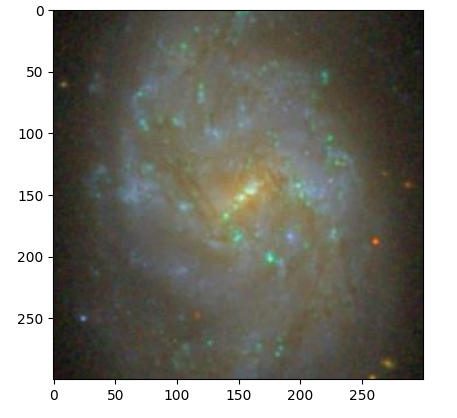
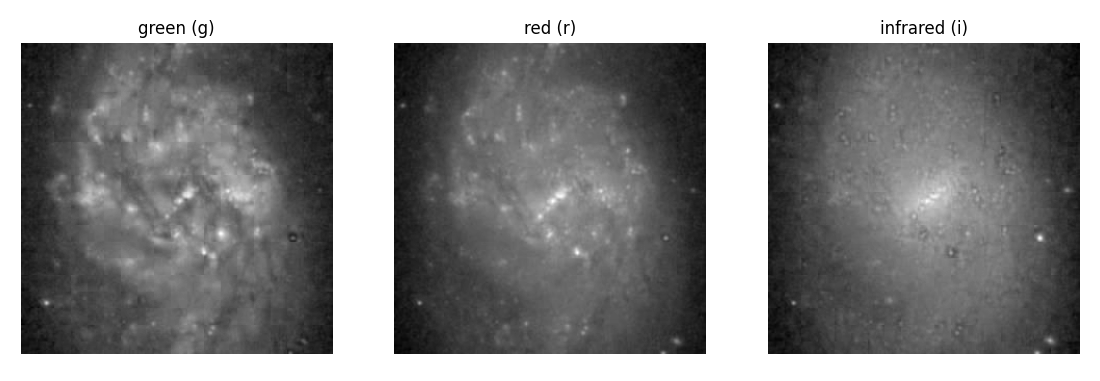
To see the image in three *gri* filter bands (green, red, infrared) separately:
```python
reg.show3b()
```
To find nearest objects:
```python
df_obj = reg.nearest_objects()
```
To find nearest objects with spectrum:
```python
df_sp = reg.nearest_spects()
```
## Photometry example
Let's download a frame, in fits and jpg, retrieve all of its objects.:
```python
from sdss.photometry import frame_filename, obj_frame_url, \
download_file, unzip, get_df, df_radec2pixel
objid = 1237646587710014999
zip_file = 'data/' + frame_filename(objid) + '.fits.bz2'
fits_file = zip_file[:-4]
jpg_file = fits_file.replace('-r-', '-irg-').replace('fits', 'jpg')
zip_url = obj_frame_url(objid, 'r')
download_file(zip_url, 'data/')
unzip(zip_file)
jpg_url = obj_frame_url(objid, 'irg', jpg=True)
download_file(jpg_url, 'data/')
df = get_df(objid)
df = df_radec2pixel(df=df, fits_file=fits_file)
df.to_csv('data/COMP.csv', index=False)
```
Now we can plot our target image:
```python
import pandas as pd
import matplotlib.pyplot as plt
from sdss.photometry import frame_filename, obj_from_jpg
objid = 1237646587710014999
jpg_file = 'data/' + frame_filename(objid).replace('-r-', '-irg-') + '.jpg'
df = pd.read_csv('data/COMP.csv')
img = obj_from_jpg(jpg_file=jpg_file, df=df, objid=objid)
fig, ax = plt.subplots()
ax.imshow(img)
plt.show()
```
Let's find the best apparture:
```python
from sdss.photometry import flux
data = img[:,:,0]
half = data.shape[0]//2
center = (half, half)
ls_r_star = [2, 3, 4, 5, 6, 7, 8, 9, 10, 11, 12]
ls_background = []
ls_real_flux = []
for r_star in ls_r_star:
background, real_flux = flux(data, center, r_star)
ls_background.append(background)
ls_real_flux.append(real_flux)
fig, ax = plt.subplots()
ax.scatter(ls_r_star, ls_real_flux, c='b')
ax.set_xlabel('R star')
ax.set_ylabel('Sky subtracted flux')
plt.grid()
plt.show()
```
See more examples at [astrodatascience.net](https://astrodatascience.net/)