https://github.com/belodetek/proxy-socks
Desktop app to forward remote TCP port to a SOCKS proxy via SSH
https://github.com/belodetek/proxy-socks
digitalocean electron-app nodejs socks-proxy ssh-tunnel
Last synced: about 1 year ago
JSON representation
Desktop app to forward remote TCP port to a SOCKS proxy via SSH
- Host: GitHub
- URL: https://github.com/belodetek/proxy-socks
- Owner: belodetek
- License: mit
- Created: 2018-04-12T20:12:02.000Z (about 8 years ago)
- Default Branch: master
- Last Pushed: 2022-11-25T17:32:46.000Z (over 3 years ago)
- Last Synced: 2025-04-01T04:17:56.981Z (about 1 year ago)
- Topics: digitalocean, electron-app, nodejs, socks-proxy, ssh-tunnel
- Language: JavaScript
- Homepage: http://app.belodetek.io
- Size: 1.23 MB
- Stars: 28
- Watchers: 2
- Forks: 6
- Open Issues: 0
-
Metadata Files:
- Readme: README.md
- Changelog: CHANGELOG.md
- License: LICENSE
Awesome Lists containing this project
README
# proxy-socks
> **TL;DR** follow these [instructions](#instructions) to start building a flexible residential back-connect proxy network on any platform running [Electron](https://electronjs.org/).
# about
 This [Electron](https://electronjs.org/) desktop app forwards `socksPort` and `squidPort` to `proxyRemote` IP on the remote server over [SSH](https://github.com/mscdex/ssh2) and in reverse, forwards a random port on a remote [Linux box](#server-config) to a [SOCKS](https://github.com/mscdex/socksv5) proxy running locally.
Clients connecting to `squidPort` or `socksPort` on the machine running the app, will be tunneled to `proxyRemote` on remote server. Similarly, remote SOCKS connections will be proxied out the local WAN interface of the machine running the app. It is up to you to handle incoming client connections on the remote server using HAProxy, Squid, etc.
# instructions

* deploy an Ubuntu or Debian box to be the proxy concentrator and note its public IP (e.g. on [DigitalOcean](https://m.do.co/c/937b01397c94))
## client config
* create SSH key locally and copy to the the proxy concentrator
mkdir -p ~/.proxy-socks\
&& echo -e 'y\n' | ssh-keygen -f ~/.proxy-socks/id_rsa\
&& ssh-copy-id -i ~/.proxy-socks/id_rsa.pub root@{proxy-concentrator}
* create `config.json`, with the hostname or IP address of the proxy concentrator and adjust ports if required
```
cat << EOF > ~/.proxy-socks/config.json
{
"username": "tunnel",
"host": "{proxy-concentrator}",
"port": 22,
"privateKey": "${HOME}/.proxy-socks/id_rsa",
"squidPort": 3128,
"socksPort": 1080,
"proxyRemote": "172.20.0.10"
}
EOF
```
## server config
* on the proxy concentrator create `tunnel` user, set a password and authorize keys
useradd -m tunnel -s /bin/bash\
&& mkdir -p /home/tunnel/.ssh\
&& cat ~/.ssh/authorized_keys > /home/tunnel/.ssh/authorized_keys
* create splash script and set permissions
```
cat << EOF > /home/tunnel/splash.sh
#!/bin/sh
echo '+--------------------------+'
echo '| |'
echo '| Nothing to see here... |'
echo '| |'
echo '+--------------------------+'
EOF
chmod +x /home/tunnel/splash.sh
chown tunnel:tunnel -hR /home/tunnel
```
* update sshd config and restart the service
```
cat << EOF >> /etc/ssh/sshd_config
Match User tunnel
ForceCommand /home/tunnel/splash.sh
EOF
service ssh restart
```
## installing
The Windows binary is not signed and modern Chrome/Windows will try to prevent it from running. If this is important to you, you can get a signing certificate from one of the [vendors](https://www.sslshopper.com/microsoft-authenticode-certificates.html) and build a signed release.
|OS|release|
|---|---|
|Windows|[latest](https://github.com/ab77/proxy-socks/releases/download/v1.0.5/proxy-socks-setup-1.0.5.exe), [1.0.4](https://github.com/ab77/proxy-socks/releases/download/v1.0.4/proxy-socks-setup-1.0.4.exe), [1.0.3](https://github.com/ab77/proxy-socks/releases/download/v1.0.3/proxy-socks-setup-1.0.3.exe), [1.0.2](https://github.com/ab77/proxy-socks/releases/download/v1.0.2/proxy-socks-setup-1.0.2.exe), [1.0.1](https://github.com/ab77/proxy-socks/releases/download/v1.0.1/proxy-socks-setup-1.0.1.exe), [1.0.0](https://github.com/ab77/proxy-socks/releases/download/v1.0.0/proxy-socks-setup-1.0.0.exe)|
|Linux (AppImage)|[latest](https://github.com/ab77/proxy-socks/releases/download/v1.0.5/proxy-socks-1.0.5-x86_64.AppImage), [1.0.4](https://github.com/ab77/proxy-socks/releases/download/v1.0.4/proxy-socks-1.0.4-x86_64.AppImage), [1.0.3](https://github.com/ab77/proxy-socks/releases/download/v1.0.3/proxy-socks-1.0.3-x86_64.AppImage), [1.0.2](https://github.com/ab77/proxy-socks/releases/download/v1.0.2/proxy-socks-1.0.2-x86_64.AppImage), [1.0.1](https://github.com/ab77/proxy-socks/releases/download/v1.0.1/proxy-socks-1.0.1-x86_64.AppImage), [1.0.0](https://github.com/ab77/proxy-socks/releases/download/v1.0.0/proxy-socks-1.0.0-x86_64.AppImage)|
|Linux (Snap)|[latest](https://github.com/ab77/proxy-socks/releases/download/v1.0.5/proxy-socks_1.0.5_amd64.snap), [1.0.4](https://github.com/ab77/proxy-socks/releases/download/v1.0.4/proxy-socks_1.0.4_amd64.snap), [1.0.3](https://github.com/ab77/proxy-socks/releases/download/v1.0.3/proxy-socks_1.0.3_amd64.snap), [1.0.2](https://github.com/ab77/proxy-socks/releases/download/v1.0.2/proxy-socks_1.0.2_amd64.snap), [1.0.1](https://github.com/ab77/proxy-socks/releases/download/v1.0.1/proxy-socks_1.0.1_amd64.snap), [1.0.0](https://github.com/ab77/proxy-socks/releases/download/v1.0.0/proxy-socks_1.0.0_amd64.snap)|
|Mac OS X|[latest](https://github.com/ab77/proxy-socks/releases/download/v1.0.5/proxy-socks-1.0.5.dmg), [1.0.4](https://github.com/ab77/proxy-socks/releases/download/v1.0.4/proxy-socks-1.0.4.dmg), [1.0.3](https://github.com/ab77/proxy-socks/releases/download/v1.0.3/proxy-socks-1.0.3.dmg), [1.0.2](https://github.com/ab77/proxy-socks/releases/download/v1.0.2/proxy-socks-1.0.2.dmg), [1.0.1](https://github.com/ab77/proxy-socks/releases/download/v1.0.1/proxy-socks-1.0.1.dmg), [1.0.0](https://github.com/ab77/proxy-socks/releases/download/v1.0.0/proxy-socks-1.0.0.dmg)|
* launch the app and note the forwarded port number
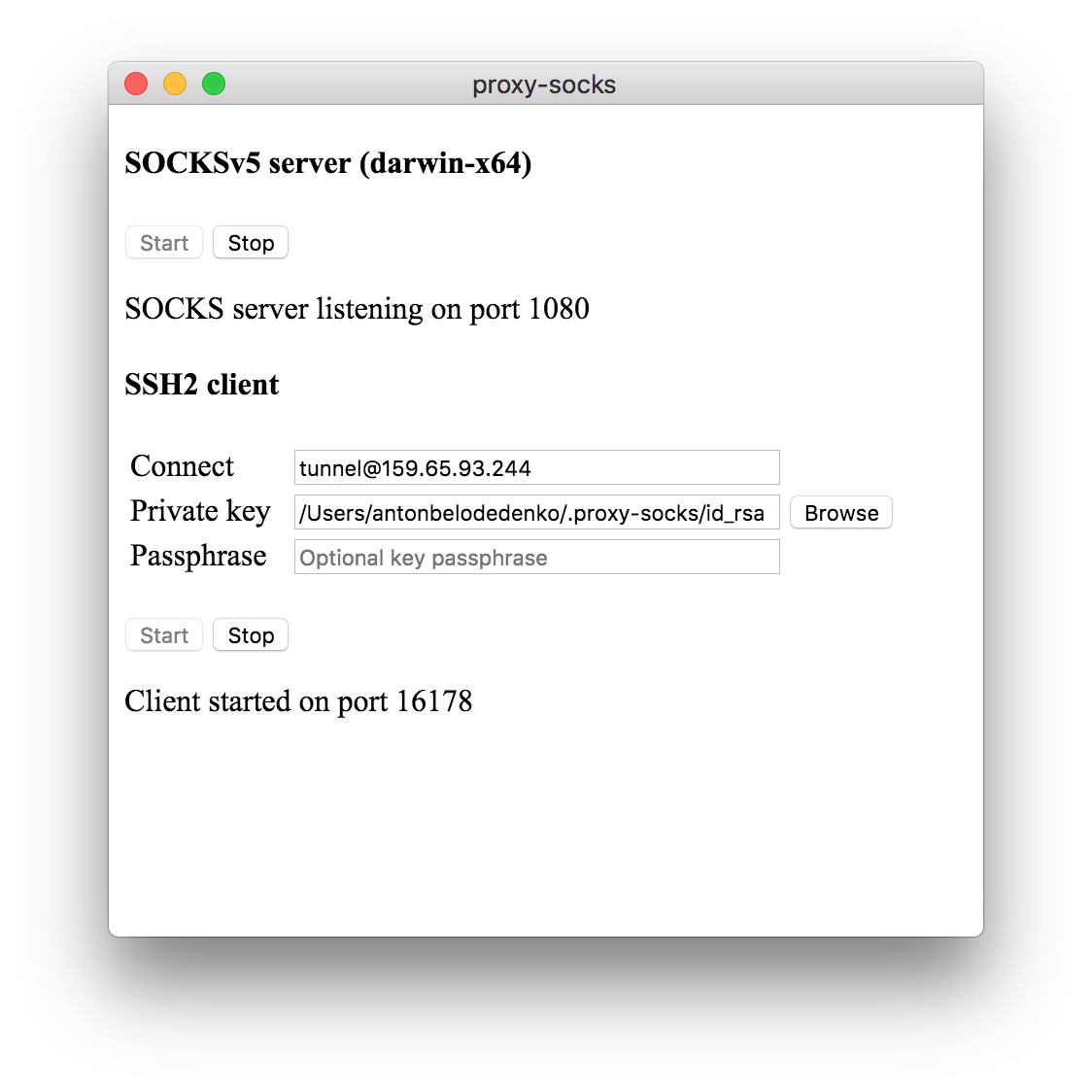
>  The app will attempt to insert itself into the appropriate start-up chain to start automatically with the operating system and appear minimised to tray.
* test connectivity to the proxy from the proxy concentrator
# netstat -a -n -p | grep LISTEN | grep 127.0.0.1
tcp 0 0 127.0.0.1:{zzz} 0.0.0.0:* ...
root@ubuntu:# curl -4 ifconfig.co
{xxx}
root@ubuntu:# curl -4 --socks5 localhost:{zzz} ifconfig.co
{yyy}
> you should see a random TCP port and two different public IPs if everything is working correctly
# IPv6
> the server is listening on both `AF_INET` and `AF_INET6` sockets
# netstat -a -n -p | grep LISTEN | grep ::1
tcp6 0 0 ::1:{zzz} :::* ...
root@ubuntu:# curl -6 ifconfig.co
{xxx}
root@ubuntu:# curl -6 --socks5 localhost:{zzz} ifconfig.co
{yyy}
# next steps
Every new installation of the app, will attempt to make a connection to the remote server and forward a random port to the local proxy. These proxies can then be exposed on the public interface of the server using [HAProxy](http://www.haproxy.org/), [OpenVPN](https://openvpn.net/) or a combination of tools.
An [example](https://raw.githubusercontent.com/ab77/proxy-socks/master/extra/update-haproxy) shell script can be used to automatically generate HAProxy configuration for all connected proxies.
> Once the ports are exposed, ensure appropriate ACLs are set.
© 2018 belodetek
