https://github.com/benedictking/ccx
Claude / Codex / Gemini API Proxy - CCX
https://github.com/benedictking/ccx
claude codex gemini
Last synced: 2 months ago
JSON representation
Claude / Codex / Gemini API Proxy - CCX
- Host: GitHub
- URL: https://github.com/benedictking/ccx
- Owner: BenedictKing
- License: mit
- Created: 2026-01-31T04:27:57.000Z (6 months ago)
- Default Branch: main
- Last Pushed: 2026-05-23T07:12:50.000Z (3 months ago)
- Last Synced: 2026-05-23T07:33:37.777Z (3 months ago)
- Topics: claude, codex, gemini
- Language: Go
- Homepage: https://benedictking.github.io/ccx/
- Size: 7.36 MB
- Stars: 1,477
- Watchers: 8
- Forks: 123
- Open Issues: 14
-
Metadata Files:
- Readme: README.md
- Changelog: CHANGELOG.md
- License: LICENSE
- Agents: AGENTS.md
Awesome Lists containing this project
- awesome-ChatGPT-repositories - ccx - Gemini API Proxy - CCX (Others / Usage)
README
# Claude / OpenAI Chat / OpenAI Images / Codex Responses / Gemini API Proxy - CCX
English | [简体中文](README.zh-CN.md)
[](https://github.com/BenedictKing/ccx/releases/latest)
[](https://opensource.org/licenses/MIT)
CCX is a high-performance AI API proxy and protocol translation gateway for Claude, OpenAI Chat, OpenAI Images, Codex Responses, and Gemini. It provides a unified entrypoint, built-in web administration, channel orchestration, failover, multi-key management, and model routing.
## Features
- Integrated backend + frontend architecture with single-port deployment
- Dual-key authentication with `PROXY_ACCESS_KEY` and optional `ADMIN_ACCESS_KEY`
- Web admin console for channel management, testing, logs, and monitoring
- Support for Claude Messages, OpenAI Chat Completions, OpenAI Images, Codex Responses, and Gemini APIs
- Smart scheduling with priorities, promotion windows, health checks, failover, and circuit recovery
- Per-channel API key rotation, proxy support, custom headers, model allowlists, and route prefixes
- Responses session tracking for multi-turn workflows
- Embedded frontend assets for simple binary deployment
## Screenshots
### Channel Orchestration
Visual channel management with drag-and-drop priority adjustment and real-time health monitoring.

### Add Channel
Supports multiple upstream service types and flexible API key, model mapping, and request parameter configuration.

### Traffic Stats
Real-time monitoring of per-channel request traffic, success rate, and latency.

## Architecture
CCX exposes one backend entrypoint:
```text
Client -> backend :3000 ->
|- / -> Web UI
|- /api/* -> Admin API
|- /v1/messages -> Claude Messages proxy
|- /v1/chat/completions -> OpenAI Chat proxy
|- /v1/responses -> Codex Responses proxy
|- /v1/images/{...} -> OpenAI Images proxy
|- /v1/models -> Models API
`- /v1beta/models/* -> Gemini proxy
```
Images endpoints currently include:
- `POST /v1/images/generations`
- `POST /v1/images/edits`
- `POST /v1/images/variations`
See [ARCHITECTURE.md](ARCHITECTURE.md) for the detailed design.
## Quick Start
### Option 1: Binary
1. Download the latest binary from [Releases](https://github.com/BenedictKing/ccx/releases/latest)
2. Create a `.env` file next to the binary:
```bash
PROXY_ACCESS_KEY=your-proxy-access-key
PORT=3000
ENABLE_WEB_UI=true
APP_UI_LANGUAGE=en
```
3. Run the binary and open `http://localhost:3000`
On Windows, if the client runs from cmd, PowerShell, WSL, or Docker and `localhost` does not reach CCX, use the Windows host IPv4 address instead, for example `http://192.168.1.23:3000`. CCX listens on all interfaces by default through `:PORT`.
For background startup without Docker, see [Service Startup](docs/service/README.md).
### Option 2: Docker
```bash
docker run -d \
--name ccx \
-p 3000:3000 \
-e PROXY_ACCESS_KEY=your-proxy-access-key \
-e APP_UI_LANGUAGE=en \
-v $(pwd)/.config:/app/.config \
crpi-i19l8zl0ugidq97v.cn-hangzhou.personal.cr.aliyuncs.com/bene/ccx:latest
```
Run in the background with Docker Compose:
```bash
docker compose up -d
```
Enable Watchtower auto-update:
```bash
docker compose -f docker-compose.yml -f docker-compose.watchtower.yml up -d
```
Pull the latest image immediately after setup if needed:
```bash
docker compose pull ccx
docker compose up -d ccx
```
### Option 3: Build From Source
```bash
git clone https://github.com/BenedictKing/ccx
cd ccx
cp backend-go/.env.example backend-go/.env
make run
```
Useful commands:
```bash
make dev
make run
make build
make frontend-dev
```
## Core Environment Variables
```bash
PORT=3000
ENV=production
ENABLE_WEB_UI=true
PROXY_ACCESS_KEY=your-proxy-access-key
ADMIN_ACCESS_KEY=your-admin-secret-key
APP_UI_LANGUAGE=en
LOG_LEVEL=info
REQUEST_TIMEOUT=300000
```
## Main Endpoints
- Web UI: `GET /`
- Health: `GET /health`
- Admin API: `/api/*`
- Claude Messages: `POST /v1/messages`
- OpenAI Chat: `POST /v1/chat/completions`
- Codex Responses: `POST /v1/responses`
- OpenAI Images: `POST /v1/images/generations`, `POST /v1/images/edits`, `POST /v1/images/variations`
- Gemini: `POST /v1beta/models/{model}:generateContent`
- Models API: `GET /v1/models`
## Development
Recommended local workflow:
```bash
make dev
```
Frontend only:
```bash
cd "frontend"
bun install
bun run dev
```
Backend only:
```bash
cd "backend-go"
make dev
```
## Additional Docs
- [README.zh-CN.md](README.zh-CN.md)
- [backend-go/README.md](backend-go/README.md)
- [ARCHITECTURE.md](ARCHITECTURE.md)
- [DEVELOPMENT.md](DEVELOPMENT.md)
- [ENVIRONMENT.md](ENVIRONMENT.md)
- [docs/service/README.md](docs/service/README.md) - non-Docker service startup
- [RELEASE.md](RELEASE.md)
## Community
Join the QQ group for discussion: **642217364**

## Star History
[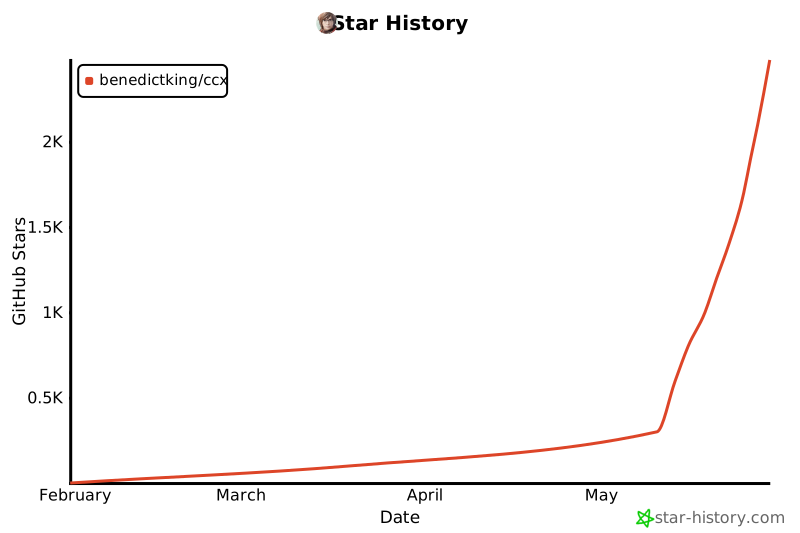](https://www.star-history.com/#BenedictKing/ccx&Date)
## License
MIT