https://github.com/benkaiser/stretto
Beautiful web-based music player
https://github.com/benkaiser/stretto
Last synced: 11 months ago
JSON representation
Beautiful web-based music player
- Host: GitHub
- URL: https://github.com/benkaiser/stretto
- Owner: benkaiser
- License: mit
- Created: 2013-12-17T08:29:31.000Z (about 12 years ago)
- Default Branch: master
- Last Pushed: 2024-05-27T13:15:02.000Z (almost 2 years ago)
- Last Synced: 2024-08-03T11:09:21.302Z (over 1 year ago)
- Language: JavaScript
- Homepage: https://next.kaiserapps.com
- Size: 31.1 MB
- Stars: 618
- Watchers: 32
- Forks: 96
- Open Issues: 21
-
Metadata Files:
- Readme: README.md
Awesome Lists containing this project
- fucking-awesome-selfhosted - Stretto - Music player with Youtube/Soundcloud import and iTunes/Spotify discovery. 🌎 [Demo](next.kaiserapps.com), <b><code> 9⭐</code></b> <b><code> 0🍴</code></b> [Clients](https://github.com/benkaiser/stretto-mobile-next))) `MIT` `Nodejs` (Software / Media Streaming - Audio Streaming)
- awesome-selfhosted - Stretto - Music player with Youtube/Soundcloud import and iTunes/Spotify discovery. ([Demo](https://next.kaiserapps.com), [Clients](https://github.com/benkaiser/stretto-mobile-next)) `MIT` `Nodejs` (Software / Media Streaming - Audio Streaming)
- awesome-selfhosted - Stretto - Music player with Youtube/Soundcloud import and iTunes/Spotify discovery. ([Demo](https://next.kaiserapps.com), [Clients](https://github.com/benkaiser/stretto-mobile-next)) `MIT` `Nodejs` (Software / Media Streaming - Audio Streaming)
- awesome-selfhosted - Stretto - Music player with Youtube/Soundcloud import and iTunes/Spotify discovery. ([Demo](https://next.kaiserapps.com), [Clients](https://github.com/benkaiser/stretto-mobile-next)) `MIT` `Nodejs` (Software / Media Streaming - Audio Streaming)
- awesome-selfhosted - Stretto - Music player with Youtube/Soundcloud import and iTunes/Spotify discovery. ([Demo](https://next.kaiserapps.com), [Clients](https://github.com/benkaiser/stretto-mobile-next)) `MIT` `Nodejs` (Software / Media Streaming - Audio Streaming)
- awesome-selfhosted - Stretto - Music player with Youtube/Soundcloud import and iTunes/Spotify discovery. ([Demo](https://next.kaiserapps.com), [Clients](https://github.com/benkaiser/stretto-mobile-next)) `MIT` `Nodejs` (Software / Media Streaming - Audio Streaming)
- awesome-selfhosted - Stretto - Music player with Youtube/Soundcloud import and iTunes/Spotify discovery. ([Demo](https://next.kaiserapps.com), [Clients](https://github.com/benkaiser/stretto-mobile-next)) `MIT` `Nodejs` (Software / Media Streaming - Audio Streaming)
README
[Stretto](https://next.kaiserapps.com/)
=================
#### An open source web-based music player


[Go to Stretto](https://next.kaiserapps.com/), or if you would like to host it yourself, scroll down to the developer instructions.
## How does Stretto work?
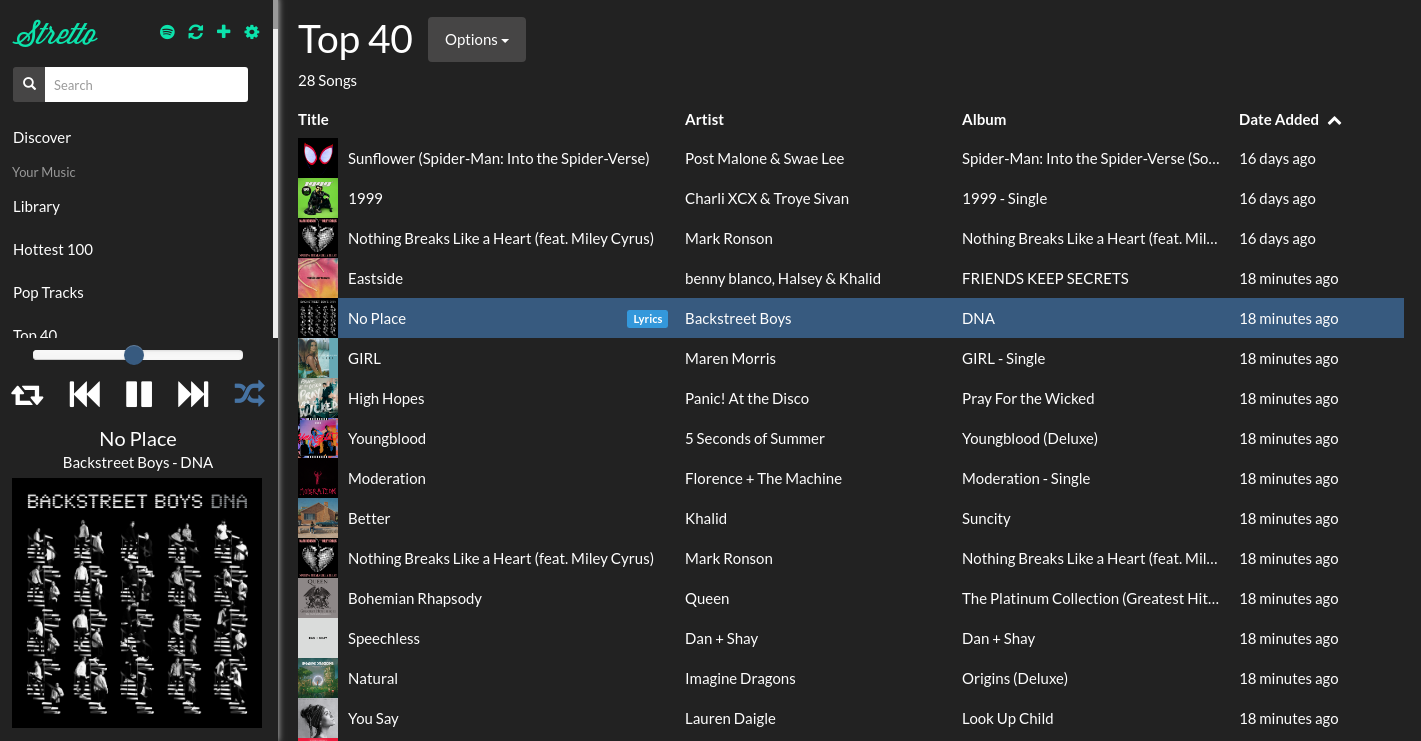
Stretto works by backing every single one of your tracks with a video or song from youtube or soundcloud. It then uses the [companion chrome extension](https://github.com/benkaiser/Stretto-Helper-Extension) to download the tracks to your browser directly.
Here is a list of some of the features Stretto has:
- [Import your playlists from Spotify](https://next.kaiserapps.com/spotify/)
- [Syncing libraries between machines](https://next.kaiserapps.com/sync/)
- Automatic lyric fetching for the currently playing song
- [Music discovery through iTunes/Spotify top charts](https://next.kaiserapps.com/discover)
- Search iTunes and add tracks to library seamlessly
- Multiple themes available
- Android Support via Kiwi Browser (see below)
- Completely free!
## Android App
Since Stretto works as a progressive web app, you can use Kiwi browser on Android to use it on mobile.
More information here: https://blog.kaiser.lol/stretto-music-player/#using-stretto-on-android
## Developer Instructions
Setup a .env file to setup your environment variables:
```
GOOGLE_CLIENT_ID=<...>
SPOTIFY_CLIENT_ID=<...>
SOUNDCLOUD_CLIENT_ID=<...>
```
#### Running in Docker + Docker Compose
```
bin/go
```
That's it! Go to http://localhost:3000
#### Without Docker
You'll need:
- Node.js 12
- Mongodb running
Add your MONGO_URL settings to your environment variables, then execute
```
yarn
npm run dev
```
#### License
MIT