https://github.com/berru-g/make-play
Website
https://github.com/berru-g/make-play
ableton arduino atmega328p microcontroller usb-midi
Last synced: about 1 month ago
JSON representation
Website
- Host: GitHub
- URL: https://github.com/berru-g/make-play
- Owner: berru-g
- Created: 2022-09-24T23:40:02.000Z (over 3 years ago)
- Default Branch: main
- Last Pushed: 2023-02-18T16:47:16.000Z (over 3 years ago)
- Last Synced: 2025-01-27T08:42:53.674Z (over 1 year ago)
- Topics: ableton, arduino, atmega328p, microcontroller, usb-midi
- Language: CSS
- Homepage: https://berru-g.github.io/Make-Play/
- Size: 63.9 MB
- Stars: 0
- Watchers: 1
- Forks: 0
- Open Issues: 1
-
Metadata Files:
- Readme: README.md
Awesome Lists containing this project
README

Make & Play
Controller USB - midi _ V 1.0.1
Code •
Electronique •
Plan 3D •
Contribution •
GNU License v2.0 •
🛒 •
A.S.S
What is this ?
Microcontroller usb midi lowcost To play on Ableton, Arena or any other music or video creation software.
This tool will allow you to map your effects to the desired potentiometer and key.
To do this, do [ ctrl+m ] in Ableton, select effet and push your btn or pot.
🎹 - 💻 - 🔊
[Drafting in progress]
Option
Refer directly to your plan according to the format of your M&P or you can feed your curiosity
- The version plug & play
- The DIY Kit
- The soldering kit
choice your version 🛒
Plan step by step
Step 1 - code for adapt your project if necessary-
#include <MIDI.h>
MIDI_CREATE_DEFAULT_INSTANCE();
If you decide to start this project really from the beginning, then a simple AtMega 328p as well as three components will be necessary, I invite you in this case to “flash”, bootloader the microcontroller. And follow that plan.
Find the full code here . The digital and analog inputs and outputs are declared at the maximum number for an AtMéga 328p type microcontroller, these can be multiplied if a multiplexer is added. The code must then provide a matrix of inputs and/or outputs.

Plan & code of my first prototyp, based on Arduino.
Step 2 - make -
Despite the simplicity, it necessary to specify to take precautions concerning the assembly, because the facade is fragile. I advise you to follow the plan to have a solid tool once fixed to its support.
Despite our choice to use quality components, the potentiometers can be weakened when shipped, we advise you to check their stability before assembly and we will send a PCB if necessary*. [the return of this product currently = 0.001%]
*kick the postman. 😜
Step 3 - config in Ableton® -
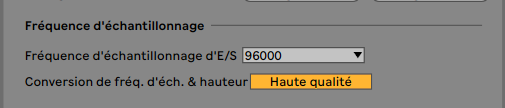
When you are ready to play, configure your M&P as below. Select option, preference,Audio & link-midi. Important, choose the 9600 sampling frequency carefully for better optimization.

Step 4 play
Share your creation in Make & Play Community 😁
For that choice your colori
2020 v-1.0.1
Make and play is Free, for used and/or modify it under the terms of the GNU General Public License .