https://github.com/bertrandom/doordash-analyzer
Tells you how much money you've spent with Doordash during the pandemic
https://github.com/bertrandom/doordash-analyzer
Last synced: 3 months ago
JSON representation
Tells you how much money you've spent with Doordash during the pandemic
- Host: GitHub
- URL: https://github.com/bertrandom/doordash-analyzer
- Owner: bertrandom
- License: mit
- Created: 2021-12-19T09:26:25.000Z (over 4 years ago)
- Default Branch: main
- Last Pushed: 2021-12-19T09:54:38.000Z (over 4 years ago)
- Last Synced: 2025-03-23T15:46:27.674Z (over 1 year ago)
- Language: JavaScript
- Homepage:
- Size: 46.9 KB
- Stars: 0
- Watchers: 1
- Forks: 0
- Open Issues: 0
-
Metadata Files:
- Readme: README.md
- License: LICENSE
Awesome Lists containing this project
README
# doordash-analyzer
Tells you how much money you've spent with Doordash during the pandemic.
Leverages [chrome-cookies-secure](https://www.npmjs.com/package/chrome-cookies-secure).
[](https://asciinema.org/a/KUJGvj6Hp0PxFSRTNxbpKMfTz)
## Installation
Clone the repo and install the dependencies:
```
git clone git@github.com:bertrandom/doordash-analyzer.git
cd doordash-analyzer
npm install
```
## Usage
Open Google Chrome and go to [Doordash](https://www.doordash.com). Click "Sign In" in the top-right and sign-in to your account.
Wait 30 seconds for Chrome to flush its cookies to the SQLite file.
Run:
```
node app
```
On OS X, this module requires Keychain Access to read the Google Chrome encryption key. The first time you use it, it will popup this dialog:
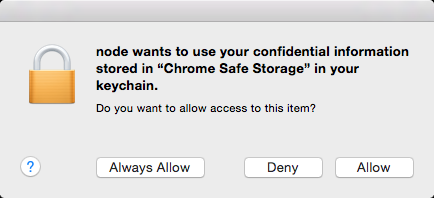
Clicking Allow will let it extract the Doordash cookies from Chrome and calculate how much you've spent.
# License
This software is free to use under the MIT license. See the LICENSE file for license text and copyright information.