https://github.com/berty/go-libtor
Self-contained Tor from Go
https://github.com/berty/go-libtor
Last synced: over 1 year ago
JSON representation
Self-contained Tor from Go
- Host: GitHub
- URL: https://github.com/berty/go-libtor
- Owner: berty
- License: bsd-3-clause
- Created: 2020-11-12T13:15:28.000Z (over 5 years ago)
- Default Branch: master
- Last Pushed: 2022-06-27T10:21:32.000Z (about 4 years ago)
- Last Synced: 2025-03-25T08:11:45.975Z (over 1 year ago)
- Language: C
- Size: 15.9 MB
- Stars: 34
- Watchers: 7
- Forks: 7
- Open Issues: 3
-
Metadata Files:
- Readme: README.md
- License: LICENSE
Awesome Lists containing this project
README
# go-libtor - Self-contained Tor from Go
⚠️ Development and maintenance on hold until further notice. See https://github.com/berty/go-libtor/issues/8#issuecomment-1167166691 ⚠️
[](https://pkg.go.dev/berty.tech/go-libtor)[](https://github.com/berty/go-libtor/actions?query=workflow%3AUpdate+Libs)
The `go-libtor` project is a self-contained, fully statically linked Tor library for Go. It consists of an elaborate suite of Go/CGO wrappers around the original C/C++ Tor library and its dependencies ([zlib](https://github.com/madler/zlib), [libevent](https://github.com/libevent/libevent) and [openssl](https://github.com/openssl/openssl)).
| Library | Version | Commit |
|:-:|:-:|:-:|
| zlib | 1.2.11 | [`cacf7f1d4e3d44d871b605da3b647f07d718623f`](https://github.com/madler/zlib/commit/cacf7f1d4e3d44d871b605da3b647f07d718623f) |
| libevent | 2.2.0-alpha-dev | [`d433f847334fff9da8e13e2dc7fdf5c0997b20b0`](https://github.com/libevent/libevent/commit/d433f847334fff9da8e13e2dc7fdf5c0997b20b0) |
| openssl | 1.1.1-stable | [`46dc0bca6cd623c42489c57e62c69cf568335664`](https://github.com/openssl/openssl/commit/46dc0bca6cd623c42489c57e62c69cf568335664) |
| tor | 0.3.5.14-dev | [`1693b6151e1369ce0938761cac95e7a0a524f5f3`](https://gitweb.torproject.org/tor.git/commit/?id=1693b6151e1369ce0938761cac95e7a0a524f5f3) |
The library is currently supported on:
- Linux `amd64`, `x86`, `arm64` and `arm`; both with `libc` and `musl` (`musl` need to checked again in the CI).
- Android `amd64`, `x86`, `arm64` and `arm`; specifically via `gomobile` (need to be checked again in the CI).
- Darwin (Macos and iOS) `amd64` and `arm64`.
## Installation (Go modules)
This library is compatible with Go modules. All you need is to import `berty.tech/go-libtor` and wait out the build. We suggest running `go build -v -x` the first time after adding the `go-libtor` dependency to avoid frustration, otherwise Go will build the 1000+ C files without any progress report.
## Installation (GOPATH)
The goal of this library is to be a self-contained Tor package for Go. As such, it plays nice with the usual `go get` workflow. That said, building Tor and all its dependencies locally can take quite a while, so it's recommended to run `go get` in verbose mode.
```
$ go get -u -v -x berty.tech/go-libtor
```
You'll also need the [`bine`](https://github.com/cretz/bine) bindings to interface with the library:
```
go get -u github.com/cretz/bine/tor
```
However to ensure a build consistency across all users of your project we recommend using **go mod**.
## BuildTags (Dynamicaly linked libs and Staticaly linked one)
Tor is always built in but tor's deps are by default dynamicaly linked, that require the build host to have the libs and their headers installed (`libevent-dev`, `zlib1g-dev` and `libssl-dev`) and the running host only requires the object files installed.
There are 3 build tags to change from a dynamic to a static one, you don't need to provide anything, their sources are wrapped in `go-libtor` :
- `staticLibevent`
- `staticZlib`
- `staticOpenssl`
So a full static build command would be :
```sh
go build -v -x -tags "staticOpenssl,staticZlib,staticLibevent" .
```
But be aware that the build process is way longer in static and the resulting binary is way bigger (you can mitigate that by stripping it, most of the stuff is just openssl debug symbols).
## Usage
The `go-libtor` project does not contain a full Go API to interface Tor with, rather only the smallest building block to start up an embedded instance. The reason is because there is already a solid Go project out there ([github.com/cretz/bine](https://github.com/cretz/bine)) which focuses on interfacing.
Using both projects in combination however is straightforward:
```go
package main
import (
"context"
"fmt"
"log"
"net/http"
"os"
"time"
"github.com/cretz/bine/tor"
"berty.tech/go-libtor"
)
func main() {
// Start tor with some defaults + elevated verbosity
fmt.Println("Starting and registering onion service, please wait a bit...")
t, err := tor.Start(nil, &tor.StartConf{ProcessCreator: libtor.Creator, DebugWriter: os.Stderr})
if err != nil {
log.Panicf("Failed to start tor: %v", err)
}
defer t.Close()
// Wait at most a few minutes to publish the service
ctx, cancel := context.WithTimeout(context.Background(), 3*time.Minute)
defer cancel()
// Create an onion service to listen on any port but show as 80
onion, err := t.Listen(ctx, &tor.ListenConf{RemotePorts: []int{80}})
if err != nil {
log.Panicf("Failed to create onion service: %v", err)
}
defer onion.Close()
fmt.Printf("Please open a Tor capable browser and navigate to http://%v.onion\n", onion.ID)
// Run a Hello-World HTTP service until terminated
http.HandleFunc("/", func(w http.ResponseWriter, r *http.Request) {
fmt.Fprintf(w, "Hello, Tor!")
})
http.Serve(onion, nil)
}
```
The above code will:
* Start up a new Tor process from within your statically linked binary
* Register a new anonymous onion TCP endpoint for remote clients
* Start an HTTP server using the Tor network as its transport layer
```
$ go run main.go
Starting and registering onion service, please wait a bit...
[...]
Enabling network before waiting for publication
[...]
Waiting for publication
[...]
Please open a Tor capable browser and navigate to http://s7t3iy76h54cjacg.onion
```
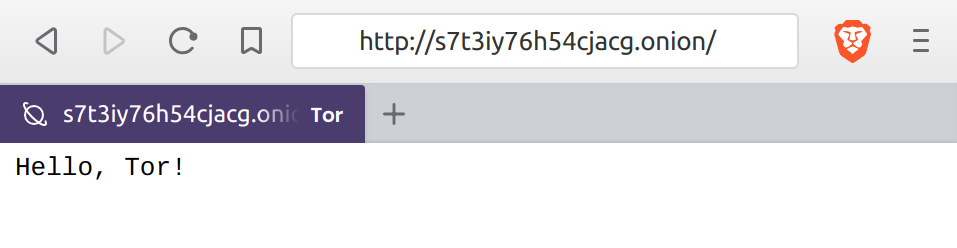
Well, that was easy. With a few lines of Go code we've created a hidden TCP service inside the Tor network. The browser used to test the server with above was [Brave](https://brave.com/), which among others has built in experimental support for Tor.
## Mobile devices
The advantage of `go-libtor` starts to show when building to more exotic platforms, since it's composed of simple CGO Go files. As it doesn't require custom build steps or tooling, it plays nice with the Go ecosystem, `gomobile` included:
Let's see how much effort would it be to deploy onto Android:
```go
package demo
import (
"context"
"fmt"
"log"
"net/http"
"os"
"time"
"github.com/cretz/bine/tor"
"berty.tech/go-libtor"
)
// Run starts up an embedded Tor process, starts a hidden onion service on a new
// goroutine and returns the onion address. We're cheating here and not caring
// about actually cleaning up after ourselves.
func Run(datadir string) string {
// Start tor with some defaults + elevated verbosity
fmt.Println("Starting and registering onion service, please wait a bit...")
t, err := tor.Start(nil, &tor.StartConf{ProcessCreator: libtor.Creator, DebugWriter: os.Stderr, DataDir: datadir})
if err != nil {
log.Panicf("Failed to start tor: %v", err)
}
// Wait at most a few minutes to publish the service
ctx, cancel := context.WithTimeout(context.Background(), 3*time.Minute)
defer cancel()
// Create an onion service to listen on any port but show as 80
onion, err := t.Listen(ctx, &tor.ListenConf{RemotePorts: []int{80}})
if err != nil {
log.Panicf("Failed to create onion service: %v", err)
}
fmt.Printf("Please open a Tor capable browser and navigate to http://%v.onion\n", onion.ID)
// Run a Hello-World HTTP service until terminated
http.HandleFunc("/", func(w http.ResponseWriter, r *http.Request) {
fmt.Fprintf(w, "Hello, Tor! This is Android!!!")
})
go http.Serve(onion, nil)
return fmt.Sprintf("http://%v.onion", onion.ID)
}
```
The above code does approximately the same thing as the one before, just in its own package with a trivial API since we want to make an Android archive, not an entire `.apk`. We can invoke `gomobile` to bind it:
```
$ gomobile bind -v -x .
[...many logs, much wow...]
$ ls -al demo*
-rw-r--r-- 1 karalabe 38976071 Jul 19 18:46 demo.aar
-rw-r--r-- 1 karalabe 6162 Jul 19 18:46 demo-sources.jar
$ unzip -l demo.aar
Archive: demo.aar
Length Date Time Name
--------- ---------- ----- ----
143 1980-00-00 00:00 AndroidManifest.xml
25 1980-00-00 00:00 proguard.txt
11044 1980-00-00 00:00 classes.jar
26102356 1980-00-00 00:00 jni/armeabi-v7a/libgojni.so
27085856 1980-00-00 00:00 jni/arm64-v8a/libgojni.so
26327236 1980-00-00 00:00 jni/x86/libgojni.so
27757968 1980-00-00 00:00 jni/x86_64/libgojni.so
0 1980-00-00 00:00 R.txt
0 1980-00-00 00:00 res/
--------- -------
107284628 9 files
```
Explaining how to load an `.aar` into an Android project is beyond the scope of this article, but you can load the archive with Android Studio as a module and edit your Gradle build config to add it as a dependency. An overly crude app would just start the server and drop the onion URL into an Android label:
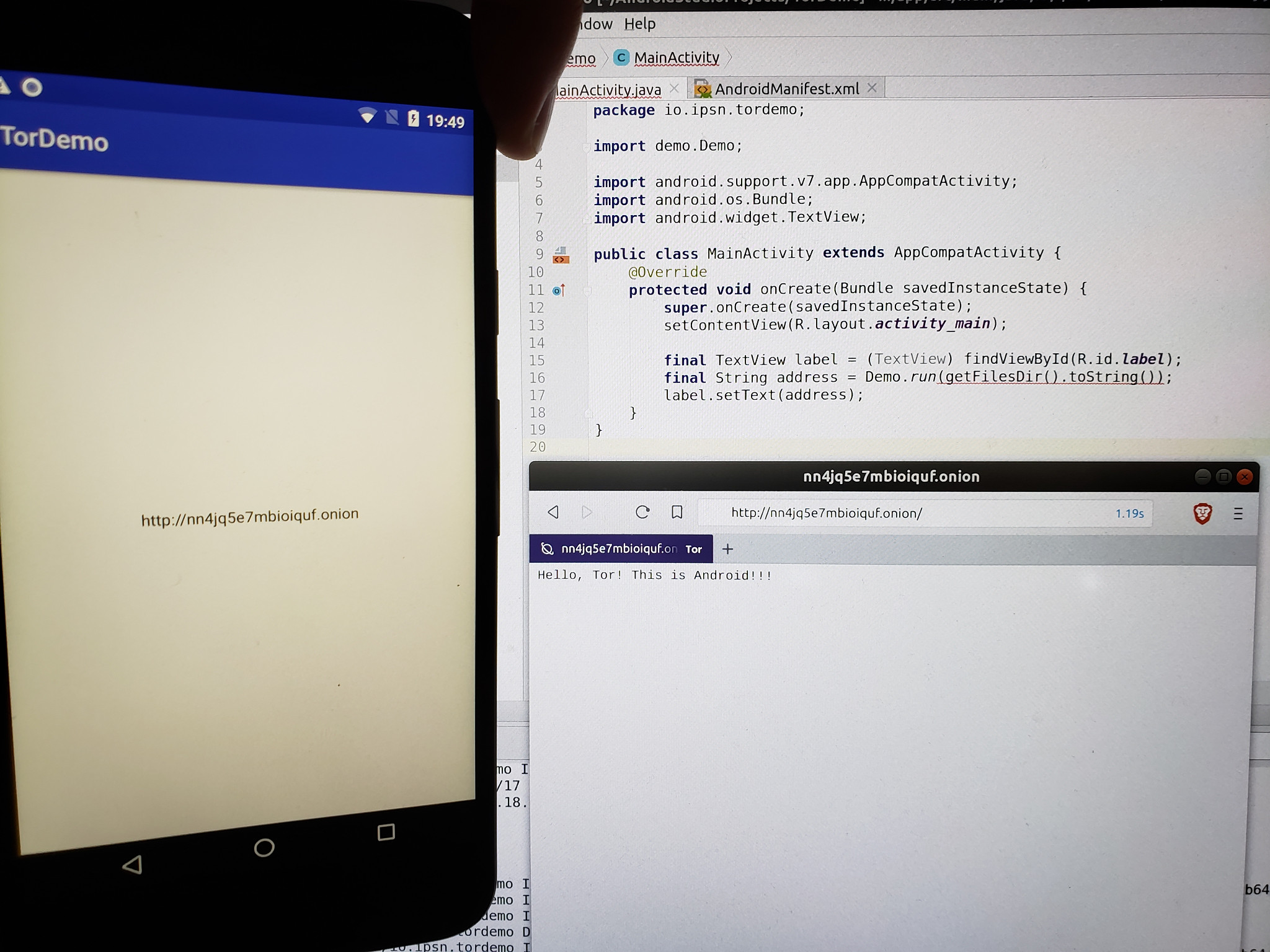
That's actually it! We've managed to get a Tor hidden service running from an Android phone and access it from another device through the Tor network, all through 40 lines of Go- and 3 lines of Java code.
## Credits
This repository is a fork of [ipsn/go-libtor](https://github.com/ipsn/go-libtor) originaly maintained by Péter Szilágyi ([@karalabe](https://github.com/karalabe)), but authorship of all code contained inside belongs to the individual upstream projects.
We ([berty](https://berty.tech/)) have forked it because [ipsn/go-libtor](https://github.com/ipsn/go-libtor) doesn't seems maintained anymore.
We have added many new functionalities :
- Uplift of the wrapping process to support a multi os / multi stage process.
- Darwin (iOS and Macos) support.
- Dynamicaly loaded libs.
## License
3-Clause BSD.