https://github.com/bezzad/downloader
Fast, cross-platform and reliable multipart downloader with asynchronous progress events for .NET applications.
https://github.com/bezzad/downloader
cross-platform csharp dotnet dotnet-core dotnet-standard dotnetframework download download-file download-manager downloader downloadmanager filedownloader high-concurrency idm internet-download-manager multipart-download multitasking stream-downloader
Last synced: 28 days ago
JSON representation
Fast, cross-platform and reliable multipart downloader with asynchronous progress events for .NET applications.
- Host: GitHub
- URL: https://github.com/bezzad/downloader
- Owner: bezzad
- License: mit
- Created: 2020-03-24T19:09:48.000Z (over 6 years ago)
- Default Branch: master
- Last Pushed: 2026-10-14T16:56:14.000Z (about 1 month ago)
- Last Synced: 2026-10-14T22:03:58.700Z (about 1 month ago)
- Topics: cross-platform, csharp, dotnet, dotnet-core, dotnet-standard, dotnetframework, download, download-file, download-manager, downloader, downloadmanager, filedownloader, high-concurrency, idm, internet-download-manager, multipart-download, multitasking, stream-downloader
- Language: C#
- Homepage:
- Size: 14.4 MB
- Stars: 1,717
- Watchers: 36
- Forks: 250
- Open Issues: 4
-
Metadata Files:
- Readme: README.md
- Changelog: CHANGELOG.md
- Funding: .github/FUNDING.yml
- License: LICENSE
- Claude: CLAUDE.md
Awesome Lists containing this project
README
[](https://github.com/bezzad/Downloader/actions/workflows/dotnet-windows.yml)
[](https://github.com/bezzad/Downloader/actions/workflows/dotnet-ubuntu.yml)
[](https://github.com/bezzad/Downloader/actions/workflows/dotnet-macos.yml)
[](https://codecov.io/github/bezzad/Downloader)
[](https://www.nuget.org/packages/downloader)
[](https://www.nuget.org/packages/downloader)
[](https://www.codefactor.io/repository/github/bezzad/downloader/overview/master)
[](https://github.com/bezzad/downloader/blob/master/LICENSE)
[](https://github.com/bezzad/Downloader)
[](https://github.com/bezzad/Downloader)
[](https://github.com/bezzad/Downloader)
[](https://github.com/bezzad/Downloader)
[](https://github.com/bezzad/Downloader)
[](https://github.com/bezzad/Downloader/blob/main/./docs/github-dependents-info.md)
# Downloader
:rocket: Fast, cross-platform, and reliable multipart downloader in `.Net` :rocket:
> [!TIP]
> **Prefer a ready-to-use app over a library?** Meet **[Downloader Desktop](https://github.com/bezzad/Downloader.Desktop)** — a free, open-source GUI download manager for **Windows · Linux · macOS**, powered by this engine: multi-connection downloads, pause/resume, queues, scheduler, speed limits and more — with no dependencies to install.
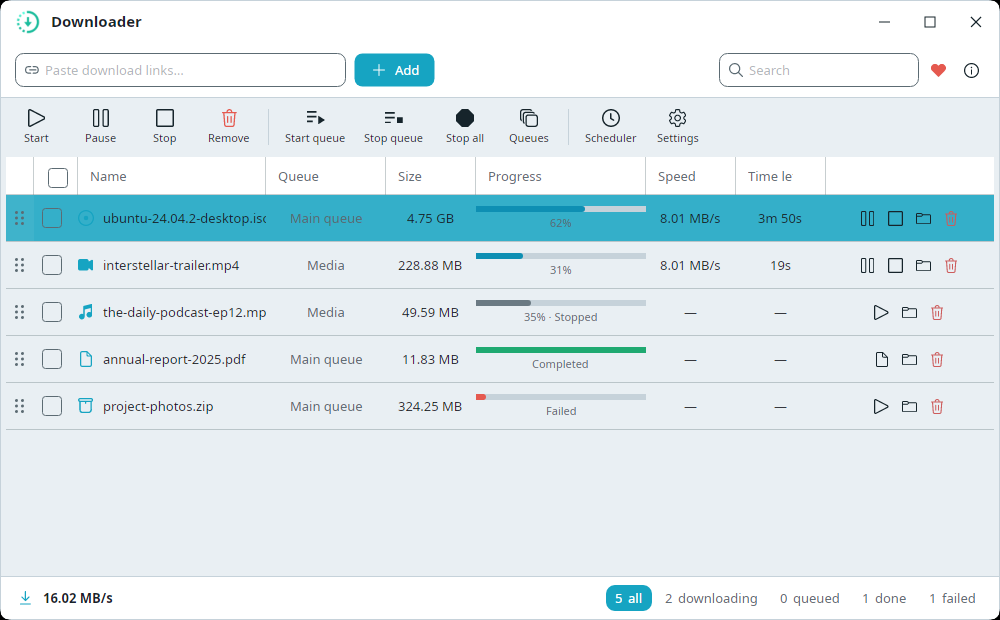
**Downloader** is a modern, fluent, asynchronous, and portable library for .NET, built with testability in mind. It supports multipart downloads with real-time asynchronous progress events. The current `v5.x` line targets `.NET 8`, `.NET 9`, and `.NET 10`. (If you need `.NET Standard 2.1` or older runtimes such as `.NET Framework 4.6.1`, use the `v3.x` line — see the note below.)
Downloader works on Windows, Linux, and macOS.
> **Note**: Support for older versions of .NET was removed in Downloader `v3.2.0`. From this version onwards, only `.Net 8.0` and higher versions are supported.
> If you need compatibility with older .NET versions (e.g., `.NET Framework 4.6.1`), use Downloader `v3.1.*`.
> For a complete example, see the [Downloader.Sample](https://github.com/bezzad/Downloader/blob/master/src/Samples/Downloader.Sample/Program.cs) project in this repository.
## Table of Contents
- [Quick Start](#quick-start)
- [Sample Console Application](#sample-console-application)
- [Key Features](#key-features)
- [Installation via NuGet](#installation-via-nuget)
- [Installation via the .NET CLI](#installation-via-the-net-cli)
- [Usage](#usage)
- [How to get the file name and size without downloading](#how-to-get-the-file-name-and-size-without-downloading)
- [How to pause and resume downloads quickly](#how-to-pause-and-resume-downloads-quickly)
- [How to stop and resume downloads (manual approach)](#how-to-stop-and-resume-downloads-manual-approach)
- [How to automatically resume downloads (recommended)](#how-to-automatically-resume-downloads-recommended)
- [Fluent download builder usage](#fluent-download-builder-usage)
- [Using a Custom HttpClient or HttpMessageHandler](#using-a-custom-httpclient-or-httpmessagehandler)
- [When does the Downloader fail to download in multiple chunks?](#when-does-the-downloader-fail-to-download-in-multiple-chunks)
- [Redirects, cookies, and protected links](#redirects-cookies-and-protected-links)
- [How to serialize and deserialize the downloader package](#how-to-serialize-and-deserialize-the-downloader-package)
- [Building a Native AOT Version](#-building-a-native-aot-version)
- [Instructions for Contributing](#instructions-for-contributing)
- [Support the Project](#support-the-project)
- [License](#license)
- [Contributors](#contributors)
## Quick Start
```bash
dotnet add package Downloader
```
```csharp
await DownloadBuilder
.New()
.WithUrl(@"https://host.com/test-file.zip")
.WithDirectory(@"C:\temp")
.Build()
.StartAsync();
```
## Sample Console Application

---
## Key Features
- Simple interface for download requests.
- Asynchronous, non-blocking file downloads.
- Supports all file types (e.g., images, videos, PDFs, APKs).
- Cross-platform support for files of any size.
- Real-time progress updates for each download chunk.
- Downloads files in multiple parts (parallel download).
- Resilient to client-side and server-side errors.
- Configurable `ChunkCount` to control download segmentation.
- Supports both in-memory and on-disk multipart downloads.
- Parallel saving of chunks directly into the final file (no temporary files).
- Always downloads to a temporary file (configurable extension, default `.download`), then renames to the final name on completion.
- Always pre-allocates file size before download begins.
- Resume downloads manually by saving and restoring the `DownloadPackage` object.
- Automatic resume: when enabled, download metadata is embedded inside the `.download` file — no extra files or manual serialization needed.
- Provides real-time speed and progress data.
- Asynchronous pause and resume functionality.
- Download files with dynamic speed limits.
- Supports downloading to memory streams (without saving to disk).
- Supports large file downloads and live-streaming (e.g., music playback during download).
- Download a specific byte range from a large file.
- Resolve a remote file's name, size, and range support **without downloading it** (`RemoteFileResolver`).
- Lightweight, fast codebase with no external dependencies.
- Manage RAM usage during downloads.
- Supports custom `HttpClient` or `HttpMessageHandler` injection for advanced scenarios (e.g., `IHttpClientFactory`, HTTP caching, custom delegating handlers).
---
## Installation via [NuGet](https://www.nuget.org/packages/downloader)
```text
PM> Install-Package Downloader
```
## Installation via the .NET CLI
```bash
dotnet add package Downloader
```
---
## Usage
### **Step 1**: Create a Custom Configuration
#### Simple Configuration
```csharp
var downloadOpt = new DownloadConfiguration()
{
// Number of file parts, default is 1
ChunkCount = 8,
// Download parts in parallel (default is false)
ParallelDownload = true
};
```
#### Complex Configuration
> **Note**: Only include the options you need in your application.
```csharp
var downloadOpt = new DownloadConfiguration()
{
// usually, hosts support max to 8000 bytes, default value is 8000
BufferBlockSize = 10240, // 10KB
// file parts to download, the default value is 1
ChunkCount = 8,
// download speed limited to MaximumBytesPerSecond,
// the default value is zero, which means unlimited
MaximumBytesPerSecond = 1024*1024*2, // 2MB/s
// the maximum number of times to fail
MaxTryAgainOnFailure = 5,
// release memory buffer after each MaximumMemoryBufferBytes
MaximumMemoryBufferBytes = 1024 * 1024 * 50, // 50MB
// download parts of the file in parallel or not.
// The default value is false
ParallelDownload = true,
// number of parallel downloads.
// The default value is the same as the chunk count
ParallelCount = 4,
// timeout (millisecond) per stream block reader,
// the default value is 1000
BlockTimeout = 1000,
// timeout (millisecond) per HttpClient request,
// default value is 100 seconds
HttpClientTimeout = 100 * 1000,
// set true if you want to download just a specific
// range of bytes of a large file
RangeDownload = false,
// floor offset of download range of a large file
RangeLow = 0,
// ceiling offset of download range of a large file
RangeHigh = 0,
// clear package chunks data when download completed
// with failure, default value is false
ClearPackageOnCompletionWithFailure = true,
// the minimum size of file to chunking or download a
// file in multiple parts, the default value is 512
MinimumSizeOfChunking = 102400, // 100KB
// the minimum size of a single chunk,
// default value is 0 equal unlimited
MinimumChunkSize = 10240, // 10KB
// Get on-demand downloaded data with
// ReceivedBytes on the downloadProgressChanged event
EnableLiveStreaming = false,
// How to handle an existing filename when
// starting to download?
FileExistPolicy = FileExistPolicy.Delete,
// When enabled, the Downloader appends package
// metadata to the end of the .download file.
// On the next download attempt,
// if metadata is found in an existing .download file,
// the download resumes automatically.
EnableAutoResumeDownload = true,
// A temporary extension appended to
// the real filename while downloading.
// e.g., "file.zip" becomes "file.zip.download"
// during download. The Downloader always uses this
// extension regardless of EnableAutoResumeDownload.
// When the download completes,
// the file is renamed back to its final name.
DownloadFileExtension = ".download",
// config and customize request headers
RequestConfiguration =
{
Accept = "*/*",
CookieContainer = cookies,
Headers = ["Accept-Encoding: gzip, deflate, br"], // { your custom headers }
KeepAlive = true,
ProtocolVersion = HttpVersion.Version11,
// your custom user agent or
// your_app_name/app_version.
UserAgent = "Mozilla/5.0",
Proxy = new WebProxy() {
Address = new Uri(
"http://YourProxyServer/proxy.pac"),
UseDefaultCredentials = false,
Credentials = System.Net.CredentialCache.DefaultNetworkCredentials,
BypassProxyOnLocal = true
},
Authorization = new AuthenticationHeaderValue
("Bearer", "XX_YOUR_TOKEN_XX")
}
};
```
### Recommended setup for fast **and** reliable downloads
A good general-purpose starting point — parallel for speed, with retries and auto-resume for safety:
```csharp
var downloadOpt = new DownloadConfiguration
{
// split into 8 parts
ChunkCount = 8,
// download chunks as parallel (fast)
ParallelDownload = true,
// cap concurrent connections to be a good citizen
ParallelCount = 4,
// retry transient network errors before giving up
MaxTryAgainOnFailure = 5,
// survive crashes/network drops with zero extra code
EnableAutoResumeDownload = true,
// cap RAM used for buffering (50MB)
MaximumMemoryBufferBytes = 50 * 1024 * 1024,
// fail early if there isn't enough disk space
CheckDiskSizeBeforeDownload = true,
// 0 = unlimited; set a value to limit speed B/s
MaximumBytesPerSecond = 0,
};
```
> **Tip:** Higher `ChunkCount`/`ParallelCount` is not always faster — many servers rate-limit or
> cap connections per client. Values around `8` chunks and `4` parallel connections are a safe,
> fast default; tune for your target hosts.
### **Step 2**: Create the Download Service
```csharp
var downloader = new DownloadService(downloadOpt);
```
### **Step 3**: Handle Download Events
```csharp
// Provide `FileName` and `TotalBytesToReceive` at
// the start of each download
downloader.DownloadStarted += OnDownloadStarted;
// Provide any information about chunk downloads,
// like progress percentage per chunk, speed,
// total received bytes and received bytes array
// to live streaming.
downloader.ChunkDownloadProgressChanged += OnChunkDownloadProgressChanged;
// Provide any information about download progress,
// like progress percentage of sum of chunks, total speed,
// average speed, total received bytes and
// received bytes array to live streaming.
downloader.DownloadProgressChanged += OnDownloadProgressChanged;
// Download completed event that can include errors or
// canceled or download completed successfully.
downloader.DownloadFileCompleted += OnDownloadFileCompleted;
```
Example handler implementations:
```csharp
void OnDownloadStarted(object? sender, DownloadStartedEventArgs e)
=> Console.WriteLine($"Started '{e.FileName}' ({e.TotalBytesToReceive} bytes)");
void OnDownloadProgressChanged(object? sender, DownloadProgressChangedEventArgs e)
=> Console.WriteLine($"{e.ProgressPercentage:F1}% @ {e.BytesPerSecondSpeed:F0} B/s");
void OnDownloadFileCompleted(object? sender, System.ComponentModel.AsyncCompletedEventArgs e)
{
if (e.Cancelled)
Console.WriteLine("Download was stopped/paused by the caller.");
else if (e.Error is not null)
Console.WriteLine($"Download FAILED: {e.Error.Message}"); // inspect/log e.Error
else
Console.WriteLine("Download completed successfully.");
}
```
> ### ⚠️ Important: how failures and cancellations are reported
>
> `DownloadFileTaskAsync(...)` / `StartAsync(...)` **do not throw** when a download fails or is
> cancelled. The awaited call completes normally, and the outcome is delivered through the
> **`DownloadFileCompleted`** event:
>
> - **Success** → `e.Cancelled == false` **and** `e.Error == null`
> - **Failure** → `e.Error` contains the exception (e.g. a network error, or an
> `IncompleteDownloadException` if the server ended the stream early)
> - **Stopped/paused by you** → `e.Cancelled == true`
>
> Always subscribe to `DownloadFileCompleted` and check `e.Error` before treating the file as
> complete — relying only on the `await` returning will silently miss failed downloads. You can
> also inspect `downloader.Package.Status` (`Completed` / `Stopped` / `Failed`).
### **Step 4**: Start the Download
```csharp
string file = @"Your_Path\fileName.zip";
string url = @"https://file-examples.com/fileName.zip";
await downloader.DownloadFileTaskAsync(url, file);
```
### **Step 4b**: Start the download without a file name
```csharp
DirectoryInfo path = new DirectoryInfo("Your_Path");
string url = @"https://file-examples.com/fileName.zip";
// download into "Your_Path\fileName.zip"
await downloader.DownloadFileTaskAsync(url, path);
```
### **Step 4c**: Download in MemoryStream
```csharp
// After the download completes, you get a MemoryStream
Stream destinationStream = await downloader.DownloadFileTaskAsync(url);
```
---
### How to get the **file name and size without downloading**
Sometimes you need a remote file's name and size **before** (or without ever) downloading it — for
example to populate a list/grid of queued downloads with their names and sizes while they wait for a
slot, instead of starting and immediately stopping a real download just to read the headers.
Use `RemoteFileResolver`. It performs a single lightweight header probe (a `Range: 0-0` GET that
follows redirects) and resolves the file name exactly the way the downloader does internally — from
the `Content-Disposition` header, falling back to the URL path, and finally to a generated GUID —
plus the size (`Content-Range` → `Content-Length`) and whether the server supports ranged
(resumable) downloads.
```csharp
// Just the file name
// (resilient: falls back to the URL-derived name
// on a network/server error)
string fileName = await RemoteFileResolver.GetFileNameAsync(url);
// Full metadata in one probe:
RemoteFileInfo info = await RemoteFileResolver.GetFileInfoAsync(url);
Console.WriteLine($"{info.FileName} — {info.FileSize} bytes, range: {info.SupportsRange}");
// info.Address is the final URL after any redirects.
```
Both methods accept an optional `DownloadConfiguration` (to reuse your headers, proxy, credentials,
cookies, redirect policy, …) and a `CancellationToken`. Each call owns and disposes its own client,
so when resolving many URLs at once add your own concurrency limiting / timeouts.
If you already hold a download service, the same lookup is available on it (using that service's
configuration, without disturbing any download in progress):
```csharp
RemoteFileInfo info = await downloader.GetFileInfoAsync(url);
```
> **Note:** `FileSize` is `-1` when the server does not advertise a length. `GetFileNameAsync` and
> the service/`GetFileInfoAsync` previews are best-effort and won't throw on a server that hides its
> size — you still get a usable name.
---
### How to **pause** and **resume** downloads quickly
When you want to resume a download quickly after pausing for a few seconds, call the `Pause` function of the downloader service. This way, the streams stay alive and are only suspended by a lock, to be released and resumed whenever you want.
```csharp
// Pause the download
downloader.Pause();
// Resume the download
downloader.Resume();
```
---
### How to **stop** and **resume** downloads (manual approach)
The `DownloadService` class has a property called `Package` that holds a live snapshot of the download state (chunk positions, URL, file path, etc.). While the download is in progress, this object is updated continuously.
To stop and later resume a download **manually**, you are responsible for keeping the `Package` object yourself — either in memory or serialized to disk. The Downloader does not store it for you in this approach.
```csharp
// 1. Keep a reference to the package before or after stopping:
DownloadPackage pack = downloader.Package;
```
**Stop or cancel the download:**
```csharp
// Fire-and-forget cancellation (returns void):
downloader.CancelAsync();
// Or await until the download has actually stopped before reading the package:
await downloader.CancelTaskAsync();
```
**Resume later — even after restarting the application:**
```csharp
// Pass the same (or deserialized) package to resume from the last position:
await downloader.DownloadFileTaskAsync(pack);
```
The `Package` object is lightweight — it contains only the URL, file path, and the position of each chunk (not the downloaded bytes). You can serialize it to JSON or binary (see [Serialization section](#how-to-serialize-and-deserialize-the-downloader-package)) and restore it at any time.
For more details see the [StopResumeDownloadTest](https://github.com/bezzad/Downloader/blob/master/src/Downloader.Test/IntegrationTests/DownloadIntegrationTest.cs#L210) method.
> **Note:** If the server does not support HTTP range requests, the download cannot be resumed and will restart from the beginning.
---
### How to **automatically resume** downloads (recommended)
If you don't want to manage `DownloadPackage` serialization yourself, enable `EnableAutoResumeDownload`. The Downloader will then handle everything automatically — no manual serialization or package management is needed.
**Configuration:**
```csharp
var downloadOpt = new DownloadConfiguration()
{
EnableAutoResumeDownload = true,
// optional, the default extension is '.download'
DownloadFileExtension = ".download"
};
var downloader = new DownloadService(downloadOpt);
```
**How `.download` files work:**
The Downloader **always** uses a temporary file with the `.download` extension (configurable via `DownloadFileExtension`) — this behavior is independent of `EnableAutoResumeDownload`. For example, downloading `report.pdf` creates `report.pdf.download` on disk. While the download is in progress, only the `.download` file exists — the user does not see the final filename. When the download completes successfully, the file is renamed to `report.pdf`.
**What `EnableAutoResumeDownload` adds:**
When this option is `true`, the Downloader appends package metadata to the **end** of the `.download` file, immediately after the file data. This metadata enables automatic resume without any work from the caller.
The file structure during download looks like this:
```text
report.pdf.download:
_____________________________________________________
| | |
|<------------ File Data ----------->|<-- Metadata -->|
|____________________________________|________________|
```
- **File Data region**: The actual file content. The file size for this region is pre-allocated at the start.
- **Metadata region**: The `DownloadPackage` state (includes TotalFileSize and Chunks) is serialized to JSON and then written as binary at the **end** of the same file.
The metadata grows as the download progresses (more chunk positions are recorded), so the on-disk file size is always `TotalFileSize + current metadata size`. The metadata only grows — it never shrinks — so no padding or extra management is needed.
**On interruption:**
If the download is interrupted (crash, network failure, app restart), the `.download` file remains on disk with both the partial file data and the latest metadata embedded at the end.
**On resume:**
When you call `DownloadFileTaskAsync` for the same file again, the Downloader:
1. Detects the existing `.download` file
2. Reads the metadata from the end of the file to restore the `DownloadPackage` state
3. Verifies the server still supports range requests and that the file size has not changed
4. Resumes downloading from where each chunk left off
5. Falls back to a fresh download if any validation fails
**On completion:**
When the download finishes successfully:
1. The file stream is truncated to `TotalFileSize` using `SetLength(TotalFileSize)`, which removes the appended metadata
2. The file is renamed from `report.pdf.download` to `report.pdf`
The result is a clean final file with no metadata artifacts.
> **Note:** If the server does not support range requests or the remote file size has changed, the Downloader will discard the partial data and start a fresh download.
---
## Fluent download builder usage
For easy and fluent use of the downloader, you can use the `DownloadBuilder` class. Consider the following examples:
Simple usage:
```csharp
await DownloadBuilder
.New()
.WithUrl(@"https://host.com/test-file.zip")
.WithDirectory(@"C:\temp")
.Build()
.StartAsync();
```
Complex usage:
```csharp
IDownload download = DownloadBuilder
.New()
.WithUrl(@"https://host.com/test-file.zip")
.WithDirectory(@"C:\temp")
.WithFileName("test-file.zip")
.WithConfiguration(new DownloadConfiguration())
.Build();
download.DownloadProgressChanged += DownloadProgressChanged;
download.DownloadFileCompleted += DownloadFileCompleted;
download.DownloadStarted += DownloadStarted;
download.ChunkDownloadProgressChanged += ChunkDownloadProgressChanged;
await download.StartAsync();
download.Stop(); // cancel current download
```
Resume the existing download package:
```csharp
await DownloadBuilder.New().Build(package).StartAsync();
```
Resume the existing download package with a new configuration:
```csharp
await DownloadBuilder.New().Build(package, config).StartAsync();
```
[Pause and Resume quickly](https://github.com/bezzad/Downloader/blob/master/src/Downloader.Test/UnitTests/DownloadBuilderTest.cs#L110):
```csharp
var download = DownloadBuilder
.New()
.WithUrl(url)
.WithFileLocation(path)
.Build();
download.DownloadProgressChanged += (_, _) => {
// pause current download quickly
download.Pause();
// continue current download quickly
download.Resume();
};
await download.StartAsync().ConfigureAwait(false);
```
---
## Using a Custom HttpClient or HttpMessageHandler
Some scenarios require using a custom `HttpClient` or `HttpMessageHandler` — for example, to reuse the connection pool from `IHttpClientFactory`, add HTTP caching via a `DelegatingHandler`, or apply custom authentication logic.
The Downloader provides two delegate properties on `DownloadConfiguration` for this purpose:
### Option 1: Provide a fully custom `HttpClient`
Use `CustomHttpClientFactory` when you want **full control** over the `HttpClient` instance. The Downloader will skip all internal handler and header configuration and use the returned client directly.
```csharp
var downloadOpt = new DownloadConfiguration()
{
ChunkCount = 8,
ParallelDownload = true,
CustomHttpClientFactory = () => {
// Example: use IHttpClientFactory
return httpClientFactory.CreateClient("MyDownloader");
}
};
var downloader = new DownloadService(downloadOpt);
await downloader.DownloadFileTaskAsync(url, filePath);
```
### Option 2: Provide a custom `HttpMessageHandler`
Use `CustomHttpMessageHandlerFactory` when you want to customize only the handler (e.g., for caching or custom SSL), while letting the Downloader still configure default request headers and timeout on the `HttpClient`.
```csharp
var downloadOpt = new DownloadConfiguration()
{
ChunkCount = 8,
ParallelDownload = true,
CustomHttpMessageHandlerFactory = () => {
return new SocketsHttpHandler {
MaxConnectionsPerServer = 500,
PooledConnectionLifetime = TimeSpan.FromMinutes(10)
};
}
};
var downloader = new DownloadService(downloadOpt);
await downloader.DownloadFileTaskAsync(url, filePath);
```
### Using the fluent builder API
Both options are also available through the `DownloadBuilder`:
```csharp
// With a custom HttpClient
await DownloadBuilder.New()
.WithUrl(url)
.WithDirectory(@"C:\temp")
.WithHttpClient(() => httpClientFactory.CreateClient("MyDownloader"))
.Build()
.StartAsync();
// With a custom HttpMessageHandler
await DownloadBuilder.New()
.WithUrl(url)
.WithDirectory(@"C:\temp")
.WithHttpMessageHandler(() => new SocketsHttpHandler {
MaxConnectionsPerServer = 500,
PooledConnectionLifetime = TimeSpan.FromMinutes(10)
})
.Build()
.StartAsync();
```
> **Note:** If both `CustomHttpClientFactory` and `CustomHttpMessageHandlerFactory` are set, `CustomHttpClientFactory` takes precedence and `CustomHttpMessageHandlerFactory` is ignored.
---
## When does the Downloader fail to download in multiple chunks?
### Content-Length
If your server does not provide the file size in the response header (`Content-Length`),
the Downloader cannot split the file into multiple parts and continues its work with one chunk.
### Accept-Ranges
If the server returns `Accept-Ranges: none` in the response header, that means the server does not support downloading in range, so
the Downloader cannot use multiple chunks and continues its work with a single chunk.
### Content-Range
At first, the Downloader sends a GET request to the server to fetch the file's size in the range.
If the server does not provide `Content-Range` in the header, that means the server does not support downloading in range.
Therefore, the Downloader has to continue its work with one chunk.
### Content-Encoding (compressed responses)
If you enable `RequestConfiguration.AutomaticDecompression` and the server returns a compressed
response (a `Content-Encoding` header such as `gzip`, `deflate`, or `br`), the Downloader falls back
to a single, non-ranged chunk. A `Range` request addresses byte offsets in the *compressed* stream,
which do not map to offsets in the *decompressed* bytes the client ultimately delivers — so splitting
a compressed representation into ranges would corrupt the output. Downloading as one chunk keeps
decompression consistent. (`AutomaticDecompression` defaults to `DecompressionMethods.None`, so this
only applies when you opt in.)
---
## Redirects, cookies, and protected links
The Downloader follows HTTP redirects automatically (`AllowAutoRedirect = true`, up to
`MaximumAutomaticRedirections = 50`), including `301`, `302`, `303`, `307`, and `308`. It also
follows **same-URL "challenge" redirects** — for example a CDN that answers with a `307` whose
`Location` points back to the same URL and a `Set-Cookie`, expecting the client to retry carrying
that cookie.
To make those challenges resolvable, `RequestConfiguration.CookieContainer` now **defaults to a new
`CookieContainer`**, so cookies issued mid-redirect are stored and replayed on the follow-up
request. Set it to `null` to disable cookie handling entirely, or supply your own container with
pre-seeded cookies:
```csharp
var downloadOpt = new DownloadConfiguration
{
RequestConfiguration =
{
CookieContainer = myCookieContainer, // or null to disable cookies
}
};
```
> **Note:** No HTTP client can pass a **JavaScript-based** bot challenge (the cookie value must be
> computed by a browser), nor revive an **expired** signed link — such URLs typically return a small
> HTML "expired/blocked" page with status `200`. If a download produces a tiny unexpected file,
> inspect the real response first (e.g. `curl -I `) before assuming a Downloader bug.
---
## How to serialize and deserialize the downloader package
> **Tip:** If you use `EnableAutoResumeDownload = true`, you do **not** need to serialize the package yourself — the Downloader handles it automatically by embedding metadata in the `.download` file. The section below is only relevant if you use the **manual resume** approach.
The `DownloadPackage` object holds the download state (URL, file path, chunk positions). You can serialize it to JSON or binary so that you can restore and resume a stopped download later — even after the application restarts.
### **JSON Serialization**
```csharp
// Serialize
var packageJson = JsonConvert.SerializeObject(package);
// Deserialize
var restoredPack = JsonConvert.DeserializeObject(packageJson);
// Resume
await downloader.DownloadFileTaskAsync(restoredPack);
```
For more details see the [PackageSerializationTest](https://github.com/bezzad/Downloader/blob/46167082b8de99d8e6ad21329c3a32a6e26cfd3e/src/Downloader.Test/DownloadPackageTest.cs#L34) method.
### **Binary Serialization**
To save the package as a binary file, serialize it to JSON first and then write it with [BinaryWriter](https://learn.microsoft.com/en-us/dotnet/api/system.io.binarywriter).
> **NOTE**: Do not use [BinaryFormatter](https://docs.microsoft.com/en-us/dotnet/api/system.runtime.serialization.formatters.binary.binaryformatter) — it is deprecated and insecure. [Reference](https://learn.microsoft.com/en-us/dotnet/standard/serialization/binaryformatter-security-guide)
## 🚀 Building a Native AOT Version
This project supports **Ahead-of-Time (AOT)** compilation, which generates a standalone native executable with faster startup times and reduced memory usage. Follow these steps to build the AOT version.
---
### Prerequisites
- [.NET 8.0 SDK](https://dotnet.microsoft.com/download/dotnet/8.0) or later.
- A supported platform (Windows, Linux, or macOS).
---
### Build Instructions
#### 1. Clone the Repository
```bash
git clone https://github.com/bezzad/downloader.git
cd downloader
```
#### 2. Build the Native AOT Executable
Run the following command to compile the project for your target platform:
Windows (x64):
```bash
dotnet publish -r win-x64 -f net8.0 -c Release
```
Linux (x64):
```bash
dotnet publish -r linux-x64 -f net8.0 -c Release
```
macOS (x64):
```bash
dotnet publish -r osx-x64 -f net8.0 -c Release
```
#### 3. Find the Output
The compiled executable will be located in:
```bash
bin/Release/net8.0//publish/
```
Example for Windows:
```bash
bin/Release/net8.0/win-x64/publish/
```
# Instructions for Contributing
Contributions are welcome — feel free to make changes and open a [**Pull Request**](http://help.github.com/pull-requests/) against the `develop` branch.
You can use either the latest version of Visual Studio or Visual Studio Code and .NET CLI for Windows, Mac and Linux.
For GitHub workflow, check out our Git workflow below this paragraph. We are following the excellent GitHub Flow process, and would like to make sure you have all the information needed to be a world-class contributor!
## Git Workflow
The general process for working with Downloader is:
1. [Fork](http://help.github.com/forking/) on GitHub
2. Make sure your line endings are correctly configured and fix your line endings!
3. Clone your fork locally
4. Configure the upstream repo (`git remote add upstream git://github.com/bezzad/downloader`)
5. Switch to the latest development branch (`git checkout develop`)
6. Create a local branch from that (`git checkout -b myBranch`).
7. Work on your feature
8. Rebase if required
9. Push the branch up to GitHub (`git push origin myBranch`)
10. Send a Pull Request on GitHub - the PR should target (have as a base branch) the `develop` branch rather than `master`.
We accept pull requests from the community. But you should **never** work on a clone of `master`, and you should **never** send a pull request from `master` - always from a branch. Please be sure to branch from the head of the `develop` branch (rather than `master`) when developing contributions.
## You can run tests with the Docker Compose file with the following command
>
> `docker-compose -p downloader up`
## Or with docker file
>
> `docker build -f ./dockerfile -t downloader-linux .`
> `docker run --name downloader-linux-container -d downloader-linux --env=ASPNETCORE_ENVIRONMENT=Development .`
## Or run the following command to call docker directly
>
> `docker run --rm -v ${pwd}:/app --env=ASPNETCORE_ENVIRONMENT=Development -w /app/tests mcr.microsoft.com/dotnet/sdk:10.0 dotnet test ../ --logger:trx`
------------------------------------------------------
# Support the Project
I've spent a lot of time creating this project.
If you like my work, please give it a ⭐ — thanks! ❤️
Want to support the project?
You can make a donation in any of the following ways:
[](https://liberapay.com/bezzad/donate)

------------------------------------------------------
# License
Licensed under the terms of the [MIT License](https://raw.githubusercontent.com/bezzad/Downloader/master/LICENSE)
[](https://app.fossa.com/projects/git%2Bgithub.com%2Fbezzad%2FDownloader?ref=badge_large)
# Contributors
Thanks go to these wonderful people (List made with [contrib. rocks](https://contrib.rocks)):

## Top Dependent Repositories
A few of the public projects that depend on **Downloader**, sorted by stars. See the [full list](docs/github-dependents-info.md) or browse all of them on [GitHub Dependents](https://github.com/bezzad/Downloader/network/dependents).
| Repository | Stars |
| :-- | --: |
| [2dust](https://github.com/2dust) / [v2rayN](https://github.com/2dust/v2rayN) | 117816 |
| [lively-community](https://github.com/lively-community) / [lively](https://github.com/lively-community/lively) | 19789 |
| [luolangaga](https://github.com/luolangaga) / [tubatools](https://github.com/luolangaga/tubatools) | 5322 |
| [PCL-Community](https://github.com/PCL-Community) / [PCL-CE](https://github.com/PCL-Community/PCL-CE) | 4379 |
| [goatcorp](https://github.com/goatcorp) / [FFXIVQuickLauncher](https://github.com/goatcorp/FFXIVQuickLauncher) | 3188 |
| [ClassIsland](https://github.com/ClassIsland) / [ClassIsland](https://github.com/ClassIsland/ClassIsland) | 2854 |
| [Paving-Base](https://github.com/Paving-Base) / [APK-Installer](https://github.com/Paving-Base/APK-Installer) | 1709 |
| [rogerfar](https://github.com/rogerfar) / [rdt-client](https://github.com/rogerfar/rdt-client) | 1596 |
| [Taiizor](https://github.com/Taiizor) / [Sucrose](https://github.com/Taiizor/Sucrose) | 1549 |
| [CHKZL](https://github.com/CHKZL) / [DDTV](https://github.com/CHKZL/DDTV) | 1495 |
| [jxlpzqc](https://github.com/jxlpzqc) / [TMSpeech](https://github.com/jxlpzqc/TMSpeech) | 1481 |
| [shuyu-labs](https://github.com/shuyu-labs) / [AntSK](https://github.com/shuyu-labs/AntSK) | 1326 |
| [Otiel](https://github.com/Otiel) / [BandcampDownloader](https://github.com/Otiel/BandcampDownloader) | 1237 |
| [Reaparr](https://github.com/Reaparr) / [Reaparr](https://github.com/Reaparr/Reaparr) | 700 |
| [chickensoft-games](https://github.com/chickensoft-games) / [GodotEnv](https://github.com/chickensoft-games/GodotEnv) | 583 |
| [anobaka](https://github.com/anobaka) / [Bakabase](https://github.com/anobaka/Bakabase) | 562 |
| [K12f](https://github.com/K12f) / [BlueCatKoKo](https://github.com/K12f/BlueCatKoKo) | 500 |
| [crazysmile-PhD](https://github.com/crazysmile-PhD) / [downkyicore](https://github.com/crazysmile-PhD/downkyicore) | 479 |
| [Euterpe-org](https://github.com/Euterpe-org) / [App](https://github.com/Euterpe-org/App) | 404 |
| [HandyOrg](https://github.com/HandyOrg) / [HandyWinGet](https://github.com/HandyOrg/HandyWinGet) | 395 |