https://github.com/bga/flytraslate
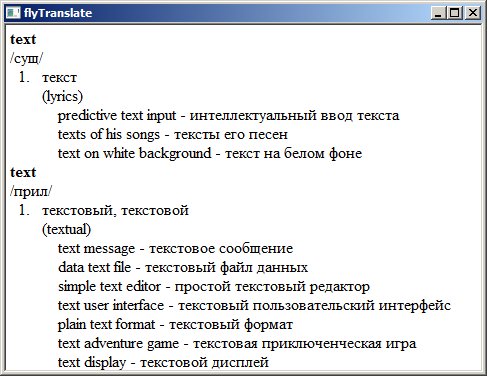
Select word, press `Alt+>` and popup with tranlation appears. Windows only
https://github.com/bga/flytraslate
autohotkey hta html js windows
Last synced: about 1 month ago
JSON representation
Select word, press `Alt+>` and popup with tranlation appears. Windows only
- Host: GitHub
- URL: https://github.com/bga/flytraslate
- Owner: bga
- License: mit
- Created: 2018-03-15T03:49:40.000Z (about 8 years ago)
- Default Branch: master
- Last Pushed: 2018-06-09T15:37:43.000Z (almost 8 years ago)
- Last Synced: 2025-05-23T04:17:32.409Z (about 1 year ago)
- Topics: autohotkey, hta, html, js, windows
- Language: JavaScript
- Homepage:
- Size: 68.4 KB
- Stars: 1
- Watchers: 1
- Forks: 0
- Open Issues: 0
-
Metadata Files:
- Readme: README.md
- License: LICENSE.txt
Awesome Lists containing this project
README
Simple word translate for Windows. Select one word in any program and press `Alt+>`. Window with translations popups.
Script using
* [AutoHotKey_L](https://github.com/Lexikos/AutoHotkey_L) for keyboard hook - need installation
* [MS HTA technology](https://en.wikipedia.org/wiki/HTML_Application) - you already have it
Translates by default from Russian to English and back - you can edit config in header of `flyTraslate.ahk`
Run `flyTraslate.ahk`
`Esc` closes popup