https://github.com/bgmeulem/reconstruct_carto
Reconstructs a simulatable 3D mesh from in-vivo CARTO mapping data
https://github.com/bgmeulem/reconstruct_carto
biophysics meshing python simulations simulations-physics
Last synced: 18 days ago
JSON representation
Reconstructs a simulatable 3D mesh from in-vivo CARTO mapping data
- Host: GitHub
- URL: https://github.com/bgmeulem/reconstruct_carto
- Owner: bgmeulem
- Created: 2021-08-31T14:52:56.000Z (almost 5 years ago)
- Default Branch: main
- Last Pushed: 2021-12-03T14:47:53.000Z (over 4 years ago)
- Last Synced: 2025-09-09T15:31:12.014Z (9 months ago)
- Topics: biophysics, meshing, python, simulations, simulations-physics
- Language: Python
- Homepage:
- Size: 3.96 MB
- Stars: 1
- Watchers: 1
- Forks: 0
- Open Issues: 0
-
Metadata Files:
- Readme: README.md
Awesome Lists containing this project
README
# Reconstruct_CARTO
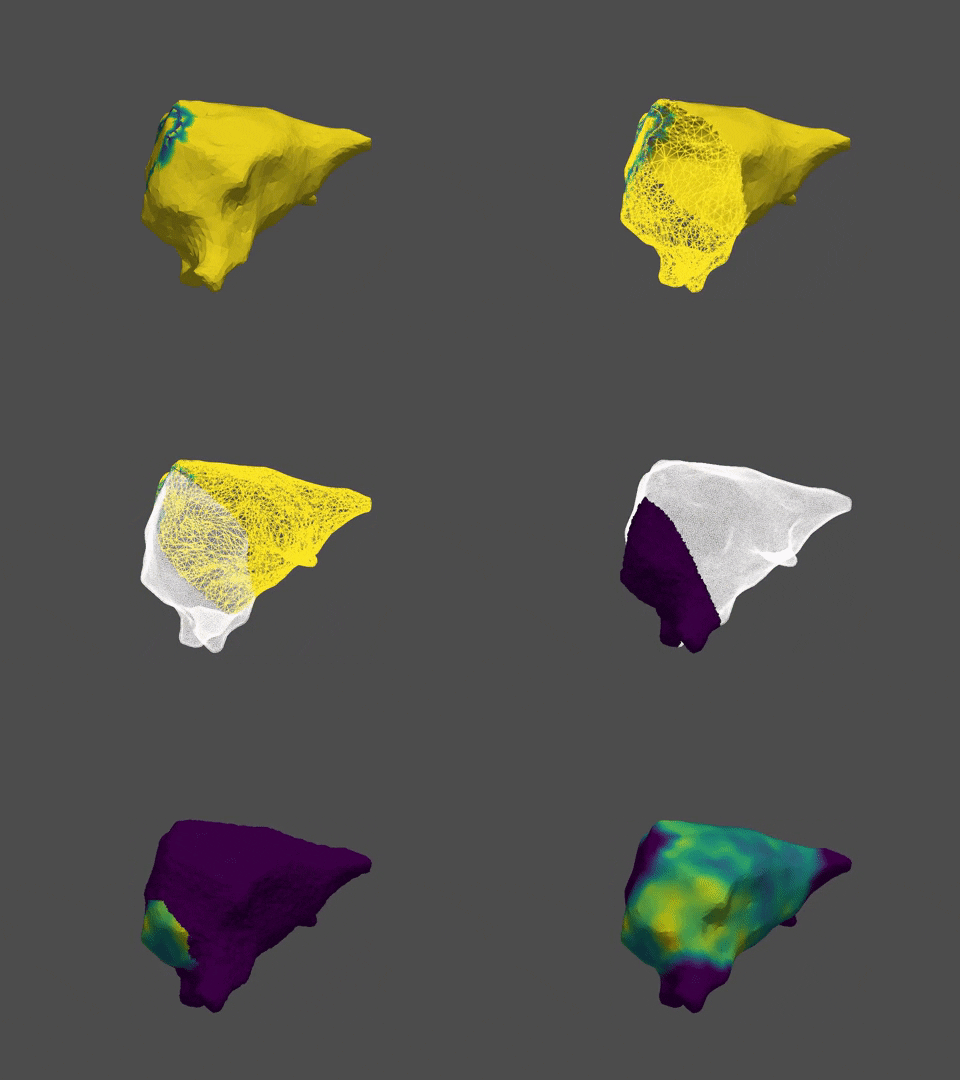
This repository provides code capable of reconstructing a simulatable 3D mesh from clinical CARTO mapping data, providing control over mesh resolution,
conduction velocity distributions and non-conductive regions. The mesh thickness is currently fixed at 5 mm
# Requirements:
Some requirements are not automatically installable. These requirements are:
- [tetgen 1.6.0](http://www.wias-berlin.de/software/index.jsp?id=TetGen&lang=1#Download) ([Download here](http://www.wias-berlin.de/software/tetgen/download2.jsp))
- The ```tetgen``` command should be aliased to the tetgen executable, located at
```/tetgen1.6.0/build/tetgen```
- [PyMesh 0.3](https://pymesh.readthedocs.io/en/latest/index.html) ([Download here](https://pymesh.readthedocs.io/en/latest/installation.html))
- Do **NOT** install PyMesh with pip. This is another module with the same name. Download, build and install according to the setup as provided by the PyMesh docs.
- Installing the third-party dependencies can be done as specified in the docs, but also by running ```./build.py all``` in the directory ```third_party```.
To install the remaining requirements, run
```shell
pip install -r requirements.txt
```
This will install the following modules, or update them if they are not already installed:
- [PyVista](https://docs.pyvista.org/getting-started/index.html)
- tqdm
- matplotlib
- numpy
- sklearn
- pandas
# Usage
**Reconstructing** involves taking an input `.mesh` file and making it into a tetrahedron mesh with user-defined
resolution. Conduction velocities can already be interpolated on this mesh if a .csv file containing point coordinates
and speed values is passed as an optional argument.
```shell
python reconstruct.py --
```
**Interpolating conduction velocities** can also be done after reconstruction, e.g. in case you want to select
non-conductive regions on the mesh *after* the reconstruction. To this end, a .csv file with point coordinates and
conduction velocity values need to be passed as an argument to the runfile `apply_cv.py`.
```shell
python apply_cv.py -- -- -- -- -- --
```
Keep in mind that using command-line arguments will override any setting defined in the `settings.ini` file.
Alternatively, if you want full control over the mesh reconstruction and its intermediate steps, you can also import the
CartoMesh class and its dependencies. This provides more control over the reconstruction process than just the two
runfiles `reconstruct.py` and `apply_cv.py` along with the settings file `settings.ini`.
```python
>>> from carto_mesh import *
>>> m = CartoMesh('filename.mesh')
>>> m.reconstruct()
```
# Documentation
Documentation can be found [here](https://bgmeulem.github.io/Reconstruct_CARTO/html/index.html)
# Contact
Feel free to report any bugs, issues or propose features either directly via github, or per [mail](mailto:bjorge1997@hotmail.com?subject=[GitHub]%20Reconstruct_CARTO:%20bug%20report%20/%20feature%20suggestion)