https://github.com/bhuvan-007-github/meetup-reactpracticeproject
A simple app built in React.js for hands-on practice and skill demonstration.
https://github.com/bhuvan-007-github/meetup-reactpracticeproject
context context-api html5 javascript jsx meetup-app react-practice-project reactjs styled-components
Last synced: about 1 month ago
JSON representation
A simple app built in React.js for hands-on practice and skill demonstration.
- Host: GitHub
- URL: https://github.com/bhuvan-007-github/meetup-reactpracticeproject
- Owner: bhuvan-007-github
- Created: 2025-05-28T06:23:31.000Z (about 1 year ago)
- Default Branch: master
- Last Pushed: 2025-05-29T08:18:42.000Z (about 1 year ago)
- Last Synced: 2025-05-29T08:31:57.325Z (about 1 year ago)
- Topics: context, context-api, html5, javascript, jsx, meetup-app, react-practice-project, reactjs, styled-components
- Language: JavaScript
- Homepage: http://bhuvanameetup.ccbp.tech/
- Size: 186 KB
- Stars: 0
- Watchers: 0
- Forks: 0
- Open Issues: 0
-
Metadata Files:
- Readme: README.md
Awesome Lists containing this project
README
# 📝 Meetup App
The goal for building this App is to demonstrate Reactjs skills using **React Context**.
A React.js application developed to **register a students with their name and chosen topic**, and subsequently display a personalized welcome message. This project reflects clean React.js architecture and the utilization of standard third-party libraries.
---
## 🚀 Project Purpose
This project was built to demonstrate **React.js development skills** using the `Context API`, component-driven architecture, and third-party library integrations. The focus is on state sharing across components using `React Context`, offering a scalable and maintainable pattern for modern React applications.
---
## 🧰 Tech Stack
* **React.js**
* **JavaScript (ES6+)**
* **HTML5**
* **Git** *(for version control)*
Third-Party-Packages
* **Styled-components** *(for styling)*
* **react-router-dom** *(for routing)*
---
## ✅ Features
* Allows users to input their **name** and select a **course/topic**.
* On submission, displays a **personalized welcome message**.
* Utilizes `React Context` for state management across routes.
* Provides basic error validation for empty inputs or unselected fields.
---
## 🧪 How to Use
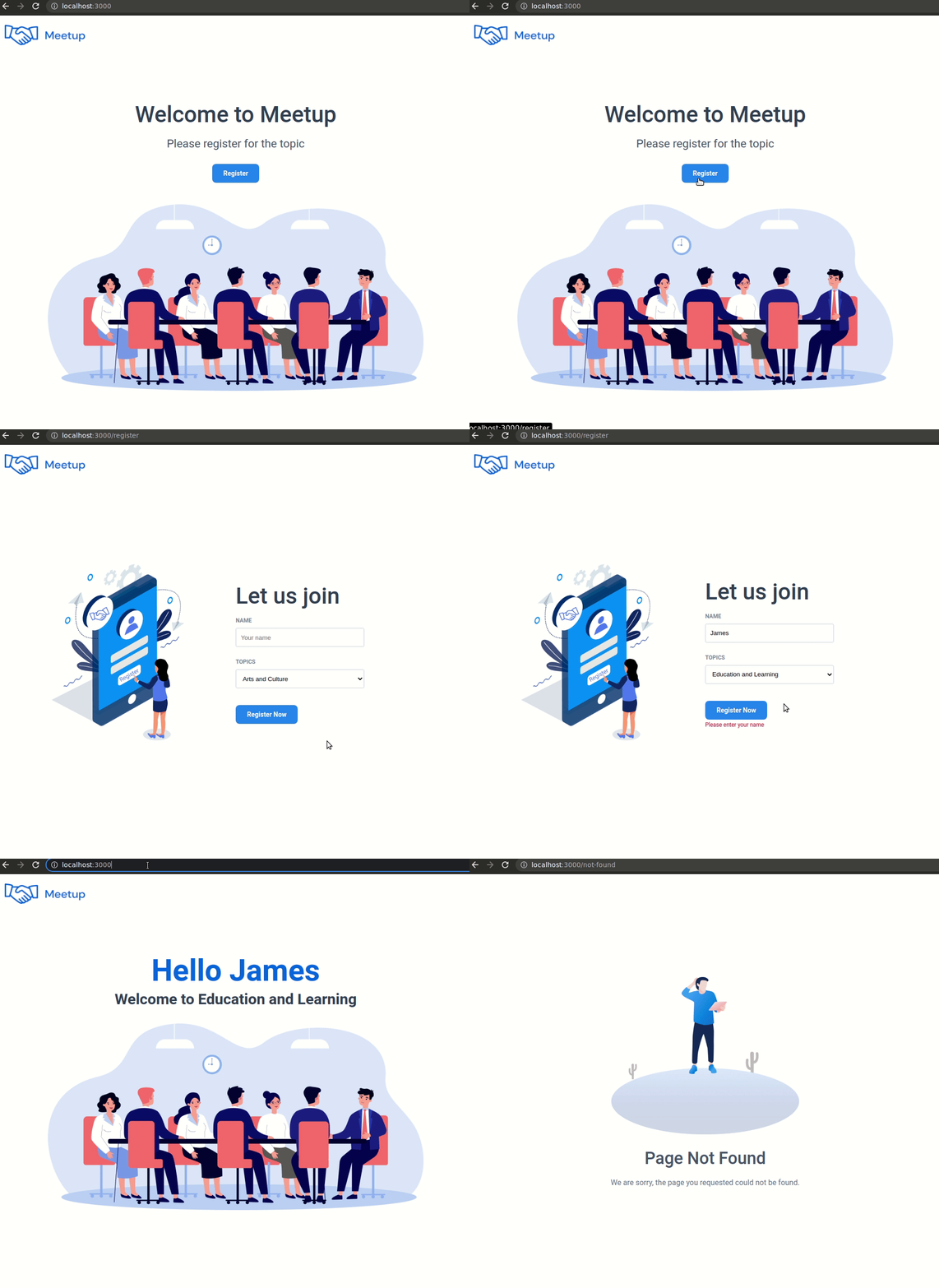
1. On the **Home** route, click the **Register** button.
2. You will be redirected to the **Register** route.
3. Enter your **Name** and select a **Course/Topic** from the dropdown menu.
4. Click **Register Now**.
5. You will be redirected to the **Home** route with a welcome message:
> `"Hello, [Your Name]! Welcome to [Course Name]."`
---
### Refer to the image below:
### Design Files
Home Route
- [Medium (Size >= 768px), Large (Size >= 992px) and Extra Large (Size >= 1200px) - Home](https://assets.ccbp.in/frontend/content/react-js/meetup-lg-home-output.png)
- [Medium (Size >= 768px), Large (Size >= 992px) and Extra Large (Size >= 1200px) - Home Registered View](https://assets.ccbp.in/frontend/content/react-js/meetup-lg-home-registered-output.png)
Register Route
- [Medium (Size >= 768px), Large (Size >= 992px) and Extra Large (Size >= 1200px) - Register](https://assets.ccbp.in/frontend/content/react-js/meetup-lg-register-output-.png)
- [Medium (Size >= 768px), Large (Size >= 992px) and Extra Large (Size >= 1200px) - Register Failure](https://assets.ccbp.in/frontend/content/react-js/meetup-lg-register-error-output.png)
Not Found Route
- [Medium (Size >= 768px), Large (Size >= 992px) and Extra Large (Size >= 1200px) - Not Found](https://assets.ccbp.in/frontend/content/react-js/meetup-lg-not-found-output.png)
---
### Resources
Image URLs
- [https://assets.ccbp.in/frontend/react-js/meetup/website-logo-img.png](https://assets.ccbp.in/frontend/react-js/meetup/website-logo-img.png) alt should be **website logo**
- [https://assets.ccbp.in/frontend/react-js/meetup/website-register-img.png](https://assets.ccbp.in/frontend/react-js/meetup/website-register-img.png) alt should be **website register**
- [https://assets.ccbp.in/frontend/react-js/meetup/meetup-img.png](https://assets.ccbp.in/frontend/react-js/meetup/meetup-img.png) alt should be **meetup**
- [https://assets.ccbp.in/frontend/react-js/meetup/not-found-img.png](https://assets.ccbp.in/frontend/react-js/meetup/not-found-img.png) alt should be **not found**
Colors
Hex: #334155
Hex: #475569
Hex: #ffffff
Hex: #3b82f6
Hex: #2563eb
Hex: #64748b
Hex: #7b8794
Hex: #cbd5e1
Hex: #ff0b37
Font-families
- Roboto
---
## 👤 Author
→ GitHub: @bhuvan-007-github
→ LinkedIn:
---
### 📝 Notes
* **Context API**: A built-in React feature used for sharing data across components without prop-drilling.
*Example*: Instead of passing user info from parent to child components, `Context` allows direct access wherever needed.