https://github.com/bhuvan-007-github/mytask-reactpracticeproject
A simple task management app built in React.js for hands-on practice and skill demonstration.
https://github.com/bhuvan-007-github/mytask-reactpracticeproject
class-components frontend javascript my-task practice-project react reactjs state-management-in-react styled-components uuid uuidv4
Last synced: about 2 months ago
JSON representation
A simple task management app built in React.js for hands-on practice and skill demonstration.
- Host: GitHub
- URL: https://github.com/bhuvan-007-github/mytask-reactpracticeproject
- Owner: bhuvan-007-github
- Created: 2025-05-14T16:12:52.000Z (about 1 year ago)
- Default Branch: master
- Last Pushed: 2025-05-14T17:19:22.000Z (about 1 year ago)
- Last Synced: 2025-06-24T03:05:20.109Z (12 months ago)
- Topics: class-components, frontend, javascript, my-task, practice-project, react, reactjs, state-management-in-react, styled-components, uuid, uuidv4
- Language: JavaScript
- Homepage: https://bhuvanmytask.ccbp.tech/
- Size: 191 KB
- Stars: 0
- Watchers: 1
- Forks: 0
- Open Issues: 0
-
Metadata Files:
- Readme: README.md
Awesome Lists containing this project
README
# 📝 My Task – Task Management App
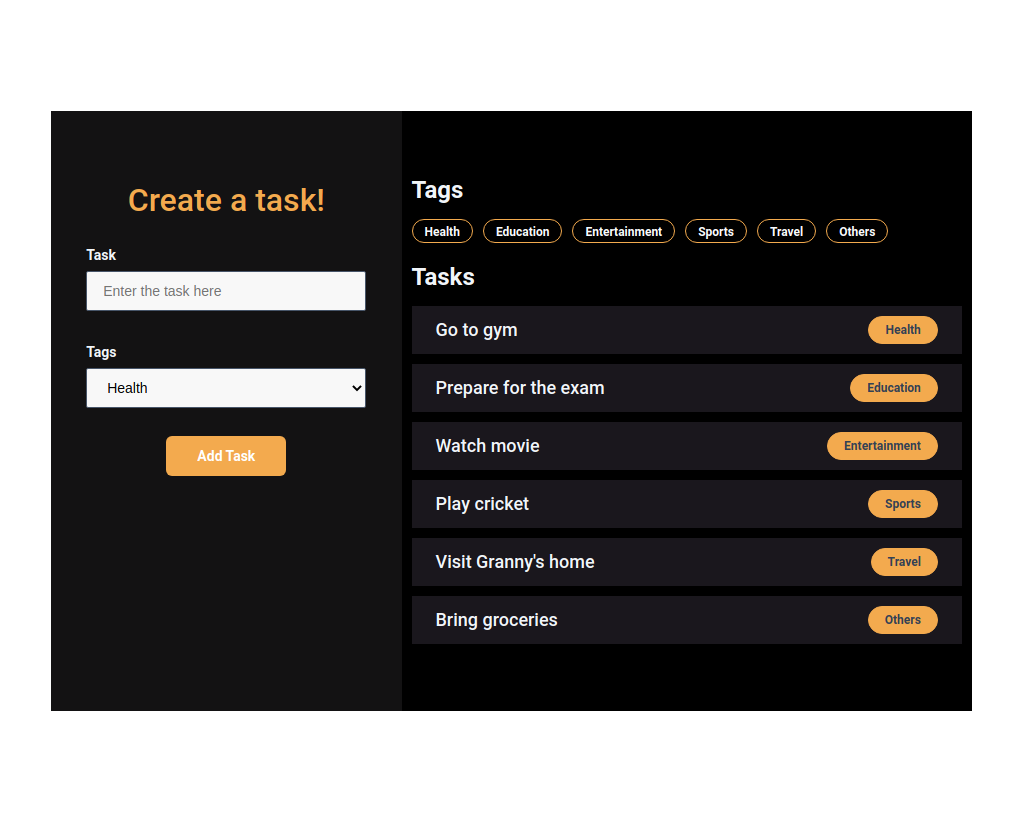
A lightweight **React.js** application designed to capture and categorize user-defined tasks. This project demonstrates best practices in modern front-end development, including component-based design, effective state management, and integration of key third-party libraries.
---
## 🚀 Project Objective
This project serves as a demonstration of clean React practices and usage of key libraries.
- Component-driven UI architecture
- Dynamic state handling using class components
- **Lists and Keys** usage
- Use of libraries such as `styled-components` for styling and `uuid` for unique key generation
---
## 🧰 Tech Stack
- **React.js** – Front-end JavaScript library
- **JavaScript (ES6+)**
- **HTML5**
- **Styled-components** – For component-scoped CSS styling
- **UUID** – For generating unique identifiers
- **Git & GitHub** – For version control and collaboration
---
## ✅ Features
- Users can:
- Input task **descriptions**
- Select a **task category** from a dropdown
- Click **"Add Task"** to submit
- All tasks are displayed after submission
- Task filtering is supported:
- Clicking on a tag filters tasks by that category
- Clicking the tag again will remove the filter
- Implements efficient array methods:
- `map()` – for rendering lists
- `filter()` – for conditional task display
---
## 🧪 How to Use
1. Enter a task description into the input field.
2. Select a category from the dropdown menu.
3. Click the **"Add Task"** button to submit.
4. Use the tag buttons above the task list to filter tasks by category.
> To remove the filter, click the active tag again.
---
### Refer to the image below:
### Design Files
Click to view
- [Medium (Size >= 768px), Large (Size >= 992px) and Extra Large (Size >= 1200px) - No Tasks View](https://assets.ccbp.in/frontend/content/react-js/my-tasks-output-no-tasks-view.png)
- [Medium (Size >= 768px), Large (Size >= 992px) and Extra Large (Size >= 1200px)](https://assets.ccbp.in/frontend/content/react-js/my-tasks-output.png)
- [Medium (Size >= 768px), Large (Size >= 992px) and Extra Large (Size >= 1200px) - Filter View](https://assets.ccbp.in/frontend/content/react-js/my-tasks-output-filter-view.png)
### Set Up Instructions
Click to view
- Download dependencies by running `npm install`
- Start up the app using `npm start`
Colors
Hex: #131213
Hex: #f3aa4e
Hex: #f1f5f9
Hex: #64748b
Hex: #f8f8f8
Hex: #475569
Hex: #323f4b
Hex: #000000
Hex: #ffffff
Hex: #f1f5f9
Hex: #1a171d
Hex: #f8fafc
Font-families
- Roboto
👤 Author
GitHub: @bhuvan-007-github