https://github.com/bigcommerce/aspnetcore-react-sample-app
🏪 Sample BigCommerce App Using ASP.NET Core and React
https://github.com/bigcommerce/aspnetcore-react-sample-app
Last synced: about 1 year ago
JSON representation
🏪 Sample BigCommerce App Using ASP.NET Core and React
- Host: GitHub
- URL: https://github.com/bigcommerce/aspnetcore-react-sample-app
- Owner: bigcommerce
- License: mit
- Created: 2020-11-04T17:33:10.000Z (over 5 years ago)
- Default Branch: main
- Last Pushed: 2022-01-22T06:19:15.000Z (over 4 years ago)
- Last Synced: 2025-03-26T06:11:27.100Z (over 1 year ago)
- Language: C#
- Homepage:
- Size: 634 KB
- Stars: 2
- Watchers: 40
- Forks: 3
- Open Issues: 6
-
Metadata Files:
- Readme: README.md
- License: LICENSE
Awesome Lists containing this project
README
# ASP.NET Core React App for BigCommerce
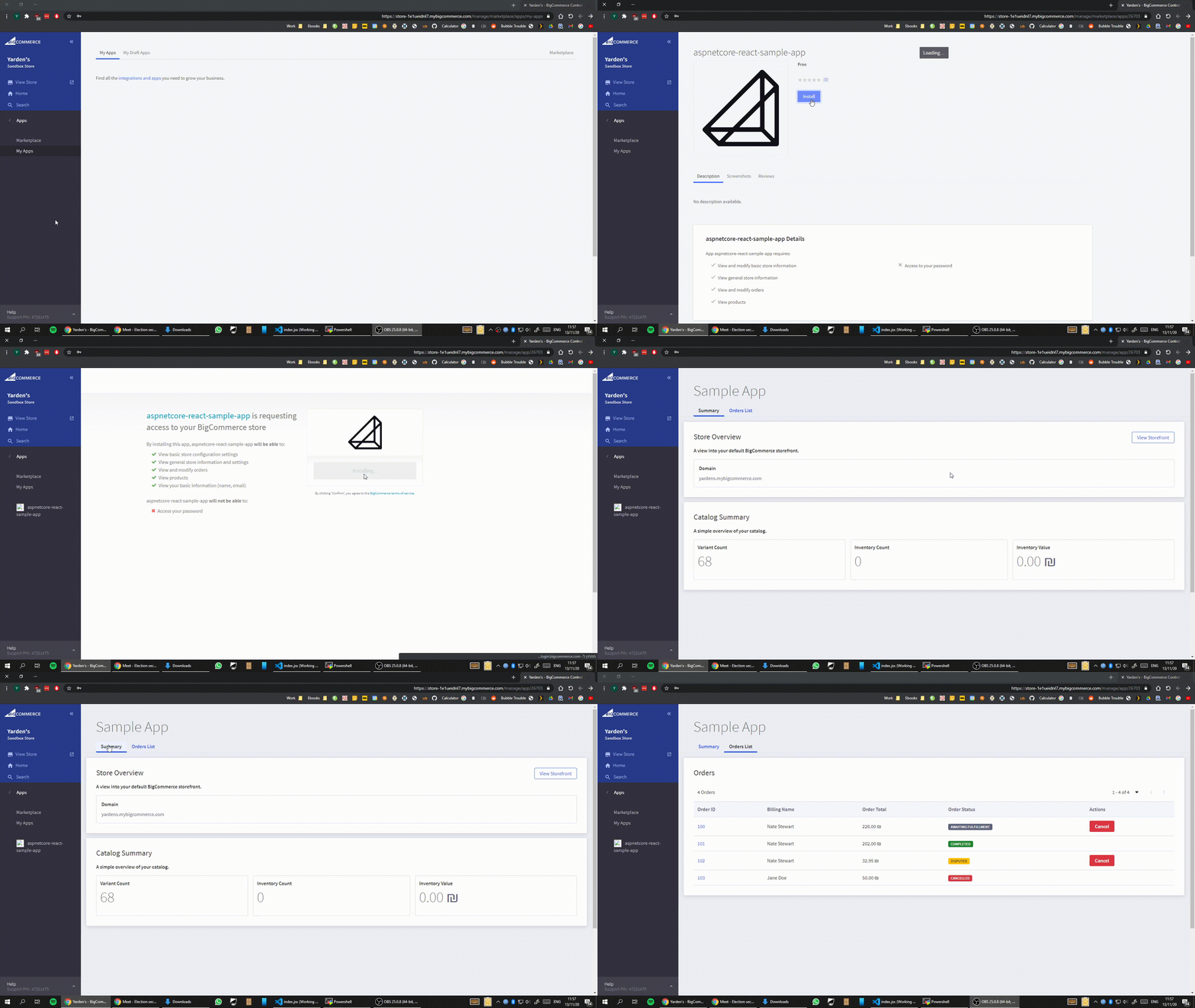
This is a basic BigCommerce app with two screens, a catalog summary view and list of orders that can be cancelled, built using ASP.NET Core and React. It uses BigCommerce's design library, [BigDesign](https://developer.bigcommerce.com/big-design/).
It's meant to fast track your ability to take a concept for an app to something usable within the BigCommerce control panel. A live store can install this app while it runs locally.
## Installation
Before jumping in, you'll want to make sure you have the system requirements met:
- C# and ASP.NET Core ([Installation Guide](https://docs.microsoft.com/en-us/visualstudio/get-started/csharp/tutorial-aspnet-core?view=vs-2019))
- Node.js ([Installation Guide](https://nodejs.org/en/))
- Local SSL Cert ([Installation Guide](https://www.hanselman.com/blog/developing-locally-with-aspnet-core-under-https-ssl-and-selfsigned-certs))
To test on a BigCommerce store, you can create a free trial on bigcommerce.com or request a free sandbox store by [signing up to be a tech partner](https://www.bigcommerce.com/partners/).
## Usage
To run the app:
```bash
dotnet run
```
After compiling the app should be reachable at the site you are hosting the app on locally. i.e https://localhost:9457/
### Environment
Set the following environment variables (or add a `.env` file):
```
# Existing env variable. Make sure it matches the base URL of your app
APP_URL=https://localhost:9457
[ ... other existing variables ... ]
# New env variables for BC app and a test API credentials for local dev
# The Client ID and Secret can be found at https://devtools.bigcommerce.com/my/apps by selecting 'View Client ID'
BC_APP_CLIENT_ID=xxxxxxxxxxxxxxxxxxxxxxxxxxxxxxxx
BC_APP_SECRET=xxxxxxxxxxxxxxxxxxxxxxxxxxxxxxxx
# These local credentials can be created by creating an API Account within your BigCommerce store (Advanced Settings > API Accounts)
BC_LOCAL_CLIENT_ID=xxxxxxxxxxxxxxxxxxxxxxxxxxxxxxxx
BC_LOCAL_SECRET=xxxxxxxxxxxxxxxxxxxxxxxxxxxxxxxx
BC_LOCAL_ACCESS_TOKEN=xxxxxxxxxxxxxxxxxxxxxxxxxxxxxxxx
BC_LOCAL_STORE_HASH=stores/xxxxxxxxxxx
```
When running the app outside of BigCommerce, setting the follow environment variable will cause the app to use the local API credential (also in the .env file):
```
APP_ENV=local
```
Likewise, setting it to production will use only the credentials received during the OAuth handshake when the app is install on the BigCommerce store:
```
APP_ENV=production
```
## Quick start demo with Docker
###### For local testing only
To quickly see the app in action with your credentials, run the following command:
```bash
docker run -d --restart=unless-stopped \
-p 80:80 -p 443:443 \
-e BC_LOCAL_CLIENT_ID= \
-e BC_LOCAL_SECRET= \
-e BC_LOCAL_ACCESS_TOKEN= \
-e BC_LOCAL_STORE_HASH= \
yardenshoham/aspnetcore-react-sample-app:demo
```
Then, go to https://localhost.
## Contributing
Pull requests are welcome. For major changes, please open an issue first to discuss what you would like to change.
## License
MIT