https://github.com/bigcommerce/storefront-data-hooks
Hooks for React Storefront UI Components
https://github.com/bigcommerce/storefront-data-hooks
Last synced: about 1 year ago
JSON representation
Hooks for React Storefront UI Components
- Host: GitHub
- URL: https://github.com/bigcommerce/storefront-data-hooks
- Owner: bigcommerce
- License: mit
- Created: 2020-10-23T18:22:21.000Z (over 5 years ago)
- Default Branch: main
- Last Pushed: 2023-05-08T20:21:57.000Z (about 3 years ago)
- Last Synced: 2025-03-29T21:02:58.902Z (over 1 year ago)
- Language: TypeScript
- Homepage:
- Size: 684 KB
- Stars: 166
- Watchers: 17
- Forks: 35
- Open Issues: 12
-
Metadata Files:
- Readme: README.md
- Changelog: CHANGELOG.md
- Contributing: CONTRIBUTING.md
- License: LICENSE.md
- Code of conduct: CODE_OF_CONDUCT.md
Awesome Lists containing this project
README

[](https://www.npmjs.org/package/@bigcommerce/storefront-data-hooks)
Table of Contents
=================
* [BigCommerce Storefront Data Hooks](#bigcommerce-storefront-data-hooks)
* [Installation](#installation)
* [General Usage](#general-usage)
* [CommerceProvider](#commerceprovider)
* [useLogin hook](#uselogin-hook)
* [useLogout](#uselogout)
* [useCustomer](#usecustomer)
* [useSignup](#usesignup)
* [usePrice](#useprice)
* [Cart Hooks](#cart-hooks)
* [useCart](#usecart)
* [useAddItem](#useadditem)
* [useUpdateItem](#useupdateitem)
* [useRemoveItem](#useremoveitem)
* [Wishlist Hooks](#wishlist-hooks)
* [Product Hooks and API](#product-hooks-and-api)
* [useSearch](#usesearch)
* [getAllProducts](#getallproducts)
* [getProduct](#getproduct)
* [Customer Addresses Hooks](#customer-addresses-hooks)
* [useAddresses](#useaddresses)
* [useAddAddress](#useaddaddress)
* [useUpdateAddress](#useupdateaddress)
* [useRemoveAddress](#useremoveaddress)
* [Checkout](#checkout)
* [Troubleshooting](#troubleshooting)
* [More](#more)
# BigCommerce Storefront Data Hooks
> This project is under active development, new features and updates will be continuously added over time
UI hooks and data fetching methods built from the ground up for e-commerce applications written in React, that use BigCommerce as a headless e-commerce platform. The package provides:
- Code splitted hooks for data fetching using [SWR](https://swr.vercel.app/), and to handle common user actions
- Code splitted data fetching methods for initial data population and static generation of content
- Helpers to create the API endpoints that connect to the hooks, very well suited for Next.js applications
## Installation
To install:
```
yarn add @bigcommerce/storefront-data-hooks
```
After install, the first thing you do is: set your environment variables in `.env.local`
```sh
BIGCOMMERCE_CHANNEL_ID=
BIGCOMMERCE_STOREFRONT_API_TOKEN=
BIGCOMMERCE_STOREFRONT_API_URL=
BIGCOMMERCE_STORE_API_CLIENT_ID=
BIGCOMMERCE_STORE_API_TOKEN=
BIGCOMMERCE_STORE_API_URL=
BIGCOMMERCE_STORE_HASH=
SECRET_COOKIE_PASSWORD=
```
## General Usage
### CommerceProvider
This component is a provider pattern component that creates commerce context for it's children. It takes config values for the locale and an optional `fetcherRef` object for data fetching.
```jsx
...
import { CommerceProvider } from '@bigcommerce/storefront-data-hooks'
const App = ({ locale = 'en-US', children }) => {
return (
{children}
)
}
...
```
### useLogin hook
Hook for bigcommerce user login functionality, returns `login` function to handle user login.
```jsx
...
import useLogin from '@bigcommerce/storefront-data-hooks/use-login'
const LoginView = () => {
const login = useLogin()
const handleLogin = async () => {
await login({
email,
password,
})
}
return (
{children}
)
}
...
```
#### Login SSO
To authenticate a user using the Customer Login API, it's necessary to point the `useLogin` hook to your own authentication endpoint.
```jsx
const login = useLogin({
options: {
url: '/api/your-own-authentication'
},
})
```
That authentication endpoint have to return a `Set-Cookie` header with `SHOP_TOKEN=your_customer_authentication_token`. [See an example.](https://gist.github.com/jorgemasta/c709b63501344970026f3a3e7646cc77)
### useLogout
Hook to logout user.
```jsx
...
import useLogout from '@bigcommerce/storefront-data-hooks/use-logout'
const LogoutLink = () => {
const logout = useLogout()
return (
logout()}>
Logout
)
}
```
### useCustomer
Hook for getting logged in customer data, and fetching customer info.
```jsx
...
import useCustomer from '@bigcommerce/storefront-data-hooks/use-customer'
...
const Profile = () => {
const { data } = useCustomer()
if (!data) {
return null
}
return (
Hello, {data.firstName}
)
}
```
### useSignup
Hook for bigcommerce user signup, returns `signup` function to handle user signups.
```jsx
...
import useSignup from '@bigcommerce/storefront-data-hooks/use-signup'
const SignupView = () => {
const signup = useSignup()
const handleSignup = async () => {
await signup({
email,
firstName,
lastName,
password,
})
}
return (
{children}
)
}
...
```
### usePrice
Helper hook to format price according to commerce locale, and return discount if available.
```jsx
import usePrice from '@bigcommerce/storefront-data-hooks/use-price'
...
const { price, discount, basePrice } = usePrice(
data && {
amount: data.cart_amount,
currencyCode: data.currency.code,
}
)
...
```
## Cart Hooks
### useCart
Returns the current cart data for use
```jsx
...
import useCart from '@bigcommerce/storefront-data-hooks/cart/use-cart'
const countItem = (count: number, item: any) => count + item.quantity
const countItems = (count: number, items: any[]) =>
items.reduce(countItem, count)
const CartNumber = () => {
const { data } = useCart()
const itemsCount = Object.values(data?.line_items ?? {}).reduce(countItems, 0)
return itemsCount > 0 ? {itemsCount} : null
}
```
### useAddItem
```jsx
...
import useAddItem from '@bigcommerce/storefront-data-hooks/cart/use-add-item'
const AddToCartButton = ({ productId, variantId }) => {
const addItem = useAddItem()
const addToCart = async () => {
await addItem({
productId,
variantId,
})
}
return Add To Cart
}
...
```
### useUpdateItem
```jsx
...
import useUpdateItem from '@bigcommerce/storefront-data-hooks/cart/use-update-item'
const CartItem = ({ item }) => {
const [quantity, setQuantity] = useState(item.quantity)
const updateItem = useUpdateItem(item)
const updateQuantity = async (e) => {
const val = e.target.value
await updateItem({ quantity: val })
}
return (
)
}
...
```
### useRemoveItem
Provided with a cartItemId, will remove an item from the cart:
```jsx
...
import useRemoveItem from '@bigcommerce/storefront-data-hooks/cart/use-remove-item'
const RemoveButton = ({ item }) => {
const removeItem = useRemoveItem()
const handleRemove = async () => {
await removeItem({ id: item.id })
}
return Remove
}
...
```
## Wishlist Hooks
Wishlist hooks are similar to cart hooks. See the below example for how to use `useWishlist`, `useAddItem`, and `useRemoveItem`.
```jsx
import useAddItem from '@bigcommerce/storefront-data-hooks/wishlist/use-add-item'
import useRemoveItem from '@bigcommerce/storefront-data-hooks/wishlist/use-remove-item'
import useWishlist from '@bigcommerce/storefront-data-hooks/wishlist/use-wishlist'
const WishlistButton = ({ productId, variant }) => {
const addItem = useAddItem()
const removeItem = useRemoveItem()
const { data } = useWishlist()
const { data: customer } = useCustomer()
const itemInWishlist = data?.items?.find(
(item) =>
item.product_id === productId &&
item.variant_id === variant?.node.entityId
)
const handleWishlistChange = async (e) => {
e.preventDefault()
if (!customer) {
return
}
if (itemInWishlist) {
await removeItem({ id: itemInWishlist.id! })
} else {
await addItem({
productId,
variantId: variant?.node.entityId!,
})
}
}
return (
)
}
```
## Product Hooks and API
### useSearch
`useSearch` handles searching the bigcommerce storefront product catalog by catalog, brand, and query string. It also allows pagination.
```jsx
...
import useSearch from '@bigcommerce/storefront-data-hooks/products/use-search'
const SearchPage = ({ searchString, category, brand, sortStr }) => {
const { data } = useSearch({
search: searchString || '',
categoryId: category?.entityId,
brandId: brand?.entityId,
sort: sortStr || '',
page: 1
})
const { products, pagination } = data
return (
{products.map(({ node }) => (
))}
)
}
```
### getAllProducts
API function to retrieve a product list.
```js
import { getConfig } from '@bigcommerce/storefront-data-hooks/api'
import getAllProducts from '@bigcommerce/storefront-data-hooks/api/operations/get-all-products'
const { products } = await getAllProducts({
variables: { field: 'featuredProducts', first: 6 },
config,
preview,
})
```
### getProduct
API product to retrieve a single product when provided with the product
slug string.
```js
import { getConfig } from '@bigcommerce/storefront-data-hooks/api'
import getProduct from '@bigcommerce/storefront-data-hooks/api/operations/get-product'
const { product } = await getProduct({
variables: { slug },
config,
preview,
})
```
## Customer Addresses Hooks
### useAddresses
Hook for returning the current users addresses
```javascript
import useAddresses from '@bigcommerce/storefront-data-hooks/address/use-addresses'
const AddressPage = () => {
const { data } = useAddresses()
return (
{JSON.stringify(data?.addresses, null, 2)}
)
}
```
### useAddAddress
Hook for adding customer address
```javascript
import useAddAddress from '@bigcommerce/storefront-data-hooks/address/use-add-address'
const AddressPage = () => {
const addAddress = useAddAddress()
const handleAddAddress = async () => {
await addAddress({
first_name: "Rod",
last_name: "Hull",
address1: "Waffle Road",
city: "Bristol",
state_or_province: "Bristol",
postal_code: "WAF FLE",
country_code: "GB",
phone: "01234567890",
address_type: "residential",
})
}
return (
{children}
)
}
```
### useUpdateAddress
Hook for updating a customer address
```javascript
import useUpdateAddress from '@bigcommerce/storefront-data-hooks/address/use-update-address'
const AddressPage = () => {
const updateAddress = useUpdateAddress()
const handleUpdateAddress = async () => {
await updateAddress({
id: 4,
first_name: "Rod",
last_name: "Hull",
address1: "Waffle Road",
city: "Bristol",
state_or_province: "Bristol",
postal_code: "WAF FLE",
country_code: "GB",
phone: "01234567890",
address_type: "residential",
id: 12
})
}
return (
{children}
)
}
```
### useRemoveAddress
Hook for removing a customers address
```javascript
import useRemoveAddress from '@bigcommerce/storefront-data-hooks/address/use-remove-address'
const AddressPage = () => {
const removeAddress = useRemoveAddress()
const handleUpdateAddress = async () => {
await removeAddress({
id: 4,
})
}
return (
{children}
)
}
```
## Checkout
> The checkout only works on **production** and with a custom domain
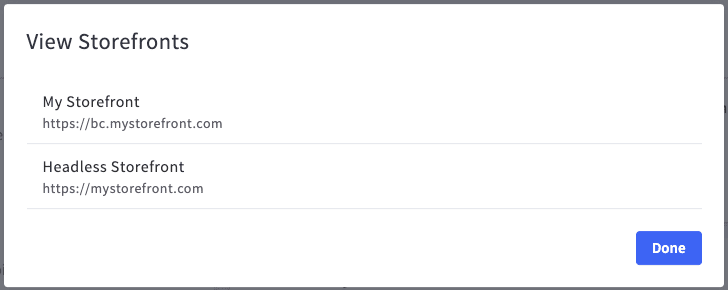
The recommended method is the [Embedded Checkout](https://developer.bigcommerce.com/api-docs/storefronts/embedded-checkout/embedded-checkout-tutorial), follow the tutorial to create a channel and a site. Notes:
- The channel should be of type `storefront`
- The site url must be your production url (e.g: https://mystorefront.com)
- This package takes care of the cart and redirect links creation
- Your bigcommerce storefront must be a subdomain of your headless storefront (eg: https://bc.mystorefront.com)
## Troubleshooting
When I try to create a customer with useSignup, I receive an error but the user is created
The `useSignup` hooks tries to login the user after creating it. Probably you have an error with the login. Checkout that your have your store **Open** since if the store is *Down for Maintenance* the users can't login.

Thanks @Strapazzon 🚀
## Contributing
### Configuration
You will need to crate a `.env` file from the `.env.example` with the following keys.
- BIGCOMMERCE_STOREFRONT_API_TOKEN
- BIGCOMMERCE_STOREFRONT_API_URL
The token and url will be crated in your BC Store admin section: Advanced Settings -> API Accounts.
Once you have added the `.env` configuration, run:
- `yarn generate` to generate your new schema.
- `yarn build` to build a new set of compiled files.
Link the package locally to your app with `yarn link` or by using the [YALC](https://www.npmjs.com/package/yalc) tool.
### Pull Requests
Pull requests, issues and comments are welcome! See [Contributing](CONTRIBUTING.md) for more details.
Many thanks to all [contributors](https://github.com/bigcommerce/storefront-data-hooks/contributors)!
## More
Feel free to read through the source for more usage, and check the commerce vercel demo and commerce repo for usage examples: ([demo.vercel.store](https://demo.vercel.store/)) ([repo](https://github.com/vercel/commerce))