https://github.com/billryan/ipfilter4xd
ipfilter4xd is used for P2P software such as transmission, utorrent & etc. to block the ip(ipv4) which aren't XiDian.
https://github.com/billryan/ipfilter4xd
Last synced: 5 months ago
JSON representation
ipfilter4xd is used for P2P software such as transmission, utorrent & etc. to block the ip(ipv4) which aren't XiDian.
- Host: GitHub
- URL: https://github.com/billryan/ipfilter4xd
- Owner: billryan
- Created: 2012-05-01T08:12:47.000Z (about 14 years ago)
- Default Branch: master
- Last Pushed: 2013-02-24T11:11:12.000Z (over 13 years ago)
- Last Synced: 2025-07-22T08:55:13.052Z (12 months ago)
- Size: 113 KB
- Stars: 2
- Watchers: 2
- Forks: 0
- Open Issues: 0
-
Metadata Files:
- Readme: README.md
Awesome Lists containing this project
README
ipfilter4xd
===========
ipfilter4xd is used for P2P software such as transmission, uTorrent & etc. to block the ip(ipv4) which aren't XiDian.
ipfilter4xd用于P2P软件(例如transmission, Ktorrent, uTorrent等)设置blocklist以阻止非西电的IPV4地址主机与本机交换文件,避免了在使用P2P软件下载外校的BT资源(如北邮人,六维BT)时浪费宝贵的校内3G流量(ipv4 only, but ipv6 free).
ipfilter.dat采用的是P2P format. 绝大多数P2P软件应该都能支持这种格式。其他学校的把ipfilter.dat换成自己学校之外的IP段即可. 如果想完全屏蔽掉所有ipv4的地址,ipfilter.dat里边填`0.0.0.0-255.255.255.255`就行了。ipfilter.dat可以用任一文本编辑器打开.
使用方法
========
将ipfilter.dat置于P2P软件所需要的位置即可,`batch-win7.bat`文件为批处理脚本,Win7下双击即可将ipfilter.dat置于指定位置。为了让你的P2P软件支持IP过滤,第一步当然就是开启ipfilter功能啦~更为详细的配置请往下走^\_^
uTorrent
--------
在Windows下我想大多数人用的应该是uTorrent吧,这也是众多BT站首推的下载软件,小巧强大!将ipfilter4xd这个repository clone后双击运行batch-win7.bat即可,当然,你也可以从网页右上角点击「download」下载后解压,殊途同归。
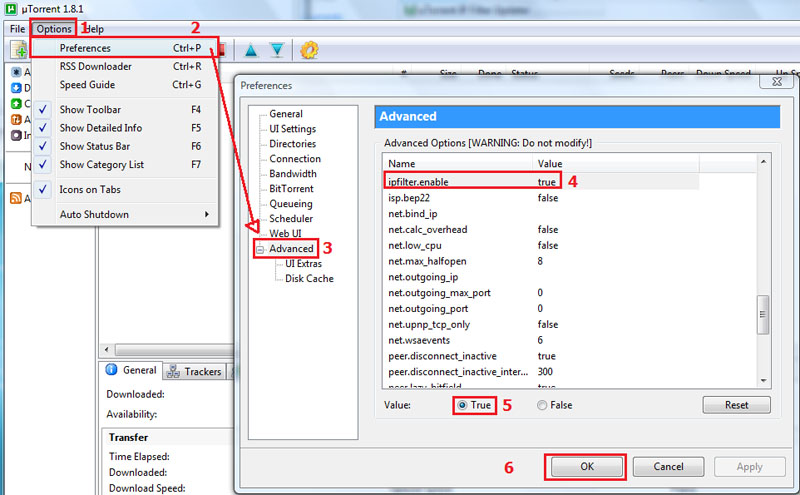
uTorrent也许还需要做一些小小的改动,可参考下图:
选项->设置->高级->ipfilter.enable 找到ipfilter.enable并设置其为true,大功告成!
中文简体版

Options > Preferences > Advanced then find ipfilter.enable. set the value to true then press ok.
English
如果你使用的是uTorrent绿色免安装版或者是网页版,可试着将ipfilter.dat置于相应运行目录下,置于有没有效果我就无从得知了...
transmission
-----
transmission的强大不必多说,Linux和MAC OS X下的用户还是比较多的,具体的配置可以到你家终端里去找男人... 网络上的配置可以到https://trac.transmissionbt.com/wiki/ConfigFiles
下查看,transmission还支持网络升级blocklist,填入ipfilter.dat 的URL应该也OK
Ktorrent
----
在自己的桌面环境还是GNOME的时候一直用的是transmission,后边转移到KDE时就换成了Ktorrent, 原因是transmission新升级的版本不支持下载时选择不同的文件夹,现在使用Ktorrent感觉也蛮好使的,不过ipfilter得换,ipfilter-ktorrent.txt就是给Ktorrent用的,在Ktorrent的「IP过滤」下打开这个文件就行了。