https://github.com/biluohc/fht2p
A cross-platform HTTP static file server developed using Rust.
https://github.com/biluohc/fht2p
http http-proxy http-server https rust
Last synced: over 1 year ago
JSON representation
A cross-platform HTTP static file server developed using Rust.
- Host: GitHub
- URL: https://github.com/biluohc/fht2p
- Owner: biluohc
- License: mit
- Created: 2016-12-10T14:06:45.000Z (over 9 years ago)
- Default Branch: master
- Last Pushed: 2024-05-30T11:58:43.000Z (about 2 years ago)
- Last Synced: 2024-05-30T13:01:02.838Z (about 2 years ago)
- Topics: http, http-proxy, http-server, https, rust
- Language: Rust
- Homepage:
- Size: 1.33 MB
- Stars: 35
- Watchers: 2
- Forks: 6
- Open Issues: 2
-
Metadata Files:
- Readme: readme.md
- License: LICENSE
Awesome Lists containing this project
README
[](https://github.com/biluohc/fht2p/actions)
[中文](https://github.com/biluohc/fht2p/blob/master/readme_zh.md)
fht2p is a cross-platform HTTP static file server developed using Rust. The CI test covers Linux, MacOS and Windows.
## Features
- Reliable: Implemented in Rust, integrated testing, safe and reliable
- Universal: Fully cross-platform, available for both Unix-like and Windows systems
- Convenient: static linking, does not depend on external dynamic libraries such as openssl, download and use
- Fast: Asynchronous multi-threaded, built on tokio and hyper, fast response, massive concurrency
- Functions: file download and upload, directory browsing, resume from breakpoint, proxy function, configuration options, everything
### Functions
1. Multi-path sharing
1. File breakpoint resume
1. Closeable directory browsing (and sorting and other functions)
1. HTTP Cache
1. File upload, make directory
1. HTTPS (tokio-rustls, does not depend on external dynamic libraries)
1. HTTP proxy (tunnel proxy, general proxy)
1. Basic Authentication
1. Cross-Origin Resource Sharing (CORS)
1. Directory page compression (GZIP)
1. Command line arguments
1. Configuration file (format is json5, similar to json but supports comments, etc.)
1. Terminal log optional level
1. Output service's URL at startup, output QR code optionally
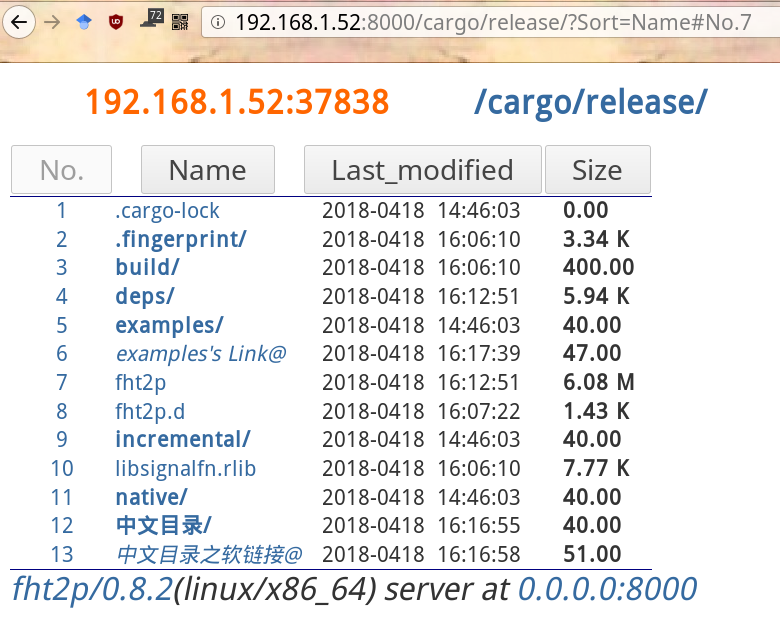
### Snapshot
### Install
#### 1. Download from [Releases](https://github.com/biluohc/fht2p/releases)
#### 2. Compile from Source Code
```sh
cargo install --locked --git https://github.com/biluohc/fht2p fht2p -f
# cargo install --locked --git https://github.com/biluohc/fht2p --branch dev fht2p -f
fht2p -h
```
##### Or
```sh
git clone https://github.com/biluohc/fht2p
# cargo install --locked --path fht2p/ fht2p -f
cd fht2p
cargo build --release
./target/release/fht2p --help
```
### Tips
1. View help information by using the --help option
1. View the default configuration content by using the --config-print option.
1. See a complete configuration example from the config directory under this project.
2. About the priority of options and profiles
The default configuration file is located in `$HOME/.config/fht2p/fht2p.json`, you can create if it doesn't exist.
There are four types of options:
- The first is --help, --version and --config-print. Programs will exit very quickly, regardless of priority.
- The second is --verbose and --qr-code They ignore priority and have no conflict with other options
- The third is --config specifies the configuration file, the fourth option is ignored
- The fourth is other options and parameters, once you have it, the default configuration file will be ignored (this is to prevent the priority from being too complicated)
5. About security and HTTPS
- HTTP is a plain text protocol based on TCP. There is no security at all. If security is required, HTTPS must be used.
- The program listens to the local loopback address (`127.0.0.1`) by default for security. If you want to access outside the machine, you can monitor` 0.0.0.0` or a specific address and configure your firewall
- The program listens to the current directory by default. Please do not share the home directory or the root directory on the network unless you understand what you are doing