https://github.com/biocomputingup/ensembletools
IDPEnsembleTools is a Python package designed to facilitate the loading, analysis, and comparison of multiple conformational ensembles of intrinsically disordered proteins (IDPs).
https://github.com/biocomputingup/ensembletools
Last synced: 2 months ago
JSON representation
IDPEnsembleTools is a Python package designed to facilitate the loading, analysis, and comparison of multiple conformational ensembles of intrinsically disordered proteins (IDPs).
- Host: GitHub
- URL: https://github.com/biocomputingup/ensembletools
- Owner: BioComputingUP
- License: mit
- Created: 2024-02-21T14:42:56.000Z (over 2 years ago)
- Default Branch: main
- Last Pushed: 2025-10-30T13:02:47.000Z (8 months ago)
- Last Synced: 2025-12-17T01:51:30.996Z (6 months ago)
- Language: Jupyter Notebook
- Homepage:
- Size: 221 MB
- Stars: 2
- Watchers: 2
- Forks: 1
- Open Issues: 0
-
Metadata Files:
- Readme: README.md
- License: LICENSE
Awesome Lists containing this project
README
# IDPEnsembleTools

[](https://pypi.org/project/idpet/)
[](https://colab.research.google.com/drive/1CVyHXXSpO_sL-zf-7TCfKIzrY3_6lId1#scrollTo=bIKhG64_cwNX)
---
## IDPEnsembleTools: An Open-Source Library for Analysis of Conformational Ensembles of Disordered Proteins
IDPEnsembleTools is a Python package designed to facilitate the **loading, analysis, and comparison** of multiple conformational ensembles of intrinsically disordered proteins (IDPs).
It supports various input formats such as `.pdb`, `.xtc`, and `.dcd`, and enables users to extract both **global** and **local** structural features, perform dimensionality reduction, and compute similarity scores between ensembles.
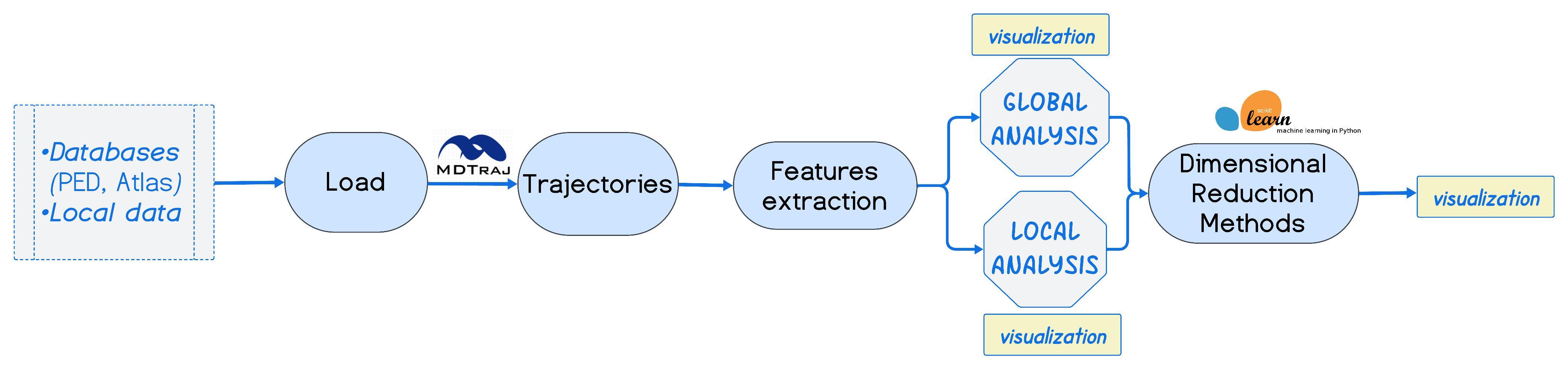
---
## Documentation
Full documentation is available at:
[https://bioComputingUP.github.io/EnsembleTools](https://bioComputingUP.github.io/EnsembleTools)
---
## Features
With **IDPEnsembleTools**, you can:
- **Extract global features** of structural ensembles:
- Radius of gyration (Rg)
- Asphericity
- Prolateness
- End-to-end distance
- **Extract local features**:
- Interatomic distances
- Phi–psi angles
- Alpha-helix content
- **Perform dimensionality reduction** on ensemble features:
- PCA
- UMAP
- t-SNE
- **Compare structural ensembles** using:
- Jensen-Shannon (JS) divergence
- Visualize similarity matrices
---
## Example Notebooks
The `notebooks/` directory contains a collection of Jupyter notebooks that demonstrate how to use the `EnsembleTools` package. These examples cover key functionalities such as ensemble comparison, dimensionality reduction (PCA, t-SNE, UMAP), feature extraction, and visualization customization. They serve both as tutorials and reproducible workflows for analyzing disordered protein ensembles.
| Notebook | Description | Link |
|------------------------------|-----------------------------------------------------------------------------------------------|------|
| `comparing_ensembles.ipynb` | Compare multiple conformational ensembles using selected metrics and visualizations. | [View](https://github.com/BioComputingUP/EnsembleTools/blob/main/notebooks/comparing_ensembles.ipynb) |
| `featurization.ipynb` | Generate numerical features from protein ensembles for downstream analysis. | [View](https://github.com/BioComputingUP/EnsembleTools/blob/main/notebooks/featurization.ipynb) |
| `kpca_analysis.ipynb` | Perform Kernel PCA to capture non-linear variance in ensemble structures. | [View](https://github.com/BioComputingUP/EnsembleTools/blob/main/notebooks/kpca_analysis.ipynb) |
| `loading_data.ipynb` | Load and preprocess ensemble data from various formats. | [View](https://github.com/BioComputingUP/EnsembleTools/blob/main/notebooks/loading_data.ipynb) |
| `pca_analysis.ipynb` | Principal Component Analysis (PCA) for dimensionality reduction and visualization. | [View](https://github.com/BioComputingUP/EnsembleTools/blob/main/notebooks/pca_analysis.ipynb) |
| `plot_customization.ipynb` | Customize plots for clarity and publication-quality visualizations. | [View](https://github.com/BioComputingUP/EnsembleTools/blob/main/notebooks/plot_customization.ipynb) |
| `sh3_example.ipynb` | Case study: global and local analysis of the SH3 domain of the Drk protein. | [View](https://github.com/BioComputingUP/EnsembleTools/blob/main/notebooks/sh3_example.ipynb) |
| `tsne_analysis.ipynb` | t-SNE embedding of ensemble features to explore local structure. | [View](https://github.com/BioComputingUP/EnsembleTools/blob/main/notebooks/tsne_analysis.ipynb) |
| `umap_analysis.ipynb` | UMAP embedding of ensemble features and visualization. | [View](https://github.com/BioComputingUP/EnsembleTools/blob/main/notebooks/umap_analysis.ipynb) |
---
## Installation
It is recommended to install `idpet` in a **clean virtual environment** to avoid conflicts with existing packages.
### 🔹 Option 1: Using `conda` (if you use Anaconda/Miniconda)
```bash
# Create and activate a new conda environment
conda create -n idpet-env python=3.9
conda activate idpet-env
# Install the package from PyPI
pip install idpet
```
### 🔹 Option 2: Using `venv` (standard Python)
```bash
# Create a new virtual environment (Python 3.7+)
python -m venv idpet-env
# Activate the environment
# On Linux/macOS:
source idpet-env/bin/activate
# On Windows:
idpet-env\Scripts\activate
# Upgrade pip and install the package
pip install --upgrade pip
pip install idpet
```
### Developer Installation (from source)
```bash
git clone https://github.com/BioComputingUP/EnsembleTools.git
cd idpet
pip install -e .
```
## License
This project is licensed under the [MIT License](LICENSE).