https://github.com/biomathcode/bulbul-studio
https://github.com/biomathcode/bulbul-studio
Last synced: 27 days ago
JSON representation
- Host: GitHub
- URL: https://github.com/biomathcode/bulbul-studio
- Owner: biomathcode
- Created: 2026-02-21T03:43:10.000Z (5 months ago)
- Default Branch: main
- Last Pushed: 2026-05-06T18:24:54.000Z (3 months ago)
- Last Synced: 2026-06-02T15:07:19.518Z (about 2 months ago)
- Language: TypeScript
- Size: 4.36 MB
- Stars: 0
- Watchers: 0
- Forks: 0
- Open Issues: 0
-
Metadata Files:
- Readme: README.md
Awesome Lists containing this project
README
# Bulbul Studio





> **Project status:** This project is in **active development** and is **not ready for production use**.
[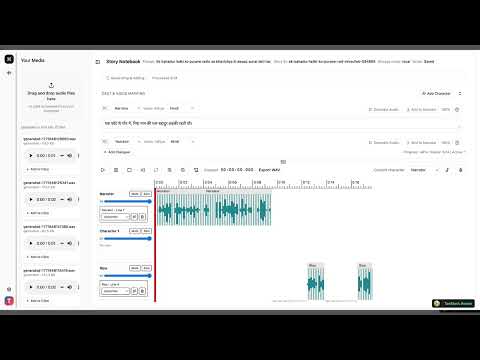](https://youtu.be/I3AylyKhGMs)
Bulbul Studio is a TanStack Start + React app for creating multi-character audio stories with Sarvam Bulbul voices, a notebook-style script editor, and timeline-based audio composition.
## Table of Contents
- [Bulbul Studio](#bulbul-studio)
- [Table of Contents](#table-of-contents)
- [Development](#development)
- [What It Does](#what-it-does)
- [Tech Stack](#tech-stack)
- [Architecture](#architecture)
- [High-Level System Diagram](#high-level-system-diagram)
- [Story Creation Flow](#story-creation-flow)
- [Audio Persistence Decision Flow](#audio-persistence-decision-flow)
- [Project Structure](#project-structure)
- [Getting Started (Local)](#getting-started-local)
- [Prerequisites](#prerequisites)
- [1) Install dependencies](#1-install-dependencies)
- [2) Configure environment](#2-configure-environment)
- [3) Run database migrations](#3-run-database-migrations)
- [4) Start development server](#4-start-development-server)
- [Environment Variables](#environment-variables)
- [Database Setup (Postgres + Drizzle)](#database-setup-postgres--drizzle)
- [Current DB model](#current-db-model)
- [Migration workflow](#migration-workflow)
- [Cloudflare Deployment](#cloudflare-deployment)
- [1) Authenticate Wrangler](#1-authenticate-wrangler)
- [2) Set production secrets](#2-set-production-secrets)
- [3) Build and deploy](#3-build-and-deploy)
- [4) Post-deploy checks](#4-post-deploy-checks)
- [Optional: Cloudflare type generation](#optional-cloudflare-type-generation)
- [API Surface](#api-surface)
- [Security Notes](#security-notes)
- [Troubleshooting](#troubleshooting)
## Development
In `vite.config.ts`, Comment out the Cloudflare plugin to run locally without Wrangler:
```ts
// cloudflare({ viteEnvironment: { name: "ssr" } }),
```
Then run
```bash
npm run dev
```
## What It Does
- Creates story workspaces from prompts, including multilingual prompts and language-aware script generation.
- Generates multi-character dialogue scripts with narrator + cast members.
- Generates TTS audio using Sarvam (`bulbul:v3`) per dialogue line.
- Supports transliteration-based input for supported Indic languages.
- Supports local persistence (IndexedDB) and optional cloud upload of generated/recorded audio.
- Supports cloud providers: Cloudinary, Cloudflare R2, AWS S3, Azure Blob.
## Tech Stack
- **Frontend/App framework:** TanStack Start, TanStack Router, React 19
- **Styling/UI:** Tailwind CSS v4, Radix UI, Lucide icons
- **Audio:** `@waveform-playlist/browser`, Tone.js
- **Auth:** Better Auth (email/password), cookie-based session handling
- **Database:** Neon Postgres + Drizzle ORM
- **Deployment runtime:** Cloudflare Workers (via `@cloudflare/vite-plugin` + Wrangler)
- **AI/TTS:** Sarvam AI SDK (`sarvamai`)
## Architecture
### High-Level System Diagram
```mermaid
graph LR
U[User Browser]
A[TanStack Start App
Routes + UI]
API[Server Routes
/api/*]
ST[Story Service]
TT[Sarvam TTS / Chat]
DB[(Neon Postgres)]
IDB[(IndexedDB)]
CS[(Cloud Storage
R2/S3/Azure/Cloudinary)]
AU[Better Auth]
U --> A
A --> API
API --> ST
API --> AU
ST --> TT
ST --> DB
API --> DB
API --> CS
A --> IDB
```
### Story Creation Flow
```mermaid
sequenceDiagram
participant User
participant Home as Home Route (/)
participant StoriesAPI as POST /api/stories
participant Service as stories/service.ts
participant Generator as stories/generator.ts
participant Sarvam as Sarvam Chat API
participant DB as Neon Postgres
User->>Home: Enter prompt + language
Home->>StoriesAPI: POST { prompt, languageCode }
StoriesAPI->>Service: createStoryForUser(...)
Service->>Generator: generateInitialStoryScript(...)
Generator->>Sarvam: chat.completions()
Sarvam-->>Generator: JSON story script
Generator-->>Service: normalized StoryScript
Service->>DB: insert story row
DB-->>Service: created story
Service-->>StoriesAPI: StoryDetail
StoriesAPI-->>Home: 201 Created
```
### Audio Persistence Decision Flow
```mermaid
flowchart TD
A[Generate/Upload audio request] --> B{Storage mode}
B -->|local| C[Persist to IndexedDB]
B -->|cloud| D[Resolve active integration]
D --> E{Integration valid?}
E -->|yes| F[Upload to cloud provider]
E -->|no or error| G[Fallback to IndexedDB]
```
## Project Structure
```text
src/
routes/
index.tsx # Home: prompt + story creation
stories.$id.tsx # Story workspace
integrations.tsx # Storage integrations UI
api/
auth/$.ts # Better Auth handler
stories.ts # List/create stories
stories.$id.ts # Get/update story script
audio/generate.ts # TTS generation
audio/upload-recording.ts # Recording upload metadata path
storage/preferences.ts # Storage mode + active provider
storage/integrations.ts # List provider integrations
storage/integrations.$provider.ts
storage/assets.ts # List cloud assets
server/
stories/ # Story generation + DB service
storage/ # Cloud provider integration layer
audio/tts.ts # Sarvam TTS integration
auth/session.ts # Auth session helpers
security/encryption.ts # AES-256-GCM secret encryption
db/schema.ts # Drizzle schema
drizzle/ # SQL migrations + snapshots
```
## Getting Started (Local)
### Prerequisites
- Node.js **20.19+** (or 22.12+)
- npm
- A Postgres database (Neon recommended)
- Sarvam API key
### 1) Install dependencies
```bash
npm install
```
### 2) Configure environment
```bash
cp .env.example .env
```
Generate an encryption key (must decode to 32 bytes):
```bash
node -e "console.log(require('node:crypto').randomBytes(32).toString('base64'))"
```
Set all required values in `.env`.
### 3) Run database migrations
```bash
npx drizzle-kit migrate
```
### 4) Start development server
```bash
npm run dev
```
App runs on `http://localhost:3000`.
## Environment Variables
Required server variables (validated in `src/server/config/env.ts`):
- `DATABASE_URL`
- `BETTER_AUTH_SECRET`
- `BETTER_AUTH_URL`
- `APP_ENCRYPTION_KEY_B64` (base64-encoded 32-byte key)
- `SARVAM_API_KEY`
Reference: `.env.example`.
## Database Setup (Postgres + Drizzle)
### Current DB model
Main tables (defined in `src/db/schema.ts`):
- Auth: `user`, `session`, `account`, `verification`
- Story: `stories`
- Storage settings: `user_storage_preferences`, `storage_integrations`, `cloud_audio_assets`
Enums:
- `storage_mode`: `local | cloud`
- `storage_provider`: `cloudinary | r2 | s3 | azure`
- `integration_status`: `active | invalid | disabled`
- `audio_source`: `generated | recorded`
### Migration workflow
Generate migration after schema changes:
```bash
npx drizzle-kit generate
```
Apply migrations:
```bash
npx drizzle-kit migrate
```
Drizzle config is in `drizzle.config.ts`, migrations are stored in `drizzle/`.
## Cloudflare Deployment
This project is configured to deploy to **Cloudflare Workers**.
### 1) Authenticate Wrangler
```bash
npx wrangler login
```
### 2) Set production secrets
Use Wrangler secrets for sensitive values:
```bash
npx wrangler secret put DATABASE_URL
npx wrangler secret put BETTER_AUTH_SECRET
npx wrangler secret put BETTER_AUTH_URL
npx wrangler secret put APP_ENCRYPTION_KEY_B64
npx wrangler secret put SARVAM_API_KEY
```
### 3) Build and deploy
```bash
npm run deploy
```
This runs:
- `npm run build` (`vite build && tsc --noEmit`)
- `wrangler deploy`
### 4) Post-deploy checks
- Confirm auth callback/session URLs use deployed origin (`BETTER_AUTH_URL`).
- Validate story creation and audio generation from deployed URL.
- If using cloud mode, configure providers in `/integrations` and verify upload works.
### Optional: Cloudflare type generation
```bash
npm run cf-typegen
```
## API Surface
Authenticated endpoints (require valid session):
- `GET /api/stories` - list user stories
- `POST /api/stories` - create story from prompt + `languageCode`
- `GET /api/stories/:id` - fetch story workspace data
- `PUT /api/stories/:id` - save normalized story script
- `POST /api/audio/generate` - generate TTS + persist
- `POST /api/audio/upload-recording` - persist uploaded recording metadata
- `GET /api/storage/preferences` - fetch storage mode and active provider
- `PUT /api/storage/preferences` - update storage mode/provider
- `GET /api/storage/integrations` - list provider integrations
- `PUT /api/storage/integrations/:provider` - upsert provider config + validate
- `DELETE /api/storage/integrations/:provider` - remove provider integration
- `GET /api/storage/assets` - list cloud assets
Auth endpoint:
- `ALL /api/auth/*` - Better Auth handler
## Security Notes
- Secrets for storage providers are encrypted at rest using AES-256-GCM (`src/server/security/encryption.ts`).
- Do **not** commit real credentials to source control.
- Rotate any leaked keys immediately (DB URLs, API keys, auth secrets).
- For production hardening, add:
- CI checks and automated tests
- Rate limiting for API routes
- stricter auth/session policies and audit logging
## Troubleshooting
- **Build fails with Node version error:** upgrade to Node 20.19+.
- **`APP_ENCRYPTION_KEY_B64` invalid:** ensure it decodes to exactly 32 bytes.
- **Story/audio APIs return 401:** check login state and `BETTER_AUTH_URL` alignment.
- **Cloud uploads fallback to local:** verify storage integration status in `/integrations` and credentials.
---
If you are evaluating this project, treat it as a fast-moving prototype until production-readiness work is completed.