https://github.com/birdabo404/bmas
A simplified Windows/macOS Office activator
https://github.com/birdabo404/bmas
activator hwid kms macos office windows
Last synced: about 1 year ago
JSON representation
A simplified Windows/macOS Office activator
- Host: GitHub
- URL: https://github.com/birdabo404/bmas
- Owner: Birdabo404
- Created: 2023-10-23T21:07:04.000Z (almost 3 years ago)
- Default Branch: main
- Last Pushed: 2025-04-14T11:38:36.000Z (over 1 year ago)
- Last Synced: 2025-04-14T12:38:55.556Z (over 1 year ago)
- Topics: activator, hwid, kms, macos, office, windows
- Homepage:
- Size: 397 KB
- Stars: 12
- Watchers: 1
- Forks: 1
- Open Issues: 0
-
Metadata Files:
- Readme: README.md
Awesome Lists containing this project
README

Birdabo's Microsoft Activation Script (BMAS)
A simplified Windows & Office activator | This repo now includes macOS Office Activator 🍎
## 🔧 Installation - Scroll down for MacOS installation
`Dependency:` Only continue reading this after the installation of the [OEM Windows/Office](https://github.com/Birdabo404/Birdabo-Microsoft-Activation#downloads).
### 📜 Terminal Method WINDOWS - (Recommended)
- On Windows 10/11, right-click on the Windows start menu and select PowerShell or Terminal (admin).
- Copy-paste the code below.
- DO NOT copy the '$' sign.
```
$ irm https://get.activated.win | iex
$ Press [5] to check office/windows activation status.
$ Press [1] to "PERMANENTLY" activate windows.
$ Press [2] to "PERMANENTLY" activate office.
$ Kindly allow the process to complete.
$ Thats it. You're Activated.
```
## 💾 Preview
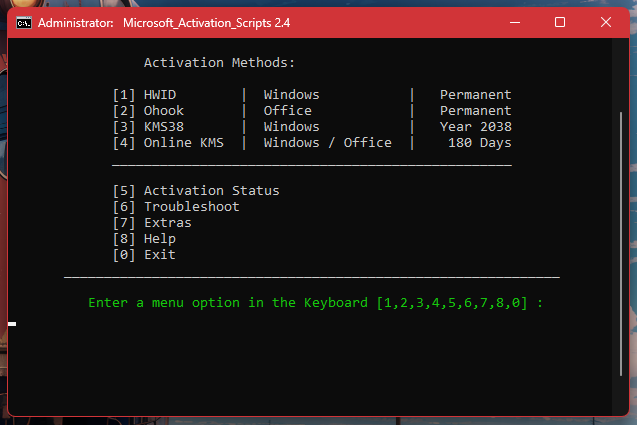
### NOTE: Do Not re-activate windows/office if it's already licensed. This will VOID your old license.
### ⬇️ IMPORTANT Downloads:
- [Download OEM Windows](https://www.microsoft.com/en-us/software-download)
- [Download OEM Microsoft Office 2021](https://c2rsetup.officeapps.live.com/c2r/download.aspx?ProductreleaseID=ProPlus2021Retail&platform=x64&language=en-us&version=O16GA)
------------------------------------------------------------------------------
# 🍎 - APPLE UNIVERSAL
- Supports only `Monterey 12.0.x` to `macOS Sequoia 15.3.x`
- native support with M series chips included (M4 untested) but should work.
- Installation for `Big-Sur` and older will be uploaded soon.
## 🔧 INSTALLATION
- STEP 1.
- `UNINSTALL` any Microsoft Office copy you have in your system.
- [Download](https://go.microsoft.com/fwlink/?linkid=525133) The official Microsoft 365 & Office 2024 trial.
- Click the `Download` button.
- STEP 2. \

- Find the downloaded PKG File and open it.
- Enter your macOS password.

- Continue and Follow the installation process.
- Congratulations you now have Microsoft Office 2024.
- Do not open it yet and continue to the next step.
- STEP 3.
- [Download](https://github.com/alsyundawy/Microsoft-Office-For-MacOS/raw/master/DATA/Microsoft_Office_2024_Preview_Serializer.pkg) The Microsoft Office 2024 LTSC (Preview) Volume License Serializer
- This will `automatically` activate your Microsoft Office 2021-2024 After Installation.
- STEP 4. \

- Check your OFFICE and see if its activated. ✅
- STEP 5.
- Star this repo :) thank you!
------------------
### 📪 Credits
[massgrave](https://github.com/massgravel/Microsoft-Activation-Scripts.git)\
https://massgrave.dev \
[Alsyundawy](https://github.com/alsyundawy)