https://github.com/birkir/react-three-gui
GUI tools for react-three-fiber and react-spring
https://github.com/birkir/react-three-gui
Last synced: 11 months ago
JSON representation
GUI tools for react-three-fiber and react-spring
- Host: GitHub
- URL: https://github.com/birkir/react-three-gui
- Owner: birkir
- Created: 2019-09-27T00:40:41.000Z (over 6 years ago)
- Default Branch: master
- Last Pushed: 2023-06-01T14:56:40.000Z (almost 3 years ago)
- Last Synced: 2025-03-29T01:14:55.306Z (11 months ago)
- Language: TypeScript
- Size: 1.65 MB
- Stars: 529
- Watchers: 8
- Forks: 30
- Open Issues: 43
-
Metadata Files:
- Readme: README.md
Awesome Lists containing this project
- awesome-list - react-three-gui - three-fiber and react-spring | birkir | 393 | (TypeScript)
README
# react-three-gui
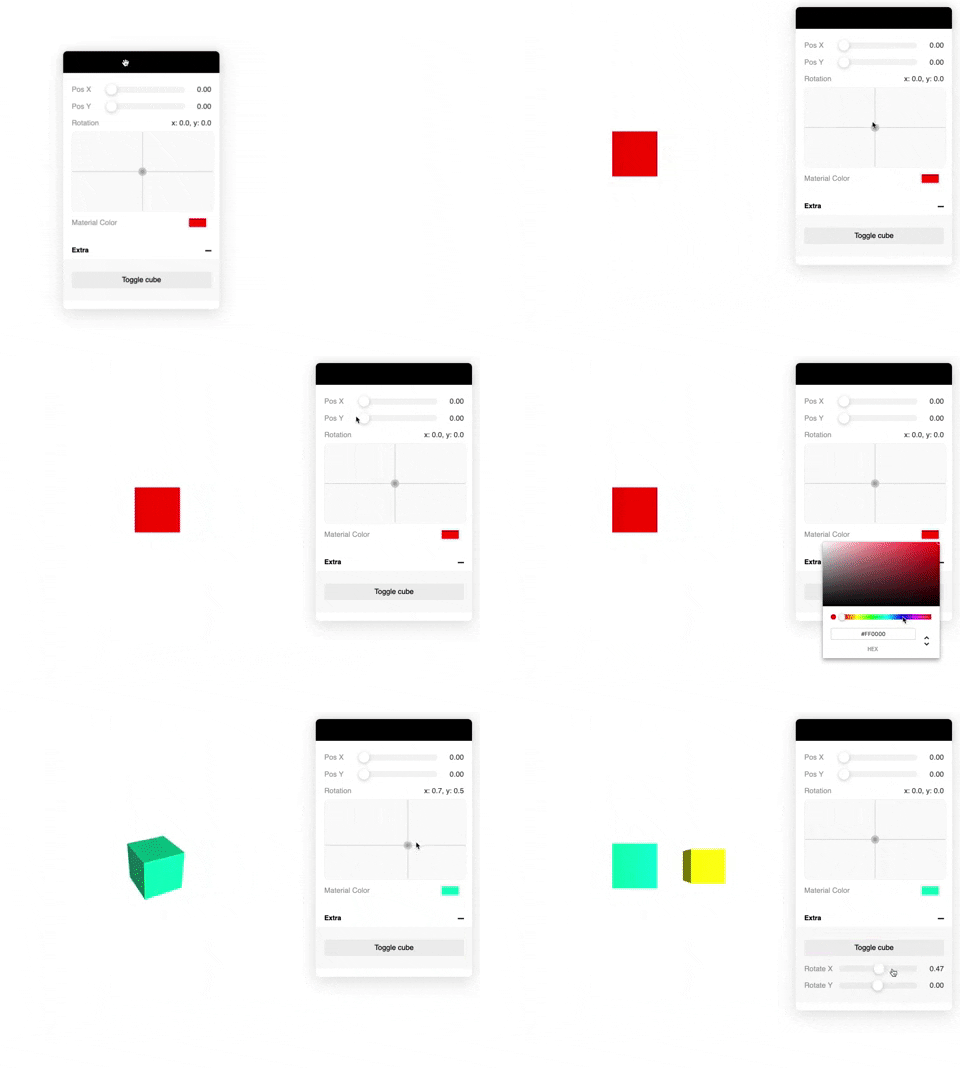
A graphical user interface for changing variable states in React.
## Using this repo
To use this repo, run the following commands inside the repo directory: \
`yarn install` \
`yarn build` \
`yarn pack` \
This will generate a tarball `.tgz` that you can copy to your project directory. \
Then you can run: `yarn add ./react-three-gui.tgz` which will install it.
## Examples
https://codesandbox.io/s/react-three-fiber-gui-62pvp
## Usage
Basic example
```tsx
import { Controls, useControl } from 'react-three-gui';
const MyMesh = () => {
const rotationX = useControl('Rotation X', { type: 'number' });
return ;
}
export const App = () => {
return (
);
};
```
Use the spring option to return a react-spring value:
```tsx
useControl('My ctrl', {
type: 'number',
spring: true,
});
// or pass a react-spring configuration value
useControl('My ctrl', {
type: 'number',
spring: { mass: 5, tension: 280, friction: 50 },
});
```
Also possible to pass in your own state:
```tsx
const [value, set] = useState(0);
useControl('Adjust value', {
type: 'number',
state: [value, set],
});
```
Also you can pass your own control component:
```tsx
const MyControl = ({ value, setValue }) => (
setValue(e.currentTarget.value)}
value={value}
/>
);
useControl('Test', {
type: 'custom',
value: 2,
component: MyControl,
});
```
## Use your own Canvas
```tsx
import { Canvas } from 'react-three-fiber';
import { withControls } from 'react-three-gui';
// Wrap the with `withControls`
const YourCanvas = withControls(Canvas);
const Scene = () => (
);
const App = () => {
return (
);
};
```
## API
```tsx
import { useControl, Controls } from 'react-three-gui';
// All the possible options
useControl(name: string, {
// General
type: 'number' | 'xypad' | 'boolean' | 'button' | 'color' | 'select' | 'string' | 'file' | 'custom';
value: any; // Initial value
spring: boolean | SpringConfig; // Use spring
group: string; // Group name
state: [any, Dispatch>]; // Use your own state
onChange(value: any): void; // onChange callback
// number | xypad
min: number; // Minimum value (default: 0)
max: number; // Maximum value (default: 1)
distance: number; // The end-to-end slider distance (default: 1)
scrub: boolean; // When slider is released it will reset to the center but keep its value
// select
items: string[];
// button
onClick(): void;
// file
loader?: THREE.TextureLoader | THREE.FileLoader | etc;
// custom
component?: React.Component;
});
// Controls component
```
## Supported controls
- number
- Returns `number`
- xypad
- Returns `{ x: number, y: number }` object
- boolean
- Returns `boolean`
- button
- Returns `void`
- color
- Returns `string` (as hex: #ffffff)
- select
- Returns `string`
- file
- Returns `new THREE.FileLoader`
- string
- Returns `string`
### Future plans
- [x] Support custom control components
- [x] File upload loader control
- [x] Groups
- [x] Draggable Widget
- [x] Collapsable widget
- [x] Persist state localstorage
- [ ] Multi platform?