https://github.com/bitmaker-hub/lnbcard
Shinny Bitcoin Payments
https://github.com/bitmaker-hub/lnbcard
Last synced: 10 months ago
JSON representation
Shinny Bitcoin Payments
- Host: GitHub
- URL: https://github.com/bitmaker-hub/lnbcard
- Owner: BitMaker-hub
- License: other
- Created: 2023-11-16T23:23:50.000Z (over 2 years ago)
- Default Branch: master
- Last Pushed: 2024-04-26T06:52:36.000Z (over 2 years ago)
- Last Synced: 2025-02-01T19:02:22.444Z (over 1 year ago)
- Language: C++
- Size: 1.47 MB
- Stars: 6
- Watchers: 2
- Forks: 1
- Open Issues: 1
-
Metadata Files:
- Readme: README.md
- License: LICENSE
Awesome Lists containing this project
README

# LNBCARD - Shiny Bitcoin&Nostr payments
**The LNBCARD**
This is an **open source project** that let you test lightning payment notifications.
Connect the LNBCard to your LNBits wallet or Alby wallet (LNDhub) and receive light notifications.
This board can be used as a cool Tip accessory for your shop or to bring it on a meetup and teach about lightning.
This project uses part of the job done with BitcoinSwitch of BenArc: https://github.com/arcbtc/bitcoinSwitch
## Requirements
- LNBCard board get yours at 🛒[bitronics.store](https://bitronics.store)🛒
- 3D badge BOX (pending)
- Screen support (soon)
### Flash firmware
#### Standard tool
Flash the LNBCard firmware from online flash tool **ESPtool** and the **binary files** that you will find in the `bin` folder.
If you want you can compile the entire project using Arduino.
1. Get an LNBCard board
1. Download this repository
1. Go to ESPtool online: https://espressif.github.io/esptool-js/
1. Load the firmware with the binary from one of the sub-folders of `bin` corresponding to your board.
1. **Important:** Hold BOOT Button and then plug your board .
1. Select each file from the sub-folder (`.bin` files) and then press flash.
### Update firmware
Update the LNBCard firmware following same flashing steps but only using the file 0x10000_firmware.bin.
#### Build troubleshooting
1. Online ESPtool works with chrome, chromium, brave
1. ESPtool recommendations: use 115200bps
1. Build errors > If during firmware download upload stops, it's recommended to enter the board in boot mode. Unplug cable, hold right bottom button and then plug cable. Try programming
1. In extreme case you can "Erase all flash" on ESPtool to clean all current configuration before uploading firmware. There has been cases that experimented Wifi failures until this was made.
1. In case of ESP32-WROOM Boards, could be necessary to put your board on boot mode. Hold boot button, press reset button and then program.
## LNBCARD configuration
After programming, you will only need to setup your Wifi and lightning wallet parameters.
#### Wifi Accesspoint
1. Connect to LNBCardAP
- AP: LNBCardAP
- PASS: BoltPower
1. Setup your Wifi Network
1. Add your LNBits wallet ID or your LNDHUB URI
#### Description video
[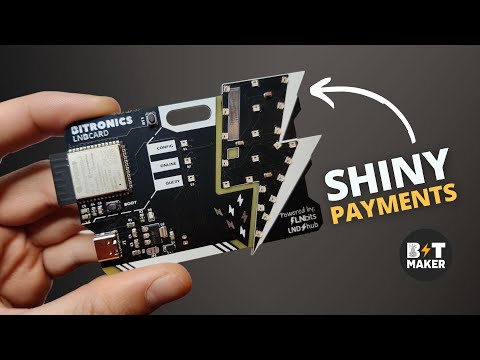](https://youtu.be/52NnTPij4A4)
### Donations/Project contributions
If you would like to contribute and help dev team with this project you can send a donation to the following LN address ⚡bitmaker@getalby.com⚡.
If you want to order an LNBCard you can contribute to my job at 🛒[bitronics.store](https://bitronics.store)🛒
Enjoy