https://github.com/bitquery/documentation
API system documentation
https://github.com/bitquery/documentation
Last synced: 5 months ago
JSON representation
API system documentation
- Host: GitHub
- URL: https://github.com/bitquery/documentation
- Owner: bitquery
- Created: 2022-12-03T13:13:39.000Z (over 3 years ago)
- Default Branch: main
- Last Pushed: 2022-12-06T03:11:54.000Z (over 3 years ago)
- Last Synced: 2025-06-23T10:50:57.420Z (about 1 year ago)
- Size: 317 KB
- Stars: 0
- Watchers: 10
- Forks: 0
- Open Issues: 0
-
Metadata Files:
- Readme: README.md
Awesome Lists containing this project
README
# Bitquery API System Overview
Description of the information flow and high level system
design for the bitquery software as a service API system.
## Table of Contents
- [Summary](#summary)
- [Functionality](#functionality)
- [Structure](#structure)
- [Accounts](#accounts)
- [Teams](#teams)
- [Billing](#billing)
- [GraphQL API](#graphql-api)
- [Data Warehouse](#data-warehouse)
- [Service Quality](#service-quality)
- [Support](#support)
## Summary
The Bitquery API system is a software as a service that allows users to create, manage, and execute queries to retrieve blockchain data from various networks in a unified way. The system consists of a frontend, which is an integrated development environment ([IDE](https://graphql.bitquery.io/)) accessed through a web browser, and a backend that consists of server programs and databases. Users can create accounts and generate unique API keys to authenticate and authorize themselves when executing queries. Users can also save queries for future use and create teams to share queries and billing plans. The system uses a credit-based billing system, with different plans offering different amounts of credits that can be used to execute queries.
## Functionality
Bitquery API system is intended to create, manage and execute queries to the blockchain on-
chain data of many networks in a unified way.
Users of Bitquery API are people and organisations, who needs to query the blockchain data.
Bitquery provides the tools (IDE and explorer) which help to build and execute queries manually
and analyse the results. When queries are built, they can be embedded in any external system
built on any programming language to be executed in an automated way.
## Structure
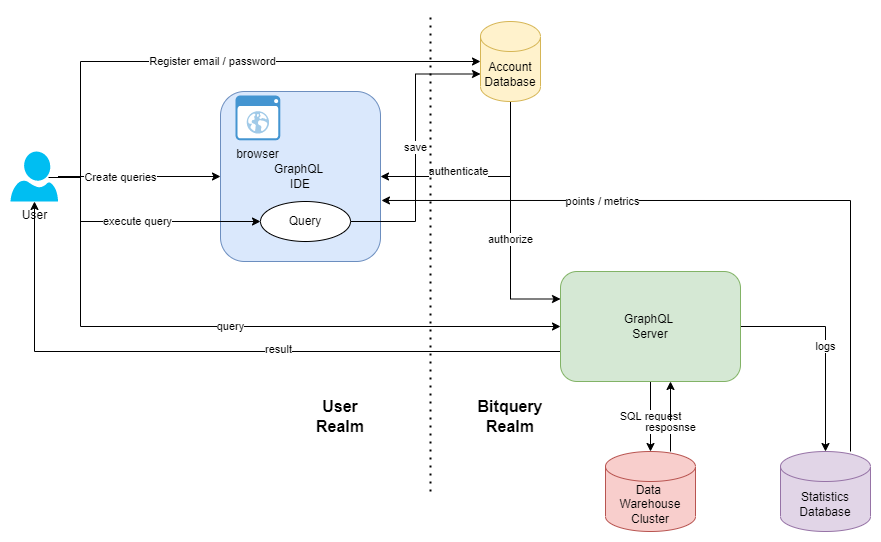
As the diagram shows, the system consists of the frontend part, executed in user’s browser
(shown on the left) and the backend part (shown on the right).
Frontend is the Integrated development environment ([IDE](https://graphql.bitquery.io/)), the Javascript application, executed
in user’s browser. It is accessed by URL https://graphql.bitquery.io using any modern browser
(Chrome recommended).
Backend part is a set of server programs and databases, deployed in Bitquery premises (rented
from a number of datacenter around the world). Most of the backend components are deployed
as a cluster for performance and redundancy. The primary functionality of the backend system is
to execute user queries in the data warehouse, storing blockchain data.
## Accounts
Accounts are created by users of the system using email / password pair. After registration,
unique secret API key is generated. API key is a secret, associated with the account, used to
authenticate and authorise in GraphQL server.
API key is used every time when user execute queries, be it using IDE or programmatically.
Without API keys, user is getting HTTP 401/403 errors.
User can save queries for the future use in the account database. When saving a query, user can
select to save the query privately (visible only to himself and to members of his team) or publicly
(visible to everyone). When saved, queries are assigned unique URLs and set of tags for ease of
search.
## Teams
Users can invite other users inside their teams. Team members shares the same set of private
queries, and having single billing plan. One user in a team is an administrator, who invite other
team members, can add and remove them. Administrator manages billing for the whole team and
pays for the paid plans for the team if necessary.
Team have the common:
1. Set of private queries. All queries created in team, visible to all members of the team;
2. Billing plan. Administrator pays for the plan and managing billing information;
When user exits the team (removed by administrator or exit by his own) he looses the access to
the other team member queries. However the queries that he created as private, remains visible to
this user. Also the removed user switches to own billing plan.
User can join and leave teams at any point of time. His private queries automatically appear
visible to the team when joining the new team.
Teams are appropriate in the following situations:
- Organisation or company set up the team for the users of Bitquery IDE and GraphQL API. One
user is the administrator, assigned from the organisation;
- Project team, including temporary projects. The team can be formed to collectively work on the
set of queries to review and reuse the team queries.
## Billing
Billing tariffs defined at [Bitquery Pricing](https://bitquery.io/pricing) are applied on per-account basis. If account is
administrator of the team, the billing plan applied to all members of the team. Plan applied by
calendar month period. Starting from the period, certain amount of credits are defined to be spent
during this period. When these credits spent, GraphQL server stops serving requests with user
API key. User then can buy additional credits for existing period, and buy the new periods in the
future. Note that the current plan purchased for the current plan may not be changed using IDE,
but you can ask Bitquery to do that of you applying support ticket.
Credit purchased for the billing period define the number of points that the user or the team may
spent in the given billing period. Point are calculated by GraphQL server for every request, using
the Statistics Database. This database stores the metrics of the request as they are reported from
server(s), executing a given query. Metrics represent actual resources used, such as memory, disk
I/O bytes, network traffic and others. To calculate count of points, metrics are summed up using
normalising coefficients. Coefficients are defined in a way, that results in the average consumption
of 1 point for simple queries. Some queries may consume less than 1 point, some much more
than one.
To calculate the points consumed by queries, statistics database stores all metrics for every
query. Some queries are executed on many servers simultaneously, in this case the metrics are
summed up. Periodically the system queries statistics database to get aggregated point count
from the beginning of the billing period. If this count exceeds the count of the credits purchased,
the access to the system is automatically turned off.
## GraphQL API
Interaction with the backend part is executed via single [GraphQL endpoint](https://graphql.bitquery.io) using HTTP POST requests. Note that this endpoint URL is the same as for
the IDE, the difference only in HTTP method used.
The endpoint is served by a cluster of GraphQL servers, executing the following logic when
executing the request:
1. Determine if the API key is passed in HTTP X-API-KEY header. Find the account owing this
API key and determine if the current billing period did not consume all credits yet. All these
actions must be successful, otherwise the error is returned
2. Convert GraphQL query to a set of SQL queries to database and execute them. Note that one
GraphQL query can embed many different entities, and each of them typically require separate
SQL query to the database. SQL queries are distributed to the data warehouse cluster. After
query is executed, results are converted to JSON and returned to the user.
3. Side effect from the query execution is the records for all metrics as resources, consumed
from servers, in statistics database. This process happens in parallel with the query execution
and does not affect it directly
## Data Warehouse
Data warehouse stores the blockchain data, populated in real time from the set of blockchain
nodes. Schemas for different blockchains are different, with the dedicated set of tables, optimised
to be used for specific queries. If GraphQL query hits the table with appropriate ordering, it will be
executed fast, and as a result, consume less points. GraphQL server tries to optimise SQL queries
selecting the table most appropriate for specific request.
Tables are deployed on a cluster of servers, and a particular server is selected to execute the
query based on availability and the load on specific server.
## Service Quality
Bitquery system considers the following factors constituting quality for users:
1. Availability of the service, meaning that a query an be executed in a reasonable time and get
proper results
2. Correctness and actuality of the data. The latest data from the blockchain nodes must be
recorded into the data warehouse with a reasonable delay. No data must missing or recorded
as duplicate, etc.
3. Performance of the system, defined by the query execution time, number of queries
executed per second (potentially concurrent) and lack of errors, related to the high load
[Monitoring page](https://graphql.bitquery.io/user/system_status) shows the current status of
service quality based on these criteria.
## Support
Support is provided in a request-response manner and support tickets by the following channels:
1) [Support Ticket System](https://support.bitquery.io/hc/en-us/requests/new)
2) [Telegram Channel](https://t.me/Bloxy_info)
3) [Discord Server](https://discord.com/invite/vzHfp7usRk)