https://github.com/bitriel/bitrielwallet-extension
https://github.com/bitriel/bitrielwallet-extension
Last synced: 9 months ago
JSON representation
- Host: GitHub
- URL: https://github.com/bitriel/bitrielwallet-extension
- Owner: bitriel
- License: apache-2.0
- Archived: true
- Created: 2025-05-23T09:33:13.000Z (about 1 year ago)
- Default Branch: main
- Last Pushed: 2025-05-30T09:04:22.000Z (about 1 year ago)
- Last Synced: 2025-07-12T14:55:20.545Z (about 1 year ago)
- Language: TypeScript
- Size: 11.9 MB
- Stars: 0
- Watchers: 0
- Forks: 0
- Open Issues: 0
-
Metadata Files:
- Readme: README.md
- Changelog: CHANGELOG.md
- Contributing: CONTRIBUTING.md
- License: LICENSE
Awesome Lists containing this project
README
## SubWallet Extension
Our SubWallet is forked from polkadot-js/extension. We aim to adding more features while being able to rebase the polkadot-js origin at any time.
## Main Concept
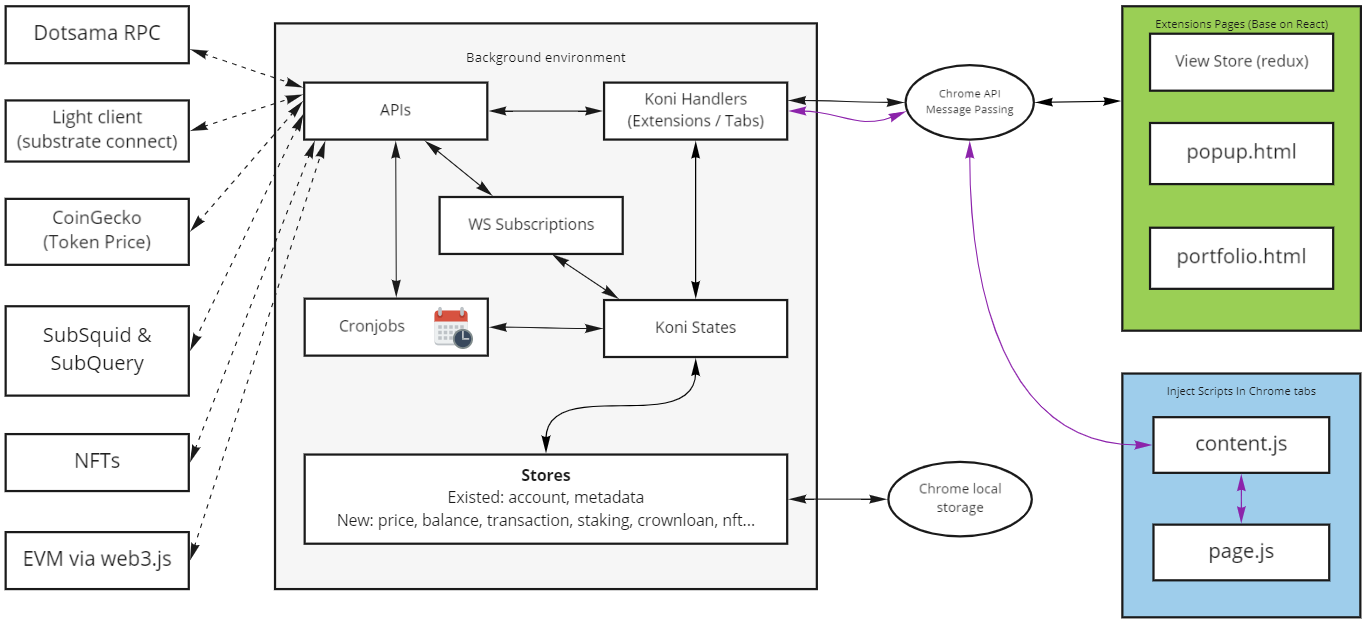
The extension is compiled from folder `packages/extension-koni`
- **Background environment**: The Background environment is compiled from `packages/extension-koni/src/background.ts`.
- The Background is use to handle message from Extensions pages and Chrome tabs via Chrome API Message Passing.
- Save all state to store and persist to chrome storage.
- Run cronjob.
- **Extension**: Is frontend and page of extension:
- popup.html: Frontend page open when click to extension icon in browser.
- portfolio.html: Frontend to display more complicated view.
- **Inject Scripts**: Inject script into chrome tabs.
All data requests must be called and processed in the background. Extension Pages and Inject Scripts use data from the background environment and do not call APIs directly.
## Project structure
- **extension-base** - Contain main features run in background, call api, persist data into chrome store and inject script.
- **extension-dapp** - A convenience wrapper to work with the injected objects, simplifying data extraction for any dapp that wishes to integrate the extension (or any extension that supports the interface)
- **extension-inject** - A convenience wrapper that allows extension developers to inject their extension for use by any dapp
- **extension-chains** - Definitions for chains that are supported by this extension. It contains the bare definitions as well as a stripped-down (call-only) metadata format.
- **extension-dapp** - The actual in-depth technical breakdown is given in the next section for any dapp developer wishing to work with the raw objects injected into the window. However, convenience wrappers are provided that allows for any dapp to use this extension (or any other extension that conforms to the interface) without having to manage any additional info.
- **extension-mocks** - Mock data for testing.
- **extension-compat-metamask**: Compitable with metamask
- **extension-koni-base**: Custom package, extension extension base
- **extension-koni-ui** *(replace extension-ui)*: The UI components for the extension, to build up the popup
- **extension-koni** *(replace extension)*: All the injection and background processing logic (the main entry)
# Development Guide
## Add an API
- API is define in folder `packages/extension-koni-base/src/api`
- Add new file depend on types of API.
- Simple API can be defined in function, more complicated API should define in Object.
## Add a store
Store is used to persist data into local storage. Stores is defined in folder `packages/extension-koni-base/src/store`
- Store class should extend class `BaseStore` or `SubscribableStore` and overwrite class prefix call via constructor.
- `BaseStore` include basic functions persist with chrome local storage
- `SubscribableStore` extend `BaseStore`, include rxjs subject and can be subscribed with method `getSubject()`. This subject trigger every time data is set.
``` typescript
export default class Price extends SubscribableStore {
constructor () {
super(EXTENSION_PREFIX ? `${EXTENSION_PREFIX}price` : null);
}
}
```
- Defined in class `KoniState` and call by `KoniExtension`, `KoniTabs` or `KoniCron`.
```typescript
export default class KoniState extends State {
private readonly priceStore = new Price();
private priceStoreReady = false;
public setPrice (priceData: PriceJson, callback?: (priceData: PriceJson) => void): void {
...
}
public getPrice (update: (value: PriceJson) => void): void {
...
}
public subscribePrice () {
return this.priceStore.getSubject();
}
}
```
## Add a message handle
Subwallet extension use message passing concept via browser API to interact between Background - Extensions - Chrome Tabs.
- Extension or Chrome Tabs send a message with id and type to Background
- Background handle message by id and type and response data.
- There are 2 message type:
- One time message: Extension Or Chrome Tabs will send message request and listen response. Listener will be deleted after receive response.
- Subscription message: Same as one time message but listener continue receive data util window close.
- Steps to add new message handle:
- Add request type:
- New request type must define in interface `KoniRequestSignatures`
```typescript
export interface KoniRequestSignatures {
'pri(price.getPrice)': [RequestPrice, PriceJson] // Message type from extension
'pri(price.getSubscription)': [RequestSubscribePrice, boolean, PriceJson] // Message type from extension with subscription
'pub(utils.getRandom)': [RandomTestRequest, number] // Message type from Tabs
}
```
- Every message type must be included:
- Type name like `pri(price.getPrice)`. Message type from extension must start with `pri`, message type from Tabs must start with `pub`.
- Request type like `RequestPrice`
- Response type like `PriceJson`
- Subscription param type (optional) like `PriceJson`
- Add handler (Background):
- Add new case in function handle of `KoniExtension` or `KoniTabs` of package `extension-koni-base`
- Add caller (Extension, Chrome Tabs):
- Add new function in file `messaging.ts` of package `extension-koni-ui` to send request and handle receive data.
## Add a cron
Cronjob is define in folder `packages/extension-koni-base/src/cron`.
- Group of cron action should define in separate file in this folder.
- Define new cronjob in method init of class `KoniCron`
## Develop UI
### UI Structure
- SubWallet Extension UI build with ReactJS.
- Popup: Main extension page, show when click into extension icon in browser extension list.
- Portfolio (Coming soon): Display more complicated view like dashboard, transaction...
- Another folders:
- assets: images, resources of extensions.
- components: Common components use in extension pages.
- hooks: public hook for global function.
- i18n: Internationalization.
- stores: Redux stores generate with react hook.
- partials: Header components
- util: utilities methods.
- messaging.ts: Send to background and handle return message.
### Add new redux store
- Subwallet extension use [redux-tookit](https://redux-toolkit.js.org/) to generate store.
- Define redux store reducers and state into separate file by method `createSlice` of redux toolkit.
- Map reducer into root store in file index.ts
### Add new message caller
Read "Add a message handle"
## Auto validate
Extension auto validate code with eslint. Please setup eslint in editor and run `yarn lint` before commit code.
## Write test
Subwallet run test with [jest](https://jestjs.io/). Create new file with name `filename.spec.ts` to write test.
## Commit and Build
- Please run `yarn lint` and `yarn test`
- Versioning:
- Dev version: Dev version is auto generated with by Github Action.
- Stable version:
- Manual change version in main file package.json from x.y.z-nn to x.y.z
- Update CHANGELOG.md
- Github Action will auto generate version file of each package.