https://github.com/bksahu/lazy100
A CLI to automate #100DaysOfX Challenges 🤖
https://github.com/bksahu/lazy100
automation github python python3 tweepy tweets
Last synced: 2 months ago
JSON representation
A CLI to automate #100DaysOfX Challenges 🤖
- Host: GitHub
- URL: https://github.com/bksahu/lazy100
- Owner: bksahu
- License: mit
- Created: 2018-07-15T13:25:52.000Z (about 8 years ago)
- Default Branch: master
- Last Pushed: 2018-07-15T15:41:46.000Z (about 8 years ago)
- Last Synced: 2025-10-28T12:35:52.694Z (9 months ago)
- Topics: automation, github, python, python3, tweepy, tweets
- Language: Python
- Homepage:
- Size: 5.86 MB
- Stars: 1
- Watchers: 0
- Forks: 0
- Open Issues: 0
-
Metadata Files:
- Readme: README.md
- License: LICENSE
Awesome Lists containing this project
README
# Lazy100

[](https://github.com/bksahu/Lazy100/blob/master/LICENSE)
[](https://github.com/bksahu/Lazy100/issues)
[](https://github.com/bksahu/Lazy100/)
[](https://twitter.com/intent/tweet?text=Wow:&url=https%3A%2F%2Fgithub.com%2Fbksahu%2FLazy100)
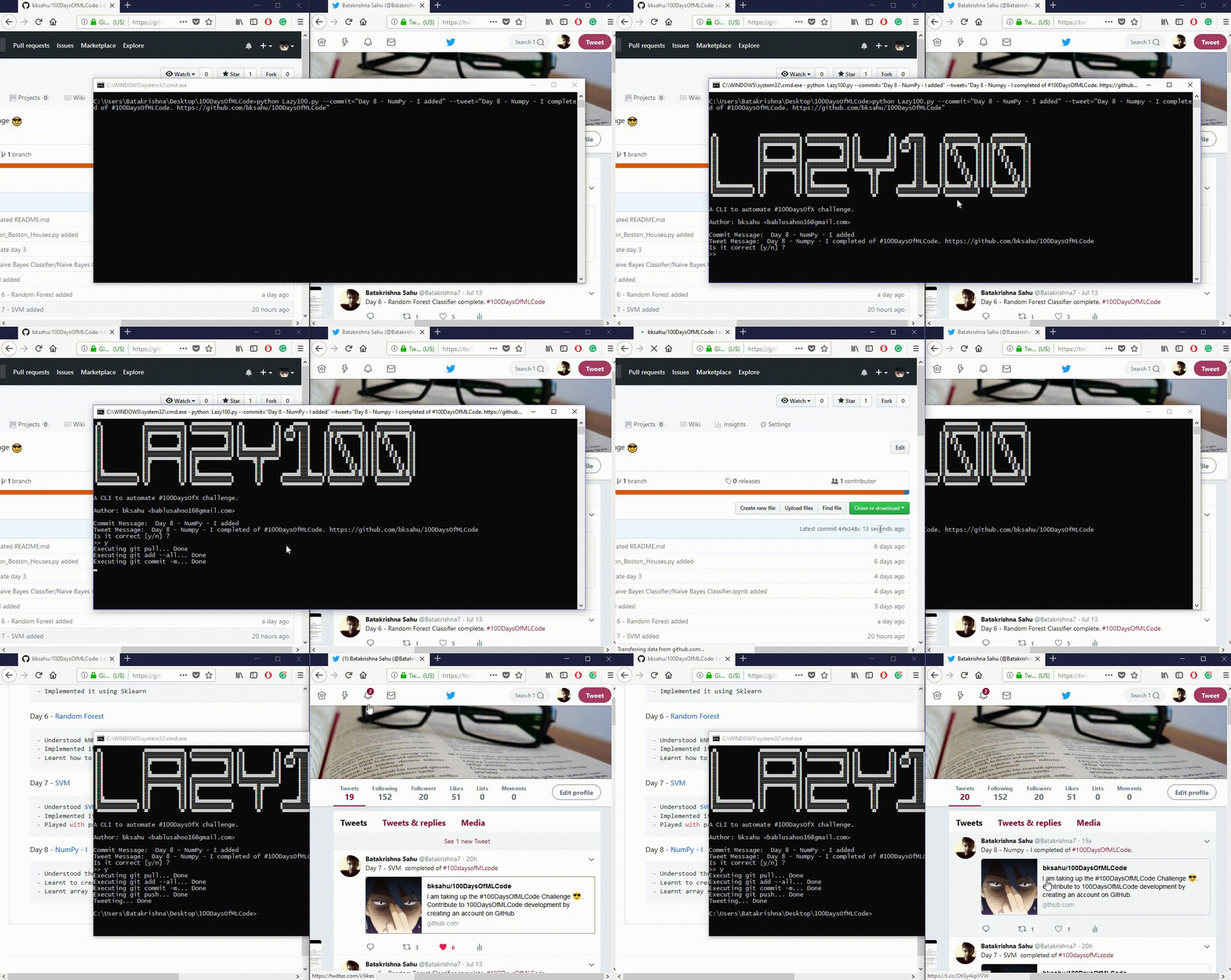
A CLI to automate **#100DaysOfX Challenges** that will `commit` your work to your github account and also `tweet` your progress to your twitter account.
There are two mode of it's operation:
- Automatic
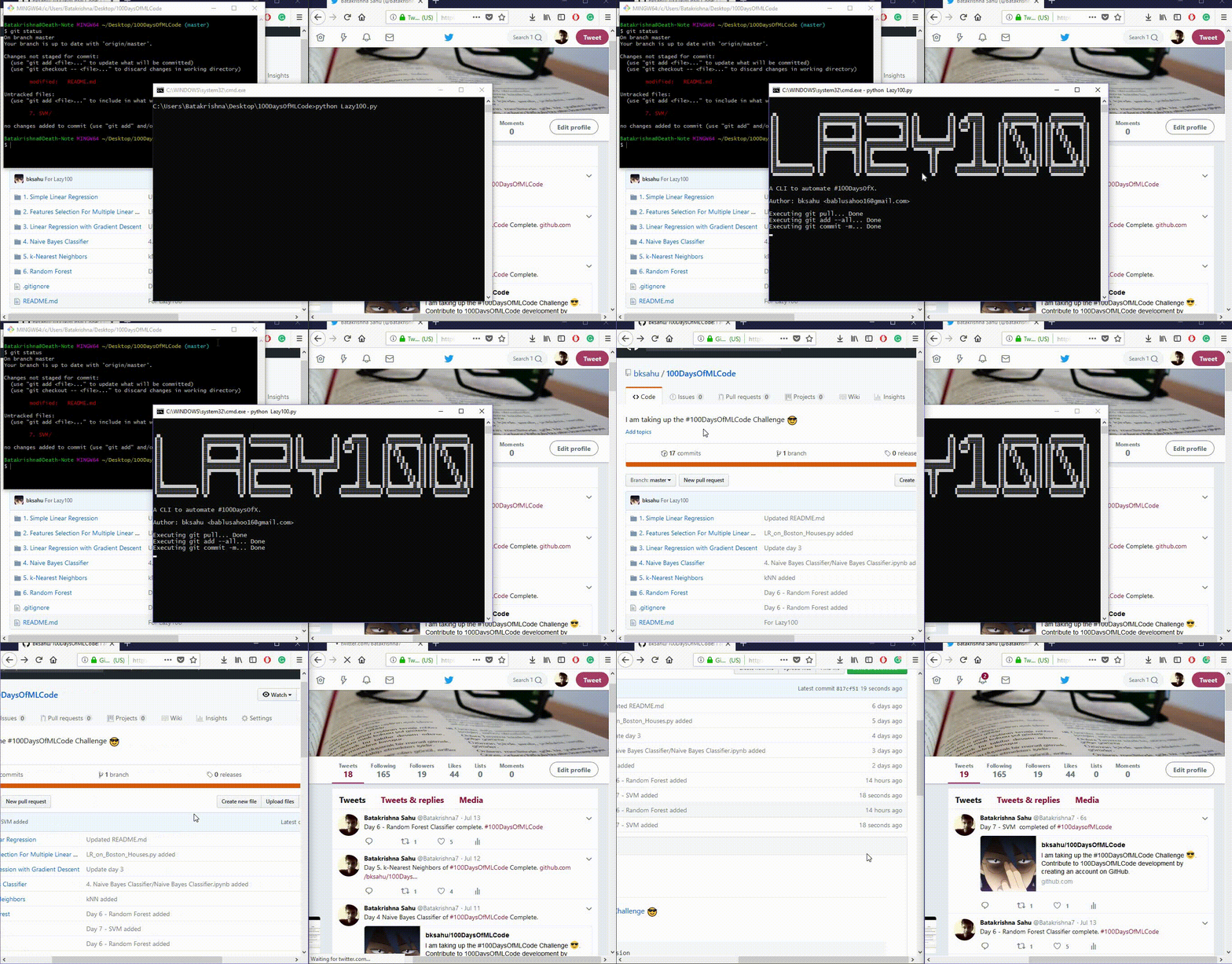
**NOTE:** Your progress must be saved in a directory named in this form: `Day. LessonName`. Example: `1. Linear Regression`
- Manual
## Installation
1. Run this command to install required modules:
`pip install -r requirements.txt`
2. Put `Lazy100.py` in your **100DaysOfX** directory.
3. Add `Lazy100.py` to .gitignore (optional)
## Create your Twitter app
This repo uses [tweepy](https://github.com/tweepy/tweepy) to interact with Twitter. To use it, you will need to create a new Twitter app and insert those credentials into `Lazy100.py`.
1. Log into twitter
1. Browse to [https://apps.twitter.com/](https://apps.twitter.com/)
1. Click the `Create New App` button and define your new app. Here are some example values:
* **Name**: `Lazy100 - `
* **Description**: `I'm Lazy`
* **Website**: ``
* **Callback URLs**: `` <= blank
1. Check the **Developer Agreement** and click the `Create your Twitter application` button.
1. In the application details page, Select the "Keys and Access Tokens" tab.
1. Under "Your Access Token", click the `Create my access token` button.
See the [tweepy tutorial](http://docs.tweepy.org/en/v3.5.0/auth_tutorial.html) for more information, if needed.
## Insert your credentials
Open `Lazy100.py`, search for following lines and insert your credentials:
```python
##############################################################
link_to_repo = '' # Set your github repo name
## Check README.md to learn how to acquire your Twitter keys
consumer_key = '' # Put your twitter consumer key
consumer_secret = '' # Put your twitter consumer secret
access_token = '' # Put your twitter access token
access_token_secret = '' # Put your twitter access token secret
###############################################################
```
## Running
Execute in either ways:
- Automatic: `python Lazy100.py`
- Manual: `python Lazy100.py -c="Your git commit message" -t="Your tweet message"`
**NOTE 1:** If `$ git push` asks for both username & password every time then, check out [this](https://stackoverflow.com/questions/11403407/git-asks-for-username-every-time-i-push) tutorial.
**NOTE 2:** If you are using automatic way then, your progress must be saved in a directory named in this form: `Day. LessonName`.
Example: `1. Linear Regression`