https://github.com/blackjacx/assist
App Store Connect API access via CLI written in Swift
https://github.com/blackjacx/assist
apns appstoreconnect appstoreconnect-api hacktoberfest push screenshot snapshot snapshot-testing swift uitesting
Last synced: 11 months ago
JSON representation
App Store Connect API access via CLI written in Swift
- Host: GitHub
- URL: https://github.com/blackjacx/assist
- Owner: Blackjacx
- License: mit
- Created: 2020-05-24T21:21:45.000Z (about 6 years ago)
- Default Branch: develop
- Last Pushed: 2025-05-05T22:15:45.000Z (about 1 year ago)
- Last Synced: 2025-06-07T04:34:08.443Z (about 1 year ago)
- Topics: apns, appstoreconnect, appstoreconnect-api, hacktoberfest, push, screenshot, snapshot, snapshot-testing, swift, uitesting
- Language: Swift
- Homepage:
- Size: 340 KB
- Stars: 33
- Watchers: 1
- Forks: 2
- Open Issues: 18
-
Metadata Files:
- Readme: README.md
- Changelog: CHANGELOG.md
- License: LICENSE
- Authors: AUTHORS
Awesome Lists containing this project
README
[](https://twitter.com/intent/follow?original_referer=https%3A%2F%2Fgithub.com%2Fblackjacx&screen_name=Blackjacxxx)
[](https://github.com/Blackjacx/Assist/releases)
[](https://swift.org/package-manager/)
[](https://swiftpackageindex.com/Blackjacx/Assist)
[](https://swiftpackageindex.com/Blackjacx/Assist)
[](https://developer.apple.com/download/)
[](https://codebeat.co/projects/github-com-blackjacx-assist-develop)
[](https://github.com/blackjacx/assist/blob/master/LICENSE)
[](https://www.paypal.me/STHEROLD)
# App Store Connect API • CLI
App Store Connect API access using your private API key. The great power of this tool is that it can operate on all apps of one or multiple teams (is you wish to), e.g. it is super easy to print the live versions of all of your apps, even across multiple teams:
```sh
asc app-store-versions list -k \
asc app-store-versions list -k \
asc app-store-versions list -k
```
## Installation
### Via [Homebrew](http://brew.sh/)
```sh
brew tap Blackjacx/asc
brew install asc
```
### Via [Mint](https://github.com/yonaskolb/mint)
Just install Mint using with [Homebrew](https://brew.sh/) via `brew install mint`.
```sh
mint install Blackjacx/Assist
```
You can also run command line tools with mint without installing them first. Mint will automatically clone and install it.
```sh
mint run git@github.com:Blackjacx/Assist.git asc apps
```
### Via Command Line
```sh
git clone https://github.com/blackjacx/assist.git AppStoreConnect
cd AppStoreConnect
swift run asc -h
```
## Authentication
Authentication is handled by the tool itself. The only thing needed is your private API key. Generate one at [App Store Connect account](https://appstoreconnect.apple.com/access/api) and execute the following command which will just store the exact parameters you provide in the user defaults.
```sh
asc api-keys register -n "name" -k "key-id" -i "issuer-id" -p "path-to-private-key-file"
```
> ⚠️ No key generation performed here. The JWT is just generated on demand when using this tool. If you have multiple keys registered the tool will ask you which one you want to use.
## Sub Commands
Executing one of the following sub commands is as easy as appending it with its parameters to the base command:
```sh
# list all registered API keys
asc api-keys list
# register API key for specific team
asc api-keys register -n "name" -k "key-id" -i "issuer-id" -p "path-to-private-key-file"
# delete API key for specific team
asc api-keys delete -k "key-id"
# list is the default
asc beta-groups
# list only beta groups with a specific name
asc beta-groups -g "group-name"
# list apps of your team
asc apps
# add beta tester to all groups matching `group-name`
asc beta-testers add -e "john@doe.com" -n "John" -l "Doe" -g "group-name"
# add beta tester to all groups matching all specified group names
asc beta-testers add -e "john@doe.com" -n "John" -l "Doe" -g "group-name-1" -g "group-name-2"
# delete beta tester from all groups found
asc beta-testers delete -e "john@doe.com"
# lists all your teams apps with their live version or if not live with their current status
asc app-store-versions
```
### `api-keys`
```sh
OVERVIEW: Lists, registers and deletes App Store Connect API keys on your Mac.
USAGE: asc api-keys
OPTIONS:
--version Show the version.
-h, --help Show help information.
SUBCOMMANDS:
list (default) List locally stored App Store Connect API keys keys.
register Registers App Store Connect API keys locally.
delete Delete locally stored App Store Connect API keys.
See 'asc help api-keys ' for detailed help.
```
### `beta-groups`
```sh
OVERVIEW: Manage groups of beta testers that have access to one or more builds.
USAGE: asc beta-groups
OPTIONS:
--version Show the version.
-h, --help Show help information.
SUBCOMMANDS:
list (default) Find and list beta testers for all apps, builds, and beta groups.
See 'asc help beta-groups ' for detailed help.
```
### `beta-testers`
```sh
OVERVIEW: Manage people who can install and test prerelease builds.
USAGE: asc beta-testers
OPTIONS:
--version Show the version.
-h, --help Show help information.
SUBCOMMANDS:
list (default) Find and list beta testers for all apps, builds, and
beta groups.
invite Send or resend an invitation to a beta tester to test
specified apps.
add Create a beta tester assigned to a group, a build, or
an app.
delete Remove a beta tester's ability to test all or
specific apps.
See 'asc help beta-testers ' for detailed help.
```
### `apps`
```sh
OVERVIEW: Manage your apps in App Store Connect.
USAGE: asc apps
OPTIONS:
--version Show the version.
-h, --help Show help information.
SUBCOMMANDS:
list (default) Find and list apps added in App Store Connect.
See 'asc help apps ' for detailed help.
```
### `app-store-versions`
```sh
OVERVIEW: Manage versions of your app that are available in App Store.
USAGE: asc app-store-versions
OPTIONS:
--version Show the version.
-h, --help Show help information.
SUBCOMMANDS:
list (default) Get a list of all App Store versions of an app across
all platforms.
See 'asc help app-store-versions ' for detailed help.
```
### `builds`
```sh
OVERVIEW: Manage builds for testers and submit builds for review.
USAGE: asc builds
OPTIONS:
--version Show the version.
-h, --help Show help information.
SUBCOMMANDS:
list (default) Find and list builds for all apps in App Store Connect.
See 'asc help builds ' for detailed help.
```
### `bundle-ids`
```sh
OVERVIEW: Manage the bundle IDs that uniquely identify your apps.
USAGE: asc bundle-ids
OPTIONS:
--version Show the version.
-h, --help Show help information.
SUBCOMMANDS:
list (default) Find and list bundle IDs that are registered to your
team.
register Register a new bundle ID for app development.
See 'asc help bundle-ids ' for detailed help.
```
## Code Documentation
The code documentation for [ASC](https://swiftpackageindex.com/Blackjacx/Assist/develop/documentation/asc), [Push](https://swiftpackageindex.com/Blackjacx/Assist/develop/documentation/push) and [Snap](https://swiftpackageindex.com/Blackjacx/Assist/develop/documentation/snap) is generated and hosted by [Swift Package Index](https://swiftpackageindex.com/) (powered by [DocC](https://developer.apple.com/documentation/docc))
## Release
To release this Swift package the following steps have to be taken:
- Increment the version in `Core.Constants.version`
- Update to the latest shared development files:
```shell
bash <(curl -H -s https://raw.githubusercontent.com/Blackjacx/Scripts/master/frameworks/bootstrap.sh)
```
- Run `bundle update` to update all Ruby gems
- Run `swift package update` to update all SPM dependencies
- Commit all changes on `develop` with the message:
```
Release version `x.y.z`
```
- Release the new version:
```shell
bundle exec fastlane release framework:"Assist" version:"x.y.z" formula:"blackjacx/formulae/asc"
```
- Create and merge the PR from the just created branch for the [Homebrew formula](https://github.com/Blackjacx/homebrew-formulae)
- Post the following on Twitter:
```
Assist (ASC, Push, Snap) release x.y.z 🎉
▸ 🚀 Tools asc, snap, push (x.y.z) successfully published
▸ 📅 September 2nd
▸ 🌎 https://swiftpackageindex.com/Blackjacx/Assist
▸ 🌎 https://github.com/Blackjacx/Assist/releases/latest
▸ 👍 Tell your friends!
#SPM #Automated #Snapshots #Push #Firebase #APNS #ASC #AppStoreConnectAPI
```
## Contribution
- If you found a **bug**, please open an **issue**.
- If you have a **feature request**, please open an **issue**.
- If you want to **contribute**, please submit a **pull request**.
## Author
[Stefan Herold](mailto:stefan.herold@gmail.com) • [X](https://twitter.com/Blackjacxxx) • [Bluesky](https://bsky.app/profile/blackjacx.bsky.social) • [Mastodon](https://mastodon.social/@blackjacx)
## Contributors
Thanks to all of you who are part of this:

## License
ASC is available under the MIT license. See the [LICENSE](LICENSE) file for more info.
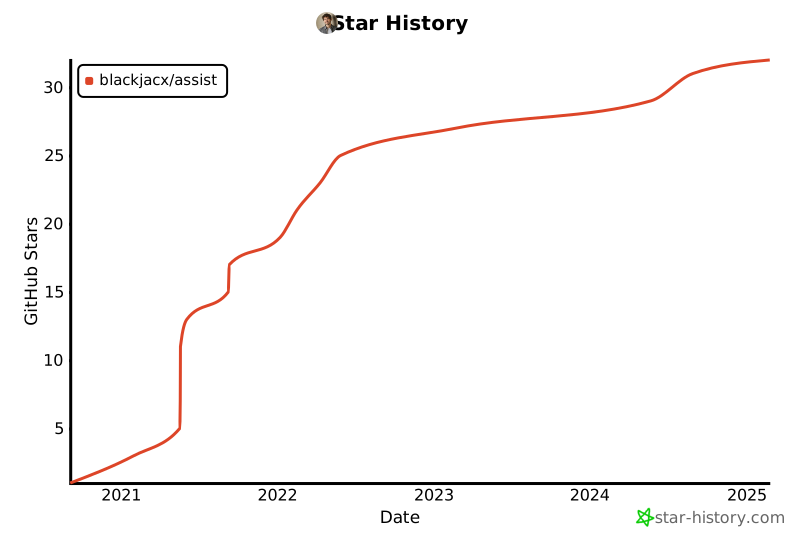
## Star History