https://github.com/blakek/wff2csv
Converts WiFiFoFum kml files to CSV logs
https://github.com/blakek/wff2csv
csv csv-logs kml wardriving wififofum wififofum-kml-files
Last synced: about 1 year ago
JSON representation
Converts WiFiFoFum kml files to CSV logs
- Host: GitHub
- URL: https://github.com/blakek/wff2csv
- Owner: blakek
- License: mit
- Created: 2016-06-30T04:00:56.000Z (about 10 years ago)
- Default Branch: master
- Last Pushed: 2019-04-30T14:50:20.000Z (about 7 years ago)
- Last Synced: 2025-06-13T11:08:28.746Z (about 1 year ago)
- Topics: csv, csv-logs, kml, wardriving, wififofum, wififofum-kml-files
- Language: JavaScript
- Size: 118 KB
- Stars: 0
- Watchers: 2
- Forks: 0
- Open Issues: 5
-
Metadata Files:
- Readme: README.md
- License: LICENSE
Awesome Lists containing this project
README
# wff2csv
> Convert WiFiFoFum KML files to CSV logs (e.g. for data visualization)
I had a homework assignment in a security class to just go wardriving and see what interesting patterns could be found. With an old iPhone 3GS I got got for $15, I just drove around town and collected hotspot data and geolocations. However, I couldn't interact with it the way I wanted... So, I wrote this to convert the KML-ish output to a CSV that can be used for data visualization.
## Usage
Convert the WiFiFoFum KML files to a CSV:
```bash
$ wff2csv WiFiFoFum_Log_586.kml > wifi.csv
```
Outputs these fields:
* ESSID
* MAC Address
* Channel
* Security
* Type
* Latitude
* Longitude
* Elevation
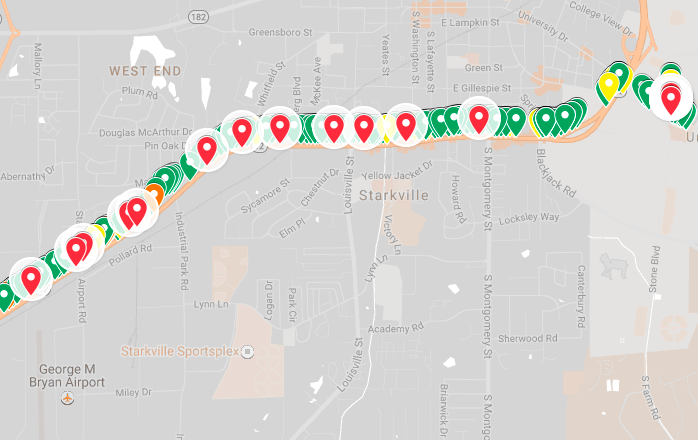
Then, you can choose your own way of dealing with data. For example, you can easily create a visualization using [Google My Maps](https://www.google.com/mymaps):
## API
If you want to write a different conversion (e.g. to JSON), there is a separate `wffParser.js` file you can take advantage of.
Parse a WFF KML file:
```js
// parser is installed with wff2csv
const wffParser = require('wff2csv/wffParser')
const wifiData = wffParser
.parseFile('WiFiFoFum_Log_586.kml')
.then(data => console.log(data))
```
Logs:
```js
[{
essid: '',
macAddress: '',
channel: '',
security: '',
type: '',
latitude: '',
longitude: '',
elevation: ''
}]
```
## Install
With [npm](https://npmjs.org/) installed:
Install for system-wide usage:
```bash
$ npm install -g wff2csv
```
Install for API/parser usage:
```bash
$ npm install --save wff2csv
```
## License
MPL-2.0