https://github.com/bleachbit/bleachbit
BleachBit system cleaner for Windows and Linux
https://github.com/bleachbit/bleachbit
antiforensics bleachbit ccleaner-alternative cleaner cross-platform desktop-app disk-cleaner free gplv3 gui linux linux-desktop open-source privacy python security system-cleaner tui windows windows-desktop
Last synced: 3 days ago
JSON representation
BleachBit system cleaner for Windows and Linux
- Host: GitHub
- URL: https://github.com/bleachbit/bleachbit
- Owner: bleachbit
- License: gpl-3.0
- Created: 2014-03-10T01:40:31.000Z (over 12 years ago)
- Default Branch: master
- Last Pushed: 2026-10-13T19:56:25.000Z (8 days ago)
- Last Synced: 2026-10-13T19:57:51.780Z (8 days ago)
- Topics: antiforensics, bleachbit, ccleaner-alternative, cleaner, cross-platform, desktop-app, disk-cleaner, free, gplv3, gui, linux, linux-desktop, open-source, privacy, python, security, system-cleaner, tui, windows, windows-desktop
- Language: Python
- Homepage: https://www.bleachbit.org
- Size: 31.8 MB
- Stars: 7,105
- Watchers: 59
- Forks: 460
- Open Issues: 331
-
Metadata Files:
- Readme: README.md
- Funding: .github/FUNDING.yml
- License: COPYING
Awesome Lists containing this project
- awesome-python - bleachbit/bleachbit - BleachBit system cleaner for Windows and Linux (User Interface / Applications and End User Tools)
- awesome-python-applications - Repo
- fucking-Awesome-Linux-Software - ](https://github.com/bleachbit/bleachbit/stargazers/) (Uncategorized / Uncategorized)
- awesome-anti-forensic - BleachBit
- awesome-kde - bleachbit - powerful cache cleaner (Third party applications / Administration)
- definitive-opensource - BleachBit
- awesome-software - bleachbit - 文件清理。 `跨平台` `GPL-3.0`    (系统工具 / 清理与卸载)
- jimsghstars - bleachbit/bleachbit - BleachBit system cleaner for Windows and Linux (Python)
- awesome-useful-projects - <img src="https://icon.horse/icon/github.com" height="20px" align="center"/>/bleachbit/bleachbit - System cleaner for Windows and Linux (Useful)
- awesome-linux-software - .
## Links
* [BleachBit home page](https://www.bleachbit.org)
* [Support](https://www.bleachbit.org/help)
* [Documentation](https://docs.bleachbit.org)
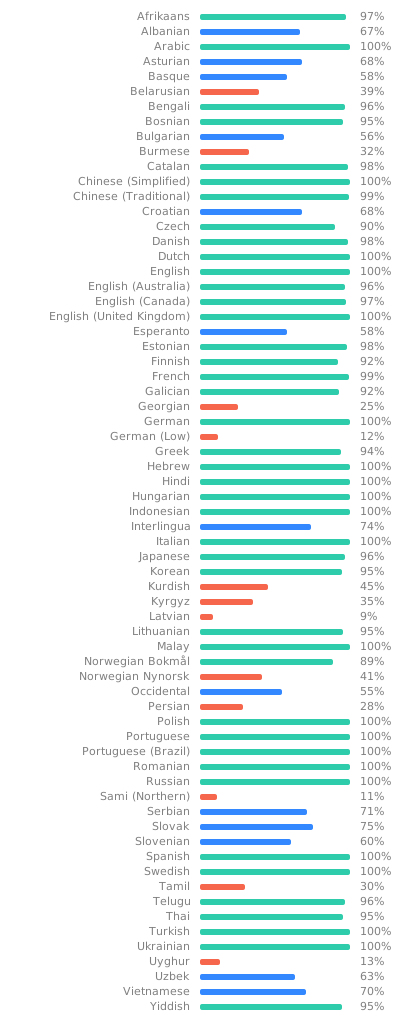
## Localization
Read [translation documentation](https://www.bleachbit.org/contribute/translate) or translate now in [Weblate](https://hosted.weblate.org/projects/bleachbit/), a web-based translation platform.
## Licenses
BleachBit itself, including source code and cleaner definitions, is licensed under the [GNU General Public License version 3](COPYING), or at your option, any later version.
markovify is licensed under the [MIT License](https://github.com/jsvine/markovify/blob/master/LICENSE.txt).
## Development
To develop, run the test suite, or build packages, install the
extra build/test/lint/packaging tools too:
```sh
make install-deps-dev
```
Common commands include:
```sh
make tests # run tests
make lint # check .py and .sh files for issues
make pretty # format .py and .xml files
```
More resources:
* [](https://github.com/bleachbit/bleachbit/actions/workflows/build_and_test.yaml)
* [](https://github.com/bleachbit/bleachbit/actions/workflows/test_macos.yaml)
* [CleanerML Repository](https://github.com/bleachbit/cleanerml)
* [BleachBit Miscellaneous Repository](https://github.com/bleachbit/bleachbit-misc)
* [Winapp2.ini Repository](https://github.com/bleachbit/winapp2.ini)
### Docker-based Linux builds
The `docker/build.sh` script sets up a container, runs `make tests`,
and builds packages for a selected distribution. Usage:
```sh
./docker/build.sh # distro is one of {debian, fedora, opensuse}
```
Artifacts are copied to `./docker-artifacts/` on the host.