https://github.com/blockmason/deployment-tracker-demo
Demo app for Blockmason Link, for infrastructure deployment management and monitoring.
https://github.com/blockmason/deployment-tracker-demo
blockmason-link demo-app devops devops-workflow javascript react
Last synced: 3 months ago
JSON representation
Demo app for Blockmason Link, for infrastructure deployment management and monitoring.
- Host: GitHub
- URL: https://github.com/blockmason/deployment-tracker-demo
- Owner: blockmason
- License: mit
- Created: 2019-05-14T17:50:37.000Z (about 7 years ago)
- Default Branch: master
- Last Pushed: 2022-12-09T02:48:11.000Z (over 3 years ago)
- Last Synced: 2025-10-30T17:54:25.736Z (8 months ago)
- Topics: blockmason-link, demo-app, devops, devops-workflow, javascript, react
- Language: JavaScript
- Homepage: https://blockmason.link/
- Size: 1.93 MB
- Stars: 0
- Watchers: 2
- Forks: 0
- Open Issues: 10
-
Metadata Files:
- Readme: README.md
- License: LICENSE.md
Awesome Lists containing this project
README
# Deployment Tracker
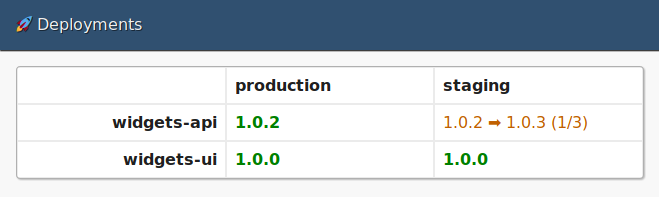
This demo app illustrates how Blockmason Link can be used to build a
dashboard for your team showing the currently deployed versions of
services across your infrastructure. It serves as a reference
implementation for those who may want to build a similar app using
Blockmason Link.
## Usage
> 💡 **Note:** This app requires some configuration before launching.
> See the *Configuration* section below for details.
To launch this app:
1. Clone the repo via `git clone https://github.com/blockmason/deployment-tracker-demo.git`.
2. Switch to the repo's directory and run `yarn install` to install its dependencies.
3. Run `yarn start` to launch the app at https://localhost:1234.
## Configuration
In order to get data to appear on the dashboard, you will need to
create an account at https://mason.link/. Sign up is free and should
only take a minute.
Once you are signed in to Link, you should see an IDE with some sample
code in it. Copy and paste the contents of this repo's
**contracts/DeploymentTracker.sol** file into the editor and save it.
At the bottom of this editor is a **Client ID** and **Client Secret**.
You can use these credentials to initialize the [Link SDK](https://www.npmjs.com/package/@blockmason/link-sdk)
in **src/index.js**.
## Managing Deployments
Deployments will not appear in this app until there is at least one
deployment to the monitored apps and environments specified in
**src/redux/actions/list-apps/index.js** and
**src/redux/actions/list-environments/index.js**, respectively.
In a Node.js console within this repo, the following snippet will
populate your project with sample deployment data:
```javascript
const { link } = require('@blockmason/link-sdk');
const project = link({
clientId: '',
clientSecret: ''
});
Promise.all([
project.post('/setAppLabel', { id: 1, label: 'widgets-api' }),
project.post('/setEnvironmentLabel', { id: 1, label: 'staging' }),
project.post('/startDeployment', { app: 1, environment: 1, version: '1.0.0' })
]).then((results) => {
console.log(results);
}).catch((error) => {
console.error(error);
});
```