https://github.com/blopa/magento-order-status-image
A simple way to show to your customer it's order status.
https://github.com/blopa/magento-order-status-image
Last synced: about 1 year ago
JSON representation
A simple way to show to your customer it's order status.
- Host: GitHub
- URL: https://github.com/blopa/magento-order-status-image
- Owner: blopa
- Created: 2014-12-27T05:41:30.000Z (over 11 years ago)
- Default Branch: master
- Last Pushed: 2014-12-27T05:57:07.000Z (over 11 years ago)
- Last Synced: 2025-02-14T05:29:41.864Z (over 1 year ago)
- Size: 227 KB
- Stars: 12
- Watchers: 5
- Forks: 5
- Open Issues: 0
-
Metadata Files:
- Readme: README.md
Awesome Lists containing this project
README
Magento-Order-Status-Image
==========================
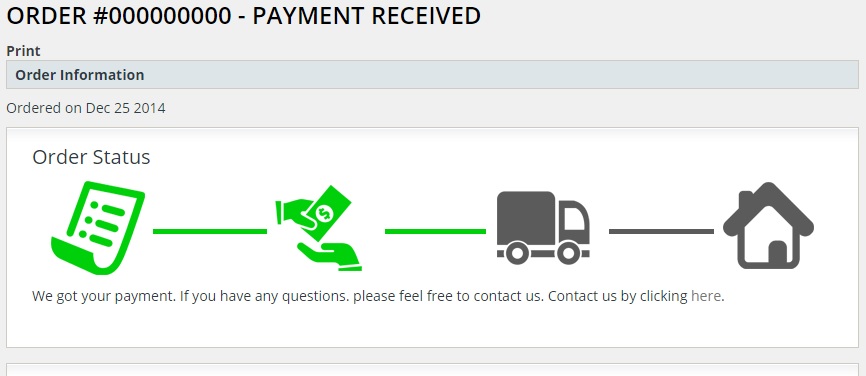
Better Order Status on Order Page
This module uses a better/cuttier way to display order status on customer order page view.
## Screenshot
## Instalation
1. Open the file ```path/to/magento/app/design/frontend/default/default/template/sales/order/info.phtml``` and around line 52, right after div ```order-info``` add the code ```getLayout()->createBlock('core/template')->setTemplate('werules/orderstatus/status.phtml')->toHtml(); ?>```.
2. Upload the content from Magento-Root folder to your magento root directory
3. As you can see on file ```Magento-Root/app/design/frontend/base/default/template/werules/orderstatus/status.phtml``` around line 30 I'm using a lot of custom order status. You will need to add your on custom status for this to work, you can easily do that by going to magento admin panel and creating your own custom status.
Now you are ready to go!
## Obs
It's possible that you have a custom template and it will not use the standard info.phtml from magendo base, so you need to check which file you're using to edit, you can easily do that by switching on the template hints on magento admin panel