https://github.com/blueandi/smartmeter
Smartmeter with S0 input
https://github.com/blueandi/smartmeter
esphome esphome-config s0 smartmeter
Last synced: 6 months ago
JSON representation
Smartmeter with S0 input
- Host: GitHub
- URL: https://github.com/blueandi/smartmeter
- Owner: BlueAndi
- License: mit
- Created: 2025-04-11T19:04:39.000Z (over 1 year ago)
- Default Branch: main
- Last Pushed: 2025-08-29T08:51:20.000Z (11 months ago)
- Last Synced: 2025-08-29T12:29:51.652Z (11 months ago)
- Topics: esphome, esphome-config, s0, smartmeter
- Homepage:
- Size: 9.77 KB
- Stars: 0
- Watchers: 1
- Forks: 0
- Open Issues: 0
-
Metadata Files:
- Readme: README.md
- License: LICENSE
Awesome Lists containing this project
README
# smartmeter
A REST API server and MQTT client which provides the power and energy consumption, which uses 2 S0 interfaces.
Its the successor project of [avr-net-io-smartmeter](https://github.com/BlueAndi/avr-net-io-smartmeter). Homeassistant MQTT automatic device discovery is supported as well.
[](http://choosealicense.com/licenses/mit/)
[](https://www.repostatus.org/#active)
[](https://github.com/BlueAndi/smartmeter/releases)
- [Motivation](#motivation)
- [Hardware](#hardware)
- [Deployment](#deployment)
- [Software](#software)
- [Installation](#installation)
- [Build](#build)
- [Flash to target and monitor](#flash-to-target-and-monitor)
- [API Endpoints and MQTT Topics](#api-endpoints-and-mqtt-topics)
- [Used Libraries](#used-libraries)
- [Issues, Ideas And Bugs](#issues-ideas-and-bugs)
- [License](#license)
- [Contribution](#contribution)
## Motivation
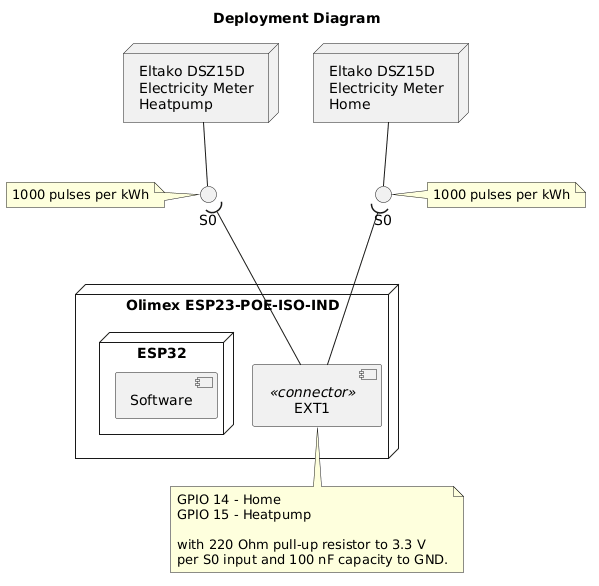
The idea was to have a simple way to get the power consumption of the heatpump and the rest of the house. The data shall be provided over REST-API and MQTT, as well as to Homeassistant.
## Hardware
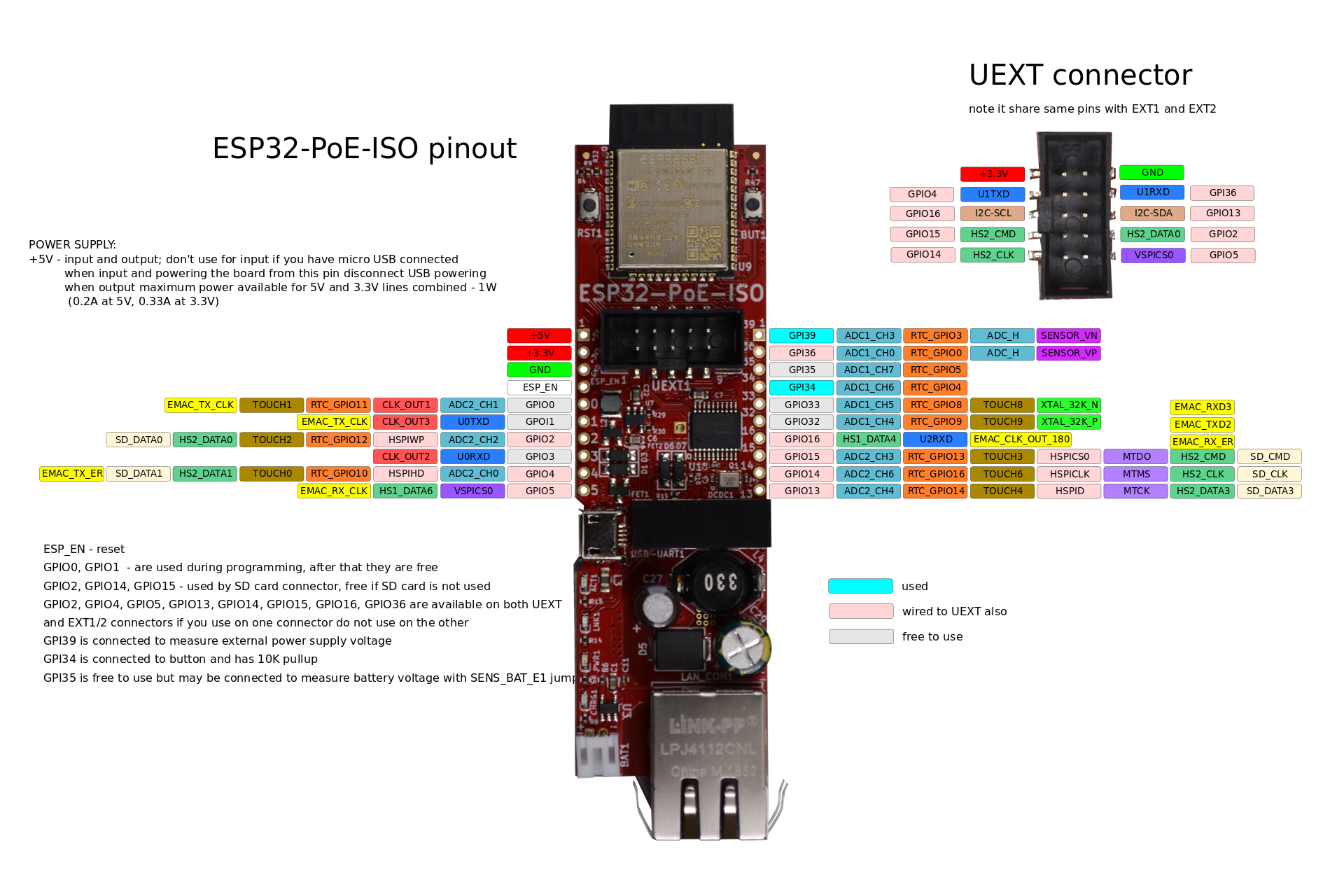
The [Olimex ESP32-POE-ISO](https://www.olimex.com/Products/IoT/ESP32/ESP32-POE-ISO/open-source-hardware) board with the RS-232 level shifter [Olimex MOD-RS232](https://www.olimex.com/Products/Modules/Interface/MOD-RS232/open-source-hardware) is used.
## Deployment
## Software
ESPHome is used as the base of the software.
### Installation
1. Install Python.
2. Setup [virtual environment](https://docs.python.org/3/library/venv.html).
```bash
python -m venv .venv
```
3. Activate virtual environment.
- Windows CMD: ```.venv\Scripts\activate.bat```
- Windows PowerShell: ```.venv\Scripts\activate.ps1```
- Linux: ```.venv/Scripts/activate```
4. Install packages.
```bash
pip install -r requirements.txt
```
5. Create a ```secrets.yaml``` in the project root folder. Replace **my_user** and **my_password** according to the MQTT broker credentials.
```yaml
mqtt_user: my_user
mqtt_password: my_password
```
### Build
```bash
esphome compile smartmeter.yaml
```
### Flash to target and monitor
```bash
esphome run smartmeter.yaml
```
## API Endpoints and MQTT Topics
| **Name** | **Description** | **REST API** | **MQTT Topic** |
|------------|-----------------|---------------------------------------|------------------------------------------|
| **s0-1** | S0-interface | `http:///sensor/s0_1` | `heatpumpctrl/sensor/s0_1/state` |
| **s0-2** | S0-interface | `http:///sensor/s0_2` | `heatpumpctrl/sensor/s0_2/state` |
## Used Libraries
| Library | Description | License |
| - | - | - |
| [ESPHome](https://github.com/esphome/esphome) | ESPHome | MIT and GPLv3 |
## Issues, Ideas And Bugs
If you have further ideas or you found some bugs, great! Create a [issue](https://github.com/BlueAndi/smartmeter/issues) or if you are able and willing to fix it by yourself, clone the repository and create a pull request.
## License
The whole source code is published under the [MIT license](http://choosealicense.com/licenses/mit/).
Consider the different licenses of the used third party libraries too!
## Contribution
Unless you explicitly state otherwise, any contribution intentionally submitted for inclusion in the work by you, shall be licensed as above, without any additional terms or conditions.