https://github.com/bmeurer/XCasts-color-theme-for-Xcode-4
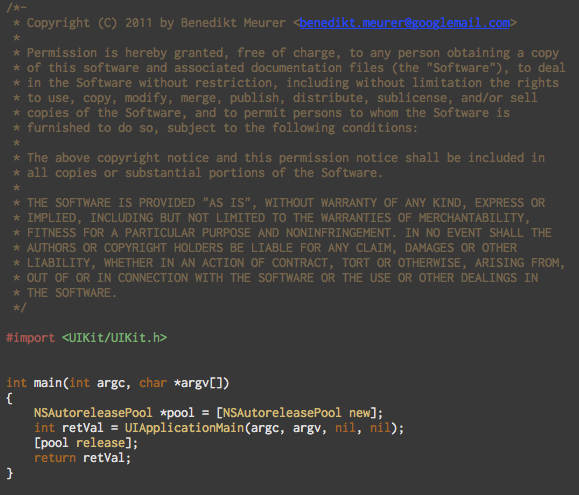
This is my Xcode 4 version of Ben Scheirman's XCasts color theme for Xcode 3.
https://github.com/bmeurer/XCasts-color-theme-for-Xcode-4
Last synced: 11 months ago
JSON representation
This is my Xcode 4 version of Ben Scheirman's XCasts color theme for Xcode 3.
- Host: GitHub
- URL: https://github.com/bmeurer/XCasts-color-theme-for-Xcode-4
- Owner: bmeurer
- Created: 2011-06-19T14:38:16.000Z (about 15 years ago)
- Default Branch: master
- Last Pushed: 2015-01-02T05:49:19.000Z (over 11 years ago)
- Last Synced: 2025-03-16T09:27:08.245Z (over 1 year ago)
- Homepage: http://benediktmeurer.de/2011/06/19/xcasts-color-theme-for-xcode4
- Size: 203 KB
- Stars: 5
- Watchers: 1
- Forks: 0
- Open Issues: 0
-
Metadata Files:
- Readme: README.md
Awesome Lists containing this project
README
# About
This is my Xcode 4 version of Ben Scheirman's [XCasts color theme for Xcode
3](http://flux88.com/2010/05/my-xcode-theme/), a dark theme loosely based on
[Ryan Bates](http://railscasts.com/)' excellent [Railscasts theme for
Textmate](http://railscasts.com/about).
# Installation
* Download and install the [Inconsolata](http://www.levien.com/type/myfonts/inconsolata.html) font.
* Place the file `XCasts.dvtcolortheme` into the directory `~/Library/Developer/Xcode/UserData/FontAndColorThemes/`.
* Restart Xcode.
* Open `XCode | Preferences | Fonts & Colors` and select the `XCasts` theme.