https://github.com/bmwant/leak
Show info about package releases on PyPI.
https://github.com/bmwant/leak
cli cli-app helpers package-management python python3 tools utility
Last synced: 11 months ago
JSON representation
Show info about package releases on PyPI.
- Host: GitHub
- URL: https://github.com/bmwant/leak
- Owner: bmwant
- License: mit
- Created: 2016-01-19T08:06:44.000Z (over 10 years ago)
- Default Branch: main
- Last Pushed: 2025-06-26T08:40:32.000Z (about 1 year ago)
- Last Synced: 2025-08-08T04:46:12.979Z (11 months ago)
- Topics: cli, cli-app, helpers, package-management, python, python3, tools, utility
- Language: Python
- Homepage: https://bmwant.link/leak-package/
- Size: 844 KB
- Stars: 15
- Watchers: 1
- Forks: 2
- Open Issues: 0
-
Metadata Files:
- Readme: README.md
- Changelog: CHANGELOG.md
- License: LICENSE
Awesome Lists containing this project
README
## leak
[](https://pypi.org/project/leak/)
[](https://pepy.tech/project/leak)
[](https://pypi.org/project/leak/#files)
[](https://tldrlegal.com/license/mit-license)
[](https://pypi.org/project/leak/)
[](https://github.com/astral-sh/ruff)
[](https://github.com/bmwant/leak/actions/workflows/unittests.yml)
Show info about package releases on PyPI.
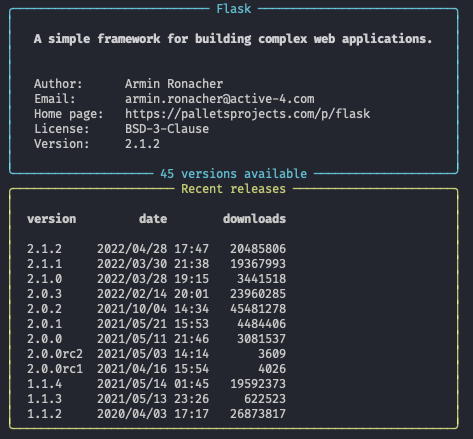
If you need to install specific version of package it is useful to know all available versions to have a choice.
Just run
```bash
leak
# e.g.
leak pyramid
# show all available releases
leak django --all
```
and you will see releases and some useful statistic about package specified. It will show most recent version, most popular (with highest number of downloads) and some additional information.
### How to install
Install using pip
```bash
pip install leak
# or to make sure the proper interpreter is used
python -m pip install leak
```
or upgrade existing version
```bash
pip install --upgrade leak
# or with pip invoked as a module
python -m pip install --upgrade leak
leak --version
```
### Obtaining downloads data
It is possible to get downloads statistics for the target package by using third-party [pepy.tech](https://pepy.tech/) provider.
Create your own [API key](https://pepy.tech/pepy-api)(note that free one is a subject to some limitations) and configure it like shown below
```bash
# for the current shell session through the environment
export LEAK_API_KEY=
# or store it within a configuration file
leak --set api-key=
```
In case you are not interested in this data, and want to hide the warning displayed, run
```bash
leak --set show-downloads=false
# to enable it back once you have an api key
leak --set show-downloads=true
```
### Contribution
See [DEVELOP.md](https://github.com/bmwant/leak/blob/main/DEVELOP.md) to setup your local development environment and create pull request to this repository once new feature is ready.
### Releases
See [CHANGELOG.md](https://github.com/bmwant/leak/blob/main/CHANGELOG.md) for the new features included within each release.
### License
Distributed under [MIT License](https://tldrlegal.com/license/mit-license).
### Acknowledgement
🍋 [podmena](https://github.com/bmwant/podmena) for providing nice emoji icons to commit messages.
🐍 [PePy](https://pepy.tech/) for providing statistics about downloads.
🇺🇦 🇺🇦 🇺🇦 We would also thank the Armed Forces of Ukraine for providing security to perform this work. This work has become possible only because of resilience and courage of the Ukrainian Army.