https://github.com/bobhageman/pinlogin
Javascript cross-browser and flexible pincode login input experience
https://github.com/bobhageman/pinlogin
code-login javascript-library javascript-plugin jquery-plugin login login-script pincode pincode-login pincode-registration pinlogin
Last synced: about 1 year ago
JSON representation
Javascript cross-browser and flexible pincode login input experience
- Host: GitHub
- URL: https://github.com/bobhageman/pinlogin
- Owner: bobhageman
- License: mit
- Created: 2019-07-09T09:35:43.000Z (about 7 years ago)
- Default Branch: master
- Last Pushed: 2022-12-04T05:15:55.000Z (over 3 years ago)
- Last Synced: 2025-06-11T20:55:37.377Z (about 1 year ago)
- Topics: code-login, javascript-library, javascript-plugin, jquery-plugin, login, login-script, pincode, pincode-login, pincode-registration, pinlogin
- Language: JavaScript
- Size: 335 KB
- Stars: 14
- Watchers: 0
- Forks: 5
- Open Issues: 10
-
Metadata Files:
- Readme: README.md
- License: LICENSE
Awesome Lists containing this project
README
# Pinlogin
Component to create a cross-device pincode login experience.
The number of pincode input fields are configurable and the plugin is made in such way that it's able to tackle most usecases. After entering a complete pin code the 'complete' callback will be fired which gives you the possibility to do any further processing. No form or hidden input fields are used to give you the freedom of choice how to handle the pincode input. It is also possible to have multiple instances so you can have a 'registration' procedure where the user needs to enter the pincode twice. How this works is visible in the demo.
This is a remake of the [jQuery-Pinlogin](https://github.com/bobhageman/jquery-pinlogin) plugin I created a while ago, but now built to be independent of jQuery while it is still possible to use it as a jQuery plugin.
## Demo
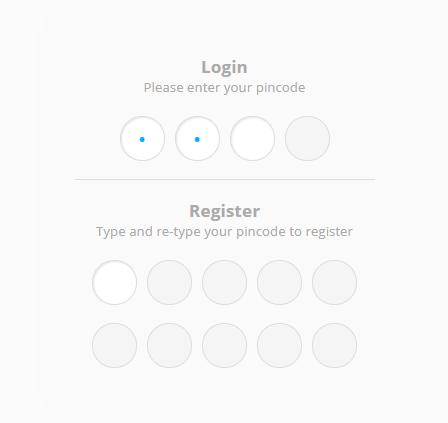
A screenshot of the plugins pincode input fields with single instance to illustrate a login procedure and two instances for registration purposes:
For a working example go to:
https://www.mybo.nu/static/pinlogin/
Or go to the `demo` folder and view the contents of the `index.html` file.
## Install
You can use Pinlogin using different methods; with or without jQuery:
### NPM
1. Install with one simple command in your project using [npm](https://www.npmjs.com/):
`npm install --save pinlogin`
2. Call the plugin:
```javascript
var pinlogin = new Pinlogin(document.querySelector('#element'), {
fields: 5,
complete : function(pin){
alert ('Awesome! You entered: ' + pin);
// further processing here
}
});
```
### Standalone, without jquery
1. Include code:
```html
```
2. Include css:
```html
```
3. Call the plugin:
```javascript
var pinlogin = new Pinlogin(document.querySelector('#element'), {
fields: 5,
complete : function(pin){
alert ('Awesome! You entered: ' + pin);
// further processing here
}
});
```
### Standalone, as a jQuery plugin
1. Include jQuery:
```html
```
2. Include plugin's code:
```html
```
2. Include plugin's css:
```html
```
3. Call the plugin:
```javascript
var pinlogin = $("#element").pinlogin({
fields: 5,
complete : function(pin){
alert ('Awesome! You entered: ' + pin);
// further processing here
}
});
```
## Usage
### fields
Number. Default `5`
The amount of pincode input fields where the user needs to enter a pin code.
### placeholder
String. Default `•`
Contains the placeholder that's displayed instead of the entered digits. You can use special characters, but if you do make sure your HTML page is properly encoded. For example UTF8:
```html
```
### autofocus
Boolean. Default `true`.
When the plugin is loaded, automatically focus on the first input field.
### hideinput
Boolean. Default `true`.
Hides or displays the user entered digits in the input field. When enabled, the caharacter in `placeholder` immediately replaces the entered digit.
### reset
Boolean. Default `true`.
When true, this resets all input fields when filled.
### pattern
String. Default `^[0-9]*$`.
A regular expression that is used to match the entered value in the input field. If no match, the entered value will be considered incorrect.
### copypaste
Boolean. Default `true`.
This determines whether it is possible to paste a copied pincode into the pinlogin fields. It also checks for invalid input using the `pattern`. Note that this will only work when:
* it is pasted into the first field
* the length of the pasted string is exact the same as the number of fields
### complete
Callback function that will fire when all input fields are filled.
Passed parameters:
* ```pin``` String. The entered pincode.
```javascript
$('#element').pinlogin({
complete : function(pin){
console.log('You entered: ' + pin);
}});
```
### invalid
Callback function that will fire when user enters an invalid character in a pincode field.
Passed parameters:
* ```field``` Element. The object of the field that's invalid.
* ```nr``` Number. The number of the field that's invalid (start counting at 0).
```javascript
$('#element').pinlogin({
invalid : function(field, nr){
console.log('The field with nr : ' + nr + ' contains an invalid character');
}});
```
### keydown
Callback function that will fire when user presses the key, and right before it reaches the pincode field.
Passed parameters:
* ```e``` Event. The 'keydown' event.
* ```field``` Element. The object of the field that's getting the keydown.
* ```nr``` Number. The number of the field that's getting the keydown (start counting at 0).
```javascript
$('#element').pinlogin({
keydown : function(e, field, nr){
console.log('The field with nr : ' + nr + ' is about to get a value');
}});
```
## Public methods
If you assign Pinlogin to a variable the jQuery element to a variable, for example `var pinlogin = new Pinlogin(...);` it's possible to use some public methods, explained below, so you can alter the behaviour of Pinlogin. Look at the demo to see an example use case for the usage of the public methods described below.
### pinlogin.getFieldId(nr)
Returns the ID of the field
Parameters:
* ```nr``` Number. The number of the fields' ID to be returned (start counting at 0).
### pinlogin.getField(nr)
Returns the field Object
Parameters:
* ```nr``` Number. The number of the fields' Object to be returned (start counting at 0).
### pinlogin.reset()
Resets the whole instance and all the input fields.
### pinlogin.resetField(nr)
Reset a single input field.
Parameters:
* ```nr``` Number. The number of the field that will be reset (start counting at 0).
### pinlogin.disable()
Disables the whole instance and all the input fields.
### pinlogin.disableField(nr)
Disable a single input field.
Parameters:
* ```nr``` Number. The number of the field that will be disabled (start counting at 0).
### pinlogin.enable()
Enables the whole instance and all the input fields.
### pinlogin.enableField(nr)
Enable a single input field.
Parameters:
* ```nr``` Number. The number of the field that will be enabled (start counting at 0).
### pinlogin.focus(nr)
Focus on the specified input field.
Parameters:
* ```nr``` Number. The number of the field that will recieve focus (start counting at 0).
### pinlogin.validateInput(nr)
Validates the input of the specified field using `pattern`.
Parameters:
* ```nr``` Number. The number of the field that will recieve focus (start counting at 0).
## License
[MIT License](https://opensource.org/licenses/mit-license) © Bob Hageman