https://github.com/bobymcbobs/ucore-k8s
ucore with a strict repo-only Sigstore container images policy, kubeadm and kata-containers
https://github.com/bobymcbobs/ucore-k8s
bootc kata-containers kubernetes rpm-ostree sigstore ublue-os ucore
Last synced: 10 months ago
JSON representation
ucore with a strict repo-only Sigstore container images policy, kubeadm and kata-containers
- Host: GitHub
- URL: https://github.com/bobymcbobs/ucore-k8s
- Owner: BobyMCbobs
- License: apache-2.0
- Created: 2025-02-17T20:15:12.000Z (over 1 year ago)
- Default Branch: main
- Last Pushed: 2025-05-05T10:25:25.000Z (about 1 year ago)
- Last Synced: 2025-06-08T16:06:04.581Z (about 1 year ago)
- Topics: bootc, kata-containers, kubernetes, rpm-ostree, sigstore, ublue-os, ucore
- Language: Just
- Homepage: https://github.com/BobyMCbobs/ucore-k8s
- Size: 422 KB
- Stars: 0
- Watchers: 1
- Forks: 0
- Open Issues: 3
-
Metadata Files:
- Readme: README.md
- License: LICENSE
Awesome Lists containing this project
README
# ucore-k8s
# Purpose
Deliver Kubernetes on Fedora CoreOS to test out container runtime classes and only run containers signed using Sigstore.
[Talos](https://talos.dev) is suitable for production, not this!
This is an experiment. Do not use it!
# Components
- Kubernetes
- best way to run containers in production
- CRI-O
- it supports container runtime classes
- it supports verifying container images and rejecting unsigned ones
- Kata-Containers
- it provides a tighter level of isolation than runc
# TODOs
- [x] vendor and sign select container images to run
- `kubeadm config images list`
- cert-manager
- knative-operator
- knative-serving
- net-kourier
- cgr.dev/chainguard/nginx:latest
- [ ] fix (needed?) kata osbuilder generate
# Installation
Boot up Fedora CoreOS 41 on amd64.
Use the following commands as root to switch to the image
``` bash
bootc switch --enforce-container-sigpolicy --transport registry ghcr.io/bobymcbobs/ucore-k8s:latest
```
Reboot
``` bash
systemctl reboot
```
# Vendoring container images
All container images run on ucore-k8s must be signed by the private key related to this repo.
This is a handy script to discover images that need to be run, vendor them (this is where you validate them or build them from scratch in a production environment) and sign them with the private key. See:
```bash
./sync-and-sign-images.sh
```
# Bootstrapping Kubernetes
Using kubeadm:
``` bash
kubeadm init --config /etc/kubernetes/init-config.yaml
```
Allow scheduling
``` bash
kubectl taint node node-role.kubernetes.io/control-plane- --all
```
# Deploying stuff
Render config (on machine with `kustomize` installed)
``` bash
kustomize build config/ > ./deploy-config.yaml
```
Apply it
``` bash
kubectl apply -f ./deploy-config.yaml
```
Patch Kourier's ExternalIPs (grossly on target machine; this is a test)
``` bash
kubectl -n knative-serving patch svc/kourier -p "{\"spec\":{\"externalIPs\":[\"$(hostname -I | awk '{print $1}')\"]}}"
```
# Prerequisites
Working knowledge in the following topics:
- Containers
- https://www.youtube.com/watch?v=SnSH8Ht3MIc
- https://www.mankier.com/5/Containerfile
- bootc
- https://containers.github.io/bootc/
- Fedora Silverblue (and other Fedora Atomic variants)
- https://docs.fedoraproject.org/en-US/fedora-silverblue/
- Github Workflows
- https://docs.github.com/en/actions/using-workflows
# How to Use
## Workflows
### build.yml
This workflow creates your custom OCI image and publishes it to the Github Container Registry (GHCR). By default, the image name will match the Github repository name.
#### Container Signing
Container signing is important for end-user security and is enabled on all Universal Blue images. It is recommended you set this up, and by default the image builds *will fail* if you don't.
This provides users a method of verifying the image.
1. Install the [cosign CLI tool](https://edu.chainguard.dev/open-source/sigstore/cosign/how-to-install-cosign/#installing-cosign-with-the-cosign-binary)
2. Run inside your repo folder:
```bash
cosign generate-key-pair
```
- Do NOT put in a password when it asks you to, just press enter. The signing key will be used in GitHub Actions and will not work if it is encrypted.
> [!WARNING]
> Be careful to *never* accidentally commit `cosign.key` into your git repo.
3. Add the private key to GitHub
- This can also be done manually. Go to your repository settings, under Secrets and Variables -> Actions
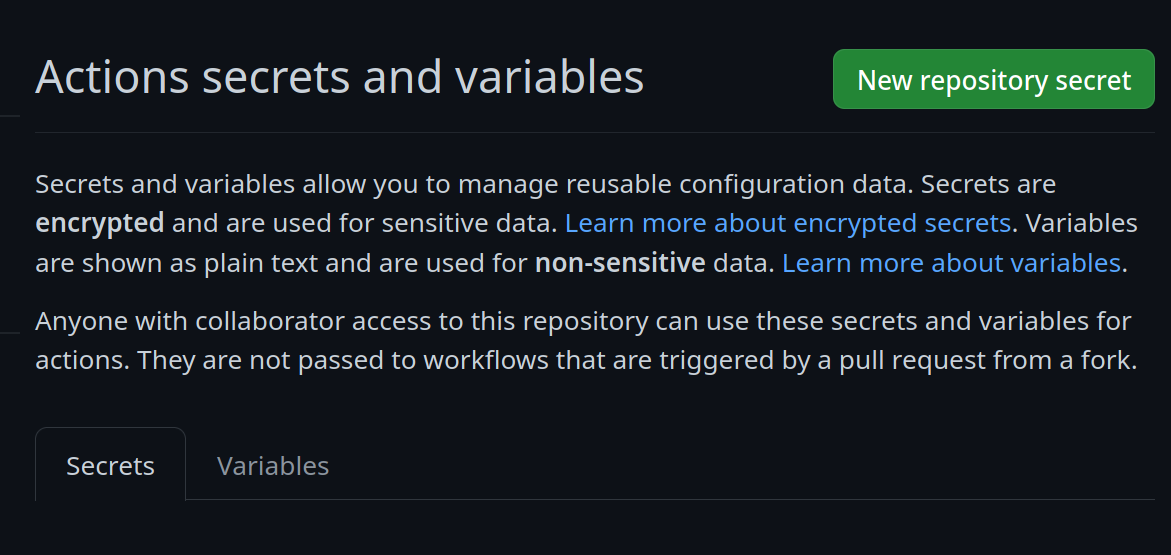
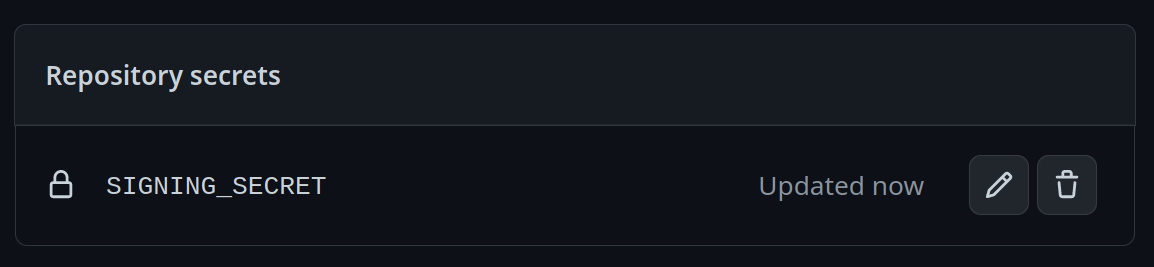
Add a new secret and name it `SIGNING_SECRET`, then paste the contents of `cosign.key` into the secret and save it. Make sure it's the .key file and not the .pub file. Once done, it should look like this:
- (CLI instructions) If you have the `github-cli` installed, run:
```bash
gh secret set SIGNING_SECRET < cosign.key
```
4. Commit the `cosign.pub` file to the root of your git repository.
# Community
- [**bootc discussion forums**](https://github.com/containers/bootc/discussions) - Nothing in this template is ublue specific, the upstream bootc project has a discussions forum where custom image builders can hang out and ask questions.
- Index your image on [artifacthub.io](https://artifacthub.io), use the `artifacthub-repo.yml` file at the root to verify yourself as the publisher. [Discussion thread](https://universal-blue.discourse.group/t/listing-your-custom-image-on-artifacthub/6446)
## Community Examples
- [m2os](https://github.com/m2giles/m2os)
- [bos](https://github.com/bsherman/bos)
- [homer](https://github.com/bketelsen/homer/)