https://github.com/boltops-tools/lono-v7
Lono v7
https://github.com/boltops-tools/lono-v7
Last synced: about 2 months ago
JSON representation
Lono v7
- Host: GitHub
- URL: https://github.com/boltops-tools/lono-v7
- Owner: boltops-tools
- License: other
- Created: 2022-02-21T15:34:36.000Z (over 4 years ago)
- Default Branch: v7
- Last Pushed: 2022-02-22T00:18:08.000Z (over 4 years ago)
- Last Synced: 2025-01-17T11:32:34.539Z (over 1 year ago)
- Language: Ruby
- Size: 5.97 MB
- Stars: 0
- Watchers: 1
- Forks: 0
- Open Issues: 0
-
Metadata Files:
- Readme: README.md
- Changelog: CHANGELOG.md
- Contributing: CONTRIBUTING.md
- License: LICENSE.txt
- Support: docs/support.md
Awesome Lists containing this project
README

# Lono

[](https://boltops.com?utm_source=badge&utm_medium=badge&utm_campaign=lono)
[](https://www.boltops.com)
Please **watch/star** this repo to help grow and support the project.
Lono is a CloudFormation framework. It builds, manages, and deploys CloudFormation templates.
## Lono Features
* Simple CLI interface to launch CloudFormation stacks.
* Ability to use [Existing CloudFormation Templates](https://lono.cloud/docs/existing-templates/).
* [The Lono DSL](https://lono.cloud/docs/dsl/) - Generate templates from beautiful code.
* Write your CloudFormation parameters with [simple env-like values](https://lono.cloud/docs/configs/params/).
* Preview CloudFormation changes before pressing the big red button.
* [Layering](https://lono.cloud/docs/core/layering/) - Allows you to build multiple environments like development and production with the same template.
* [Variables](https://lono.cloud/docs/layering/variables/) - Allows you to construct templates where runtime Parameters do not suffice.
* [Helpers](https://lono.cloud/docs/core/helpers/) - Allows you to extend Lono and simplify code.
* [Configsets](https://lono.cloud/docs/configsets/) - Configurement Management. Automatically configure EC2 instances with reuseable code.
See [lono.cloud](http://lono.cloud) for full lono documentation.
## Upgrading
If you are on version 6 and upgrading to 7. You can run [lono upgrade](https://lono.cloud/reference/lono-upgrade/) within your project. Refer to the [Upgrading Guide](https://lono.cloud/docs/extras/upgrading/).
## Quick Usage
It only takes a couple of commands to start using lono.
gem install lono
lono new infra
cd infra
lono blueprint new demo
lono cfn deploy demo
## DSL
Here's an example of what the Lono CloudFormation DSL looks like:
```ruby
description "Demo stack"
parameter("InstanceType", "t3.micro")
mapping("AmiMap",
"us-east-1": { Ami: "ami-0de53d8956e8dcf80" },
"us-west-2": { Ami: "ami-061392db613a6357b" }
)
resource("Instance", "AWS::EC2::Instance",
InstanceType: ref("InstanceType"),
ImageId: find_in_map("AmiMap", ref("AWS::Region"), "Ami"),
SecurityGroupIds: [get_att("SecurityGroup.GroupId")],
UserData: base64(user_data("bootstrap.sh"))
)
resource("SecurityGroup", "AWS::EC2::SecurityGroup",
GroupDescription: "demo security group",
)
output("Instance")
output("SecurityGroup", get_att("SecurityGroup.GroupId"))
```
### Lono Cfn Deploy
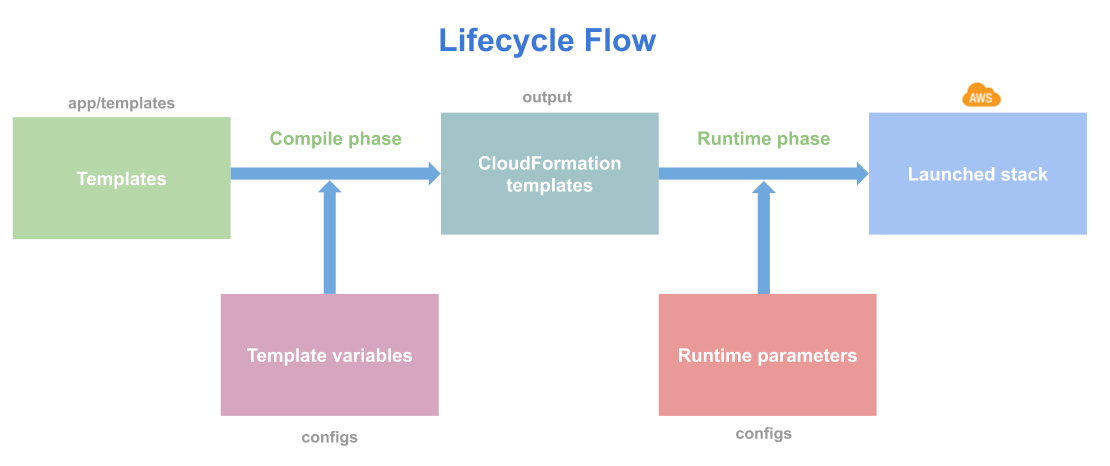
Lono provides a `lono cfn` lifecycle command that allows you to launch stacks quickly. The `lono cfn deploy` generates and launches the CloudFormation stack. If you are in a lono project and have a `demo` lono blueprint. To create a stack run:
$ lono cfn deploy demo
## Contributing
1. Fork it
2. Create your feature branch (`git checkout -b my-new-feature`)
3. Commit your changes (`git commit -am 'Add some feature'`)
4. Push to the branch (`git push origin my-new-feature`)
5. Create new Pull Request