https://github.com/boltuix/in_app_auto_updates
https://github.com/boltuix/in_app_auto_updates
Last synced: 10 months ago
JSON representation
- Host: GitHub
- URL: https://github.com/boltuix/in_app_auto_updates
- Owner: BoltUIX
- License: mit
- Created: 2023-03-18T14:31:50.000Z (over 3 years ago)
- Default Branch: main
- Last Pushed: 2023-03-19T05:47:45.000Z (over 3 years ago)
- Last Synced: 2024-12-26T03:25:32.022Z (over 1 year ago)
- Language: C++
- Size: 289 KB
- Stars: 0
- Watchers: 1
- Forks: 0
- Open Issues: 0
-
Metadata Files:
- Readme: README.md
- Changelog: CHANGELOG.md
- License: LICENSE
Awesome Lists containing this project
README
# in_app_auto_updates
Immediate updates are fullscreen UX flows that require the user to update and restart the app in order to continue using it. This UX flow is best for cases where an update is critical to the core functionality of your app. After a user accepts an immediate update, Google Play handles the update installation and app restart.
## Installation
1. Add the latest version of package to your pubspec.yaml (and run`dart pub get`):
```yaml
dependencies:
in_app_auto_updates: ^0.0.3
```
2. Import the package and use it in your Flutter App.
```dart
import 'package:in_app_auto_updates/in_app_auto_updates.dart';
```
3. Call this function in your widget
```dart
InAppUpdate().autoForceUpdate(); // Call this initState
```
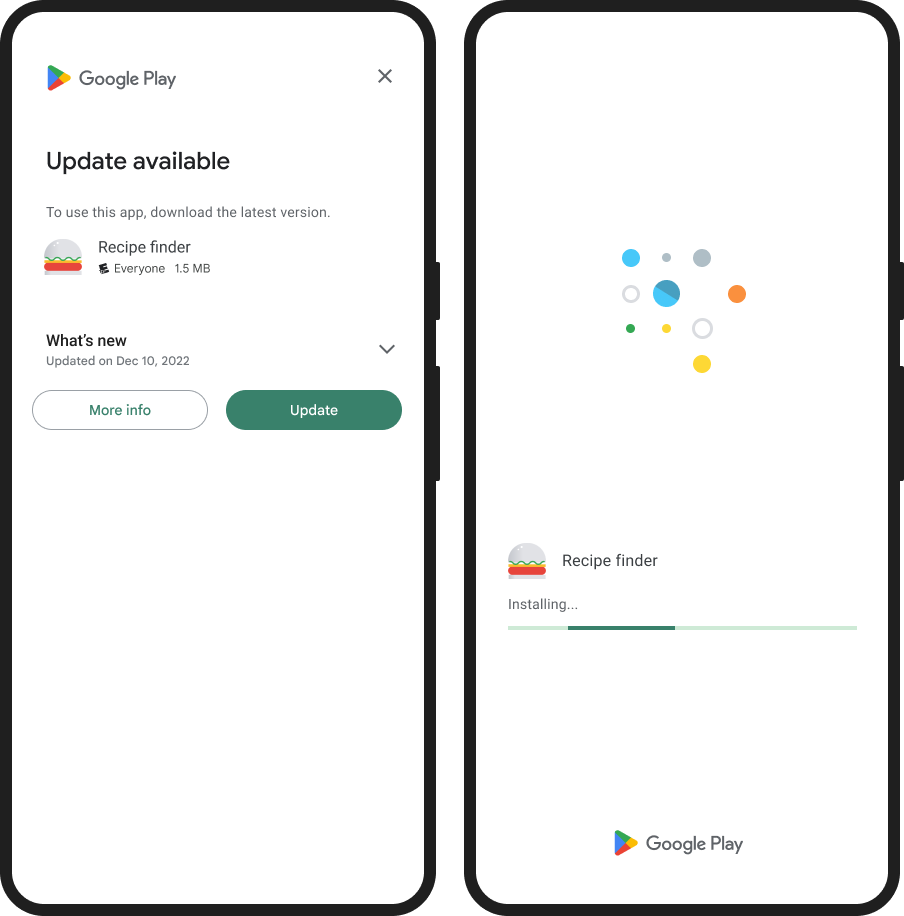
Please refer to the example app for guidance on how to use this plugin.
### Android
For Android devices, this plugin utilizes the official Android APIs for performing in-app updates that were released in 2019. You can find more information on this at:
https://developer.android.com/guide/app-bundle/in-app-updates.
### iOS
However, for iOS devices, there is no built-in functionality for in-app updates. As an alternative, you may want to consider using packages like https://pub.dev/packages/upgrader. If you attempt to use the methods provided by this plugin on an iOS device, you will receive a not-implemented exception.
# Troubleshooting
## Getting ERROR_API_NOT_AVAILABLE error
In case you encounter an ERROR_API_NOT_AVAILABLE error, please note that this plugin cannot be tested locally. It must be installed through Google Play in order to function properly. For more information on In-App Updates from Google, please refer to their official documentation:
https://developer.android.com/guide/playcore/in-app-updates/test