https://github.com/boneskull/meat
A WiFi Meat Thermometer for the ESP8266
https://github.com/boneskull/meat
Last synced: 12 months ago
JSON representation
A WiFi Meat Thermometer for the ESP8266
- Host: GitHub
- URL: https://github.com/boneskull/meat
- Owner: boneskull
- License: mit
- Archived: true
- Created: 2016-01-07T09:55:36.000Z (over 10 years ago)
- Default Branch: master
- Last Pushed: 2016-01-07T23:13:39.000Z (over 10 years ago)
- Last Synced: 2025-04-04T06:12:12.832Z (over 1 year ago)
- Language: CMake
- Homepage:
- Size: 23.4 KB
- Stars: 27
- Watchers: 7
- Forks: 1
- Open Issues: 1
-
Metadata Files:
- Readme: README.md
- License: LICENSE
Awesome Lists containing this project
README
# meat
> A WiFi Meat Thermometer for the ESP8266
I barbecue a lot. But getting the meat to *just* the right temperature always stresses me out, and I'm prone to checking it way too often.
Why drop $50 to $100 on a Bluetooth-enabled meat thermometer when you can make something arguably better for *pennies on the dollar*?!
Actually, I just wanted to see if I could do it myself.
So here's this, which uses WiFi for connectivity and [Blynk](http://blynk.cc) for an interface.
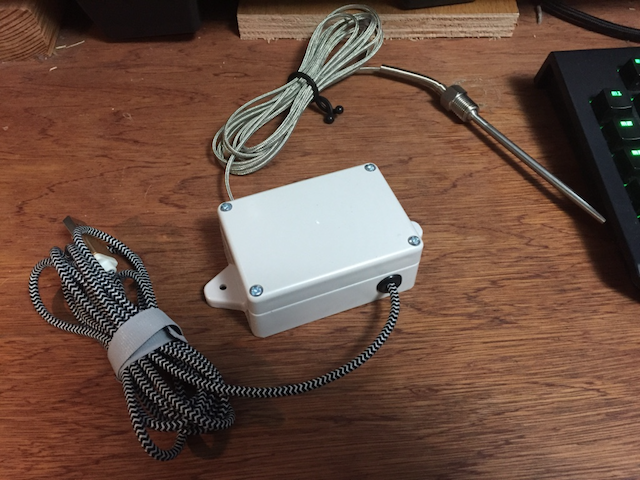
The stuff is in the box. Trust me!
## Components
- [WeMos D1 Mini](http://www.wemos.cc/wiki/doku.php?id=en:d1_mini): This is basically a smaller [NodeMCU dev board](http://nodemcu.com/index_en.html#fr_54747661d775ef1a3600009e).
- K-type thermocouple probe, such as [this](http://www.amazon.com/Probe-Thermocouple-Sensor-Temperature-Controller/dp/B00899A4LY/)
- [MAX6675](https://www.maximintegrated.com/en/products/analog/sensors-and-sensor-interface/MAX6675.html)-based breakout board, such as [this](http://www.electrodragon.com/product/max6675-breakout-board-for-thermocouple-genius-ic/)
- USB cable for power (to be used with USB wall adapter or whatever)
- Some watertight enclosure
- Assortment of M/F, M/M or F/F Dupont cables depending on your board's headers. I soldered female headers to the top of my D1 mini.
- (Optional) DHT22 ([datasheet](https://www.sparkfun.com/datasheets/Sensors/Temperature/DHT22.pdf)) breakout such as [this](http://www.play-zone.ch/en/dht22-am2302-digitaler-temperatur-und-feuchtigskeitssensor-breakout.html) for ambient temp and relative humidity
- (Optional) An itty-bitty breadboard such as [this](https://www.adafruit.com/products/2463) if necessary; the D1 Mini only has one exposed GND header
## Build
Wire it up and stuff it in the enclosure (see `src/main.cpp` for pin mappings). Oh, yeah--drill some holes first.
I'm unsure if the pins are 5V tolerant or not; there is a 5V output on the D1 Mini, but I'm scared to use it, so I connected both breakouts to 3.3V.
## Blynk
Go get [Blynk](http://blynk.cc) for your phone and make a Blynk app. This sketch uses virtual ports 7 and 8 for the main display and graph; it also uses virtual ports 0 and 1 for ambient temp and relative humidity, respectively.
Can you share Blynk apps? I don't know.
## Installation
1. Clone this repo.
2. Install [PlatformIO](http://platformio.org) if you haven't already:
```shell
$ pip install platformio
```
3. Modify `src/meat.h` with your credentials. There's probably a better way to do this, but I am stupid about these things.
4. Modify `platformio.ini` with any tweaks. I've built this for a WeMos D1 Mini, but it will likely work on other boards. If you can add support for another board, please send it my way!
5. To build, execute:
```
$ platformio run
```
6. To upload the sketch, plugin your device via USB (sorry, no OTA) and:
```
$ platformio run --target upload
```
## Notes
`src/main.cpp` is an Arduino sketch. See PlatformIO's docs for instructions on how to use this with various different IDEs; I used CLion.
## License
© 2016 [Christopher Hiller](https://boneskull.com). Licensed MIT.