https://github.com/boylesoftware/cody
Solution for publishing static websites using git from Amazon CodeCommit to S3.
https://github.com/boylesoftware/cody
Last synced: 11 months ago
JSON representation
Solution for publishing static websites using git from Amazon CodeCommit to S3.
- Host: GitHub
- URL: https://github.com/boylesoftware/cody
- Owner: boylesoftware
- License: mit
- Created: 2018-05-17T20:58:10.000Z (about 8 years ago)
- Default Branch: master
- Last Pushed: 2022-12-02T03:46:46.000Z (over 3 years ago)
- Last Synced: 2025-01-17T21:09:48.949Z (over 1 year ago)
- Language: JavaScript
- Homepage:
- Size: 812 KB
- Stars: 0
- Watchers: 3
- Forks: 0
- Open Issues: 15
-
Metadata Files:
- Readme: README.md
- License: LICENSE
Awesome Lists containing this project
README
# Cody
_Cody_ is an [Amazon Web Services](https://aws.amazon.com/) solution that automatically publishes content from a git repository in [AWS CodeCommit](https://aws.amazon.com/codecommit/) to an [Amazon S3](https://aws.amazon.com/s3/) bucket. Whenever the content is updated in the repository, _Cody_ publishes the changes. It is especially useful for serving static websites from S3 (or [Amazon CloudFront](https://aws.amazon.com/cloudfront/) distribution backed by S3), while maintaining the website content source in a git repository. A single _Cody_ installation in a given AWS account can be used to maintain more than one website.
## How It Works
_Cody_ is deployed in AWS as an [AWS CloudFormation](https://aws.amazon.com/cloudformation/) stack and uses only serverless AWS components, so once deployed, no maintenance is required. Below is the solution diagram:
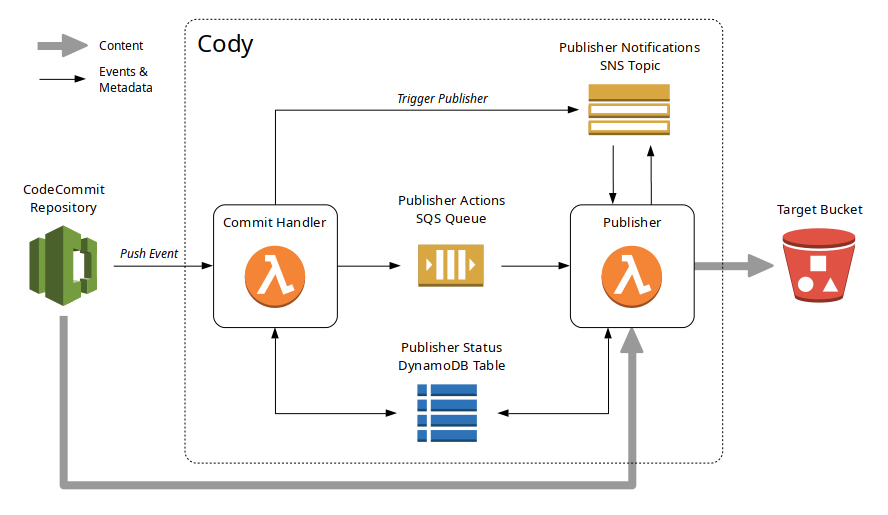
Pushing a new commit to the CodeCommit repository triggers Commit Handler Lambda function. This Lambda function attempts to find the previously published commit ID for the repository in the Publisher Status DynamoDB table. If it finds it, it performs the difference between the previously published commit and the new commit. If it does not find it, it gets the different between the new commit and an empty repository to get the full content. For each changed file the Commit Handler Lambda function creates a publishing action, which can be "delete file from target S3 bucket" or "upload file to target S3 bucket". Each generated publishing action is then pushed to the Publishing Actions Queue. When action for all changes have been pushed to the queue, the Commit Handler Lambda function triggers the Publisher Lambda function by sending a notification to its SNS topic.
The Publisher Lambda function reads publisher actions from the queue one by one for executes them. Once all actions have been applied and the target S3 bucket content is thus synchronized with the contents of the CodeCommit repository, the Publisher Lambda function updates the Publisher Status DynamoDB table with the new published commit ID so that next time the Commit Handler can calculate the correct difference for the new commit.
## Installation
_Cody_ installation in a given AWS account involves several steps described below.
### Prerequisites
The source CodeCommit repository and the target S3 bucket used to serve the content are not part of _Cody_ setup and are assumed to already exist. You need to create them before you can proceed with setting up _Cody_.
When setting up the source CodeCommit repository, make sure that it has the master branch. When a new empty repository is created there is no master branch. You must commit and push something to make git create the master branch. It can be an empty stub file or anything else. Note, that _Cody_ publishes content of `content` subdirectory in the git repository to the target S3 bucket. Anything outside of the `content` directory is ignored by _Cody_.
How the target S3 bucket is created depends on the use of the published content. Normally, _Cody_ is used to publish static websites, so the S3 bucket needs to be configured accordingly. The content can be served directly from the bucket or the bucket can be used as the source for a CloudFront distribution. Consult with the corresponding S3 and CloudFront services documentation.
### Build
_Cody_ includes two AWS Lambda functions that need to be built and packaged. The package zip files then need to be uploaded to an S3 bucket (not the target bucket, some other bucket) from where CloudFormation can pick them up during the deployment. Here is how to do it:
1. First, clone or download _Cody_ from [GitHub](https://github.com/). For example, to clone it you can use git like the following:
`git clone https://github.com/boylesoftware/cody.git`
2. Go to the cloned directory and install the [NPM](https://www.npmjs.com/) modules needed for the build and the runtime:
`npm install`
3. Build and package the Lambda functions with [gulp](https://gulpjs.com/):
`gulp`
You may need to install gulp if you don't have it. Something like the following:
`npm install -g gulp`
Follow gulp documentation for the details.
Once gulp successfully completes, you will have two zip files in the `build` subdirectory: `cody-commit-handler.zip` and `cody-publisher.zip`. These will need to be uploaded to an S3 bucket during the deployment described next.
### Deploy and Configure
As mentioned earlier, _Cody_ is deployed in an AWS account using [AWS CloudFormation](https://aws.amazon.com/cloudformation/). After it is deployed, some manual configuration is still required to connect it to your source CodeCommit repository and the target S3 bucket. These are the steps:
1. Before the CloudFormation stack can be deployed, the Lambda function packages need to be uploaded to an S3 bucket. The bucket must be accessible to the AWS identity you are going to use to deploy the CloudFormation stack.
2. Once the Lambda function packages are uploaded, we can deploy the CloudFormation stack. The stack template is located in the _Cody_ source under `cloudformation/template.json`. The template has several input parameters, some of which do not have defaults and must be provided for the deployment. If you deploy the stack using [AWS Management Console](https://aws.amazon.com/console/), it will ask you for the values for the input parameters in the second step called _Specify Details_. The parameters that do not have default values are:
* _LambdaFunctionsBucket_ - This is the name of the S3 bucket where you uploaded _Cody_'s Lambda function zips.
* _TargetBucket_ - This is the name of your target S3 bucket where _Cody_ will be publishing your content from the CodeCommit repository. The name may contain `${repo}` string, which will be replaced by _Cody_ with the name of the CodeCommit repository, and `${branch}` string, which will be replaced with the name of the branch, to which the push is made. This allows using a single _Cody_ deployment for multiple CodeCommit repositories and publish the content in multiple target S3 buckets.
* _TargetFolder_ - You can configure _Cody_ to publish content under a nested folder in your target S3 bucket. This allows sharing a single bucket for multiple source repositories, which may be a good choice if you host multiple websites and use the S3 bucket as the source for the corresponding CloudFront distributions (a CloudFront distribution allows specifying a folder inside the source S3 bucket). As with the _TargetBucket_ parameter, you can use strings `${repo}` and `${branch}` in the _TargetFolder_ parameter value. If this parameter is left empty, _Cody_ will publish into the root of the target bucket.
_Cody_'s stack can be also deployed using [AWS Command Line Interface](https://aws.amazon.com/cli/). For example, assuming you've uploaded the Lambda function to a bucket named `my-lambda-funcs`, the deployment comment may look like the following:
```shell
aws cloudformation deploy --template-file ./cloudformation/template.json --stack-name Cody \
--capabilities CAPABILITY_NAMED_IAM \
--parameter-overrides LambdaFunctionsBucket="my-lambda-funcs" TargetBucket="${repo}" TargetFolder=""
```
Note that we need `CAPABILITY_NAMED_IAM` capability since the stack creates some IAM roles.
3. Once the stack is deployed, a couple of configuration tasks need to be performed to complete the setup. First, the target bucket policy needs to be updated to allow _Cody_ publish content in it. Lookup the ARN of the Publisher Lambda function role in the CloudFormation stack's outputs under the key `PublisherRoleArn`. Then, in the AWS Management Console go to your target bucket's _Permissions_ section, click _Bucket Policy_ button and make sure that the policy includes the following statement:
```json
{
"Effect": "Allow",
"Principal": {
"AWS": "arn:aws:iam::xxxxxxxxxxxx:role/cody/codyPublisher"
},
"Action": [
"s3:PutObject",
"s3:DeleteObject"
],
"Resource": "arn:aws:s3:::my-bucket-name/*"
}
```
Put the Publisher role ARN in the "Principal" and replace "my-bucket-name" in the "Resource" with your target bucket name (alternatively just use a "*", e.g. "arn:aws:s3:::*").
4. When for some reason one of _Cody_'s Lambda functions cannot process the incoming event, it is forwarded to a Dead Letter Queue (the DLQ), which is an SNS topic. You can subsribe an email to the topic to get notified whenever it happens (it should never happen, but who knows...). The ARN of the topic can be taken from CloudFormation's `DLQTopicArn` output.
5. Finally, you need to create a trigger for your source CodeCommit repository to invoke _Cody_'s Commit Handler Lambda function whenever a new commit is pushed. In the AWS Management Console go to your CodeCommit repository, click _Settings_ in the navigation bar on the left, and then go to _Triggers_ tab. There, create a new trigger like the following:
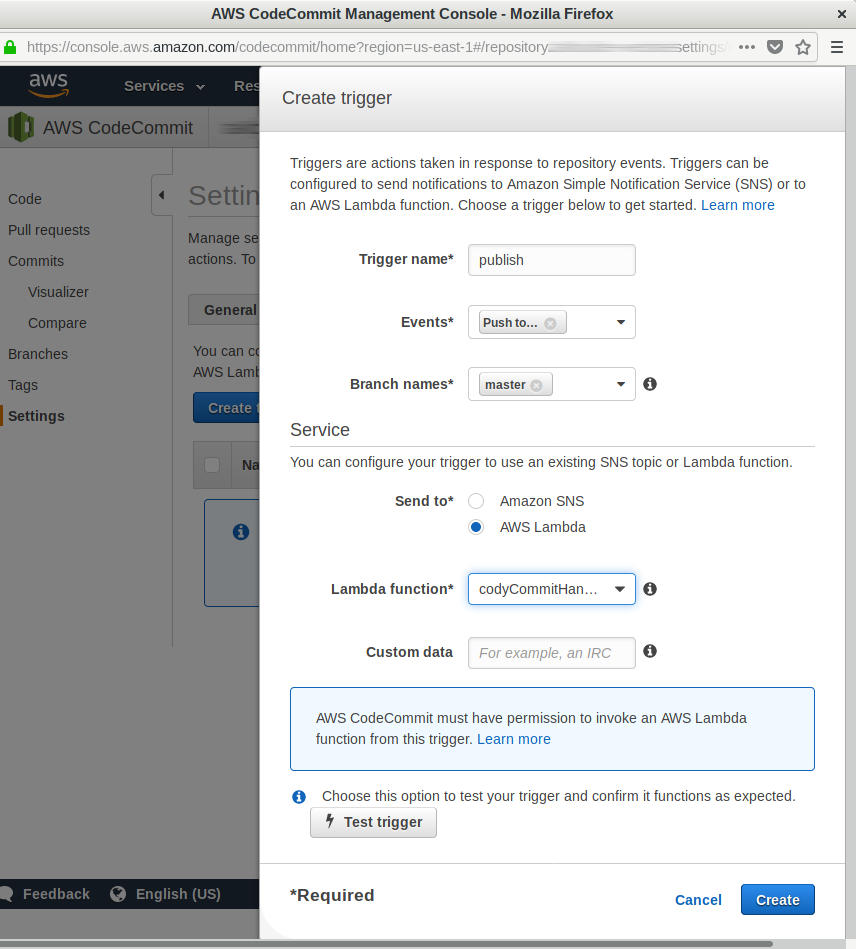
* In the _Events_ select "Push to existing branch".
* In _Branch names_ select "master".
* In _Send to_ select "AWS Lambda".
* In _Lambda function_ select "codyCommitHandler".
* Then hit _Create_ button.
This completes the setup. You can now make some changes to your website content, commit it and push it to the CodeCommit repository's master branch. Upon the push, _Cody_ will publish the content of your repository's `content` subdirectory to your target S3 bucket as configured.
## Usage
As mentioned earlier, _Cody_ automatically publishes changes to the files under your CodeCommit repository's `content` subdirectory. In addition to that, your repository's root can include some special files that configure _Cody_'s functionality.
First, you can include `.codyignore` file in the root of you repository. This file has syntax identical to `.gitignore` and can be used to exclude some files under `content` from being processed and published by _Cody_.
Second, you can include `.codyrc` file, which has syntax of an ini file (see [ini](https://www.npmjs.com/package/ini) NPM module for details). Currently, the only supported option is `contentPrefix`, which allows to override the default `content` subdirectory with something else.