https://github.com/bozimmerman/Sip
Sip is a desktop client for MUD (Multi-User Dungeon) gaming.
https://github.com/bozimmerman/Sip
mud-client muds text-games
Last synced: about 1 year ago
JSON representation
Sip is a desktop client for MUD (Multi-User Dungeon) gaming.
- Host: GitHub
- URL: https://github.com/bozimmerman/Sip
- Owner: bozimmerman
- Created: 2025-05-27T06:28:45.000Z (about 1 year ago)
- Default Branch: master
- Last Pushed: 2025-06-10T22:17:29.000Z (about 1 year ago)
- Last Synced: 2025-06-10T22:32:32.011Z (about 1 year ago)
- Topics: mud-client, muds, text-games
- Language: JavaScript
- Homepage: http://coffeemud.org
- Size: 1.42 MB
- Stars: 4
- Watchers: 1
- Forks: 0
- Open Issues: 0
-
Metadata Files:
- Readme: README.md
Awesome Lists containing this project
- awesome-muds - Sip
README
# Sip MUD Client
Sip is a stand-alone desktop client for MUD (Multi-User Dungeon) gaming. It is optimized for [CoffeeMUD](http://www.coffeemud.net/), but can be used with others. Originally launched as a Java AWT client over 20 years ago, Sip has been reimagined for today’s players.
## Features
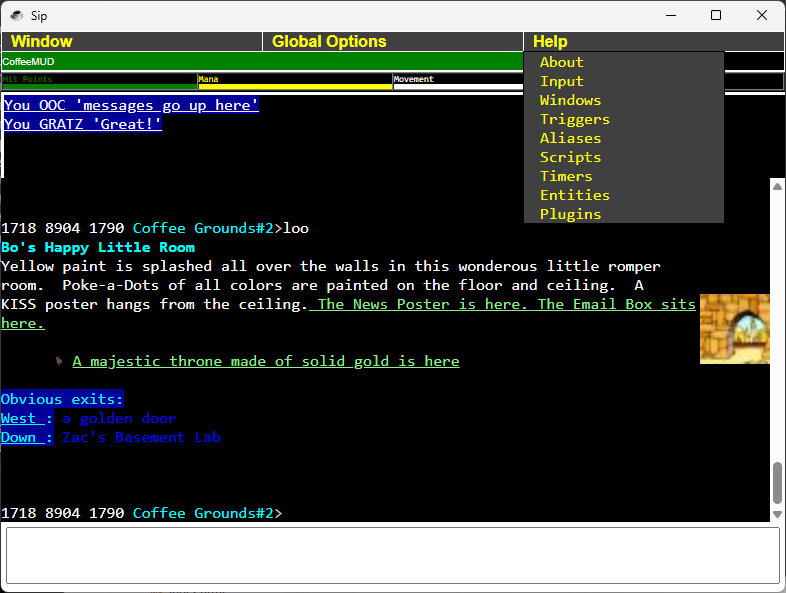
- ANSI-TRUE: All the colors you could hope for.
- MXP: Pictures, sounds, clickable text, and mini-frames.
- MSP: Sound and Music
- GMCP: Access server information out-of-band + Client.Login, Client.Media.
- MSDP: Access server information out-of-band
- Aliases: Customize your commands, or trigger a myriad of events.
- Triggers: Cause a custom action when the mud sends a particular message.
- Scripts (JavaScript): Go wild with customizing your mud client.
- Timers: Cause some action to occur periodically, or after a delay.
- MXP editor: Customize your screen layout or colors, have a window for TELLs, etc.
- Media: Local images and sounds for your custom GUI.
- Mapper: Built in API for building interactive visual area maps.
- Plugins: Sweet bundles of all the above and media and more.
## Screenshots
## Installation
1. **Download the Executable**:
- Download `Sip-3.0.0.win64.exe` from [GitHub Releases](https://github.com/bozimmerman/sip/releases)
2. **Run Sip**:
- Double-click `Sip-3.0.0.win64.exe` to launch the app on Windows. No installation is required—this is a portable executable.
## Usage
1. **Launch Sip**:
- Run `Sip-3.0.0.win64.exe`.
- Optionally, use `--dev` to enable DevTools for troubleshooting:
```
Sip-3.0.0.win64.exe --dev
```
2. **Connect to CoffeeMUD**:
- Sip automatically connects to `coffeemud.net:23` (CoffeeMUD’s default telnet port).
- If using a different server, use the `Connect` menu option under `Window`.
3. **Interact with the MUD**:
- View server output in the big black area.
- Enter commands in the input field at the bottom (e.g., `look`, `attack`).
4. **Read the Help**:
- Help for the several features is available under the `Help` menu.
## Building from Source
If you’d like to modify Sip and build your own `.exe`:
1. **Clone the Repository**:
svn checkout https://coffeemud.net/public/Sip
cd Sip
2. **Install Dependencies**:
npm install
3. **Run in Development**:
npm start
- Add `--dev` to open DevTools:
```
npm start -- --dev
```
4. **Build the .exe**:
npm run dist:win
or
npm run dist:mac
or
npm run dist:linux
- Outputs e.g. `Sip-3.0.0.win64.exe` in the `dist/` folder.
## Known Issues
- None at the moment.
## Contributing
Sip is a passion project, but contributions are welcome! Fork the repository, make your changes, and contact the author to review your changes.
## License
Sip is released under the [Apache 2.0 License](LICENSE).
## Acknowledgments
- Built with [Electron](https://www.electronjs.org/) for cross-platform desktop support.
- Thanks to the CoffeeMUD community for their support and feedback.
- CodeMirror.js is included under the MIT License. https://github.com/codemirror/CodeMirror.
## Contact
For questions, bug reports, or feature requests, reach out via:
- Contact: https://www.zimmers.net/email/form-page.html
- Development Home Page: http://www.coffeemud.org
- Support forum: http://coffeemud.net:27744/forum.cmvp?journal=Support&journalpage=0
- GitHub: [bozimmerman](https://github.com/bozimmerman)
---
Sip: Savor the Experience! ☕