https://github.com/breinify/brein-api-library-ios
Breinify's iOS API Library
https://github.com/breinify/brein-api-library-ios
analtics breinify events geolocation holidays locationservice reverse-geocoding temporal-data timeout wheather
Last synced: 5 months ago
JSON representation
Breinify's iOS API Library
- Host: GitHub
- URL: https://github.com/breinify/brein-api-library-ios
- Owner: Breinify
- License: mit
- Created: 2016-08-23T02:23:46.000Z (almost 10 years ago)
- Default Branch: master
- Last Pushed: 2022-09-15T02:01:33.000Z (almost 4 years ago)
- Last Synced: 2026-01-07T04:04:34.558Z (6 months ago)
- Topics: analtics, breinify, events, geolocation, holidays, locationservice, reverse-geocoding, temporal-data, timeout, wheather
- Language: Swift
- Homepage: https://www.breinify.com
- Size: 3.16 MB
- Stars: 2
- Watchers: 6
- Forks: 0
- Open Issues: 0
-
Metadata Files:
- Readme: README.md
- License: LICENSE
Awesome Lists containing this project
README

# Breinify's API Library
[](http://cocoapods.org/pods/BreinifyApi)
[](http://cocoapods.org/pods/BreinifyApi)
[](http://cocoapods.org/pods/BreinifyApi)
Features: **Temporal Data**, **(Reverse) Geocoding**, **Events**, **Weather**, **Holidays**, **Analytics**
This library utilizes [Breinify's API](https://www.breinify.com) to provide tasks like `PushNotifications`, `geocoding`, `reverse geocoding`, `weather and events look up`, `holidays determination` through the API's endpoints, i.e., `/activity` and `/temporaldata`. Each endpoint provides different features, which are explained in the following paragraphs. In addition, this documentation gives detailed examples for each of the features available for the different endpoints.
**PushNotifications**:
The goal of utilizing Breinify’s Time-Driven push notifications is to send highly dynamic & individualized engagements to single app-users (customer) rather than the everyone in a traditional segments. These push notifications are triggered due to user behavior and a combination of hyper-relevant weather, events, and holidays.
**Activity Endpoint**: The endpoint is used to understand the usage-patterns and the behavior of a user using, e.g., an application, a mobile app, or a web-browser. The endpoint offers analytics and insights through Breinify's dashboard.
**TemporalData Endpoint**: The endpoint offers features to resolve temporal information like a timestamp, a location (latitude and longitude or free-text), or an IP-address, to temporal information (e.g., timezone, epoch, formatted dates, day-name), holidays at the specified time and location, city, zip-code, neighborhood, country, or county of the location, events at the specified time and location (e.g., description, size, type), weather at the specified time and location (e.g., description, temperature).
## Getting Started
### Retrieving an API-Key
First of all, you need a valid API-key, which you can get for free at [https://www.breinify.com](https://www.breinify.com). In the examples, we assume you have the following api-key:
**938D-3120-64DD-413F-BB55-6573-90CE-473A**
It is recommended to use signed messages when utilizing the iOS library. A signed messages ensures, that the request is authorized. To activate signed message ensure that Verification Signature is enabled for your key (see Breinify's API Docs for further information). In this documentation we assume that the following secret is attached to the API key and used to sign a message.
**utakxp7sm6weo5gvk7cytw==**
### Requirements
- iOS 9.0+
- Xcode 12.1
- AppCode 2020.2+
- Swift 5.0
### Installation
Please follow this [link](Documentation/cocoapods_instructions.md) if you're new to Cocoapods and need some information how to setup the environment (please use always the latest available verison on Cocoapods).
#### Including the Library
Add in your pod file:
```
...
pod 'BreinifyApi', '~> 2.0.17'
...
```
#### Consideration of Firebase Libraries
In case of Firebase Message support (only used for sending PushNotifications by using Firebase Cloud Message Service) the following Firebase Libraries needs to be included as well:
```
...
pod 'Firebase/Core'
pod 'Firebase/Messaging'
...
```
#### Permissions
The Breinify SDK needs some permission in order to retrieve the appropriate information. In your `info.plist` file you have to add the following permissions:
```xml
NSAppTransportSecurity
NSExceptionDomains
api.breinify.com
NSIncludesSubdomains
NSTemporaryExceptionAllowsInsecureHTTPLoads
NSTemporaryExceptionMinimumTLSVersion
TLSv1.1
ip-api.com
NSIncludesSubdomains
NSTemporaryExceptionAllowsInsecureHTTPLoads
NSTemporaryExceptionMinimumTLSVersion
TLSv1.1
```
### Configuring the Library
Whenever the library is used, it needs to be configured once with the correct API key and secret. The best place to do this is within the `didFinishLaunchingWithOptions` method like this:
```Swift
import BreinifyApi
func application(_ application: UIApplication, didFinishLaunchingWithOptions launchOptions: [UIApplication.LaunchOptionsKey: Any]?) -> Bool {
/// constants for ApiKey and secret
let validApiKey = "938D-3120-64DD-413F-BB55-6573-90CE-473A"
let validSecret = "utakxp7sm6weo5gvk7cytw=="
Breinify.initialize(apiKey: validApiKey, secret: validSecret)
return true
}
```
### Clean-Up after Usage
Whenever the library is not used anymore, it is recommended to clean-up and release the resources held. To do so, the `Breinify.applicationWillTerminate()` method is used. Add the call to the `applicationWillTerminate` method like this:
```swift
func applicationWillTerminate(_ application: UIApplication) {
Breinify.applicationWillTerminate()
}
```
## Activity: Selected Usage Examples
The `/activity` endpoint is used to track the usage of, e.g., an application, an app, or a web-site. There are several libraries available to be used for different system (e.g., [Node.js](https://github.com/Breinify/brein-api-library-node), [Android](https://github.com/Breinify/brein-api-library-android), [Java](https://github.com/Breinify/brein-api-library-java), [JavaScript](https://github.com/Breinify/brein-api-library-javascript-browser), [Ruby](https://github.com/Breinify/brein-api-library-ruby), [PHP](https://github.com/Breinify/brein-api-library-php), [Python](https://github.com/Breinify/brein-api-library-python)).
### Sending Login
The example shows, how to send a login activity, reading the data from an request. In general, activities are added to the interesting measure points within your applications process (e.g., `login`, `addToCart`, `pageVisit`). The endpoint offers analytics and insights through Breinify's dashboard.
Add the `Breinify.setUserInfo(...)` as soon as user information are available and before the first of any `activities`.
```swift
// create a user you're interested in
Breinify.setUserInfo(firstName: "Fred",
lastName: "Feuerstein",
phone: "+1223344556677",
email: "fred.feuerstein@stoneage.com")
```
### Sending pageVisit Activity
Sending an activity is done by applying the following 4 steps:
1. create additional activity type related data
4. call activity endpoint with the activity type and additional tags
```Swift
// create additional activity type related data
let tagsDic = [String: Any]()
tagsDic["pageId"] = "userDetailsPage" as Any
// invoke activity call
Breinify.sendActivity(BreinActivityType.PAGE_VISIT.rawValue, tagsDic: tagsDic)
```
## TemporalData: Selected Usage Examples
The `/temporalData` endpoint is used to transform your temporal data into temporal information, i.e., enrich your temporal data with information like
*current weather*, *upcoming holidays*, *regional and global events*, and *time-zones*, as well as geocoding and reverse geocoding.
### Getting User Information
Sometimes it is necessary to get some more information about the user of an application, e.g., to increase usability and enhance the user experience,
to handle time-dependent data correctly, to add geo-based services, or increase quality of service. The client's information can be retrieved easily
by calling the `/temporaldata` endpoint utilizing the `Breinify.temporalData(...)` method or by executing a `BreinTemporalData` instance, i.e.,:
```swift
do {
try Breinify.temporalData({
// success
(result: BreinResult) -> Void in
if let holiday = result.get("holidays") {
print("Holiday is: \(holiday)")
}
if let weather = result.get("weather") {
print("Weather is: \(weather)")
}
if let location = result.get("location") {
print("Location is: \(location)")
}
if let time = result.get("time") {
print("Time is: \(time)")
}
})
} catch {
print("Error")
}
```
The returned result contains detailed information about the time, the location, the weather, holidays, and events at the time and the location. A detailed
example of the returned values can be found here.
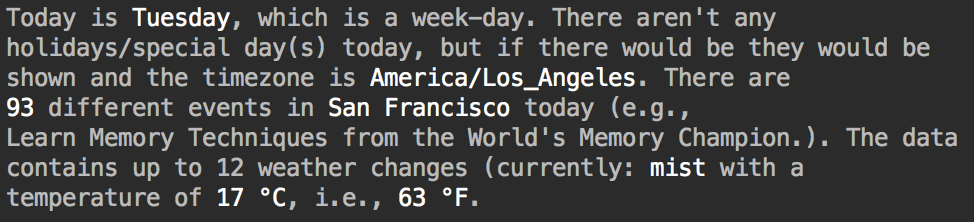
Possilbe sample output utilizing some commanly used features.
### Geocoding (resolve Free-Text to Locations)
Sometimes it is necessary to resolve a textual representation to a specific geo-location. The textual representation can be structured and even partly unstructured, e.g., the textual representation `the Big Apple` is considered to be unstructured, whereby a structured location would be, e.g., `{ city: 'Seattle', state: 'Washington', country: 'USA' }`. It is also possible to pass in partial information and let the system try to resolve/complete the location, e.g., `{ city: 'New York', country: 'USA' }`.
```swift
do {
let breinTemporalData = BreinTemporalData()
.setLocation(freeText: "The Big Apple")
try Breinify.temporalData(breinTemporalData, {
(result: BreinResult) -> Void in
let breinLocationResult = BreinLocationResult(result)
print("Latitude is: \(breinLocationResult.getLatitude())")
print("Longitude is: \(breinLocationResult.getLongitude())")
print("Country is: \(breinLocationResult.getCountry())")
print("State is: \(breinLocationResult.getState())")
print("City is: \(breinLocationResult.getCity())")
print("Granularity is: \(breinLocationResult.getGranularity())")
})
} catch {
print("Error")
}
```
This will lead to the following result:
```
Latitude is: 40.7614927583
Longitude is: -73.9814311179
Country is: US
State is: NY
City is: New York
```
Or shown as an Apple Map result:
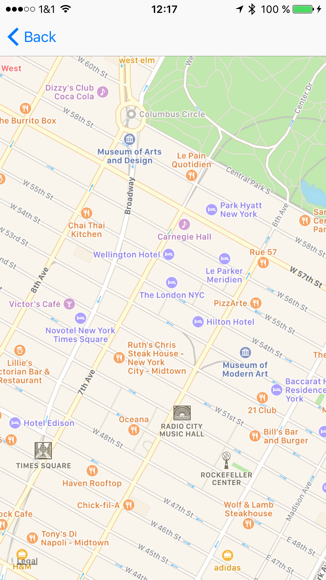
Map output by utilizing the result of reverse geocoding requests.
### Reverse Geocoding (retrieve GeoJsons for, e.g., Cities, Neighborhoods, or Zip-Codes)
The library also offers the feature of reverse geocoding. Having a specific geo-location and resolving the coordinates to a specific city or neighborhood (i.e., names of neighborhood, city, state, country, and optionally GeoJson shapes).
A possible request if you're interesed in events might look like this:
```swift
do {
let breinTemporalData = BreinTemporalData()
.setLatitude(37.7609295)
.setLongitude(-122.4194155)
.addShapeTypes(["CITY"])
try Breinify.temporalData(breinTemporalData, {
(result: BreinResult) -> Void in
print("Api Success : result is:\n \(result)")
// Events
let breinEventResult = BreinEventResult(result)
breinEventResult.getEventList().forEach { (entry) in
let eventResult = BreinEventResult(entry)
print("Starttime is: \(eventResult.getStartTime())")
print("Endtime is: \(eventResult.getEndTime())")
print("Name is: \(eventResult.getName())")
print("Size is: \(eventResult.getSize())")
let breinLocationResult = eventResult.getLocationResult()
print("Latitude is: \(breinLocationResult.getLatitude())")
print("Longitude is: \(breinLocationResult.getLongitude())")
print("Country is: \(breinLocationResult.getCountry())")
print("State is: \(breinLocationResult.getState())")
print("City is: \(breinLocationResult.getCity())")
print("Granularity is: \(breinLocationResult.getGranularity())")
}
}
```
## PushNotifications: Selected Usage Example
Let's integrate Breinify's PushNotifications within an iOS App. Follow this [link](Documentation/pushnotification_configuration.md) to see how you can configure your app for receiving push notifications.
### Configuring the Library with APNS Service
In case the push notifications will come from APNS add the following statements in your `AppDelegate.swift` file:
```swift
import BreinifyApi
func application(_ application: UIApplication, didRegisterForRemoteNotificationsWithDeviceToken deviceToken: Data) {
var userInfoDic = [String: String]()
userInfoDic["firstName"] = "Fred"
userInfoDic["lastName"] = "Firestone"
userInfoDic["phone"] = "+1223344556677"
userInfoDic["email"] = "fred.firestone@stoneage.com" // mandatory
let apnsToken = Breinify.retrieveDeviceToken(deviceToken)
Breinify.initWithDeviceTokens(apnsToken: apnsToken,
fcmToken: nil,
userInfo: userInfoDic)
}
```
### Configuring the Library with Firebase Cloud Message Service
In case the Push Notifications will come from Firebase Cloud Message Service add the following statements in your `AppDelegate.swift` file:
```swift
import Firebase
import BreinifyApi
func application(_ application: UIApplication, didRegisterForRemoteNotificationsWithDeviceToken deviceToken: Data) {
// Firebase Message to retrieve the token
Messaging.messaging().token { token, error in
if let error = error {
print("Error fetching FCM registration token: \(error)")
} else if let token = token {
print("FCM registration token: \(token)")
var userInfoDic = [String: String]()
userInfoDic["firstName"] = "Fred"
userInfoDic["lastName"] = "Firestone"
userInfoDic["phone"] = "+1223344556677"
userInfoDic["email"] = "fred.firestone@stoneage.com" // mandatory
let apnsToken = Breinify.retrieveDeviceToken(deviceToken)
Breinify.initWithDeviceTokens(apnsToken: apnsToken,
fcmToken: token,
userInfo: userInfoDic)
}
}
}
```
### Integration
Using Breinify Push Notifications in iOS apps is straightforward. The Breinify API integrates smoothly within the iOS Application Lifecycle. Simply invoke the appropriate Breinify functions within the `didReceiveRemoteNotification` lifecycle functions:
Add the following statements to your delegate swift file (e.g `AppDelegate.swift`):
```Swift
import BreinifyApi
```
#### Method didReceiveRemoteNotification
There are two different methods named `didReceiveRemoteNotification` that needs to be enhanced by sending the userInfo to the Breinify SDK like this:
```Swift
func application(_ application: UIApplication, didReceiveRemoteNotification userInfo: [AnyHashable: Any], fetchCompletionHandler completionHandler: @escaping (UIBackgroundFetchResult) -> Void) {
// inform the Breinify API
Breinify.didReceiveRemoteNotification(userInfo)
completionHandlerUIBackgroundFetchResult.newData)
}
```
And this one without the completionHandler parameter.
```swift
func application(_ application: UIApplication, didReceiveRemoteNotification userInfo: [AnyHashable: Any]) {
Breinify.didReceiveRemoteNotification(userInfo)
}
```
### Notification Sample Screens
The Breinify engine will trigger a notification that will be send through Apple Notification Service and will trigger notification to the user.
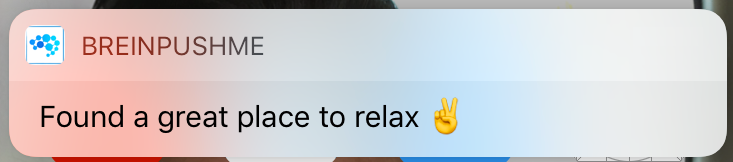
Notification that will appear.
Assuming the user will react to this particular notification a more detailed dialog might appear if the App has been configured to use RichText-Notifications:
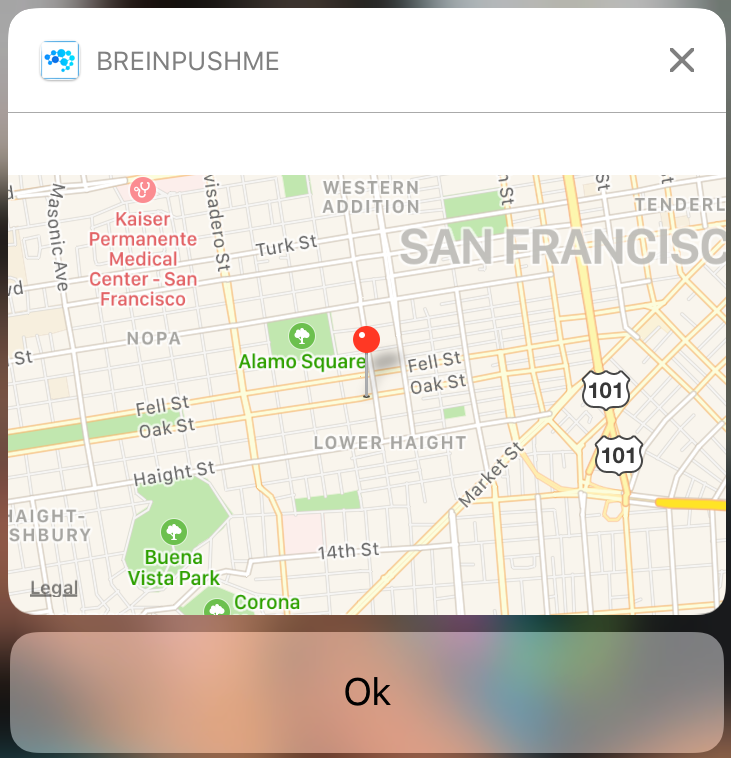
Detailed notification with more information.
It is just a sample to show a map. Further media content can be considered as well (e.g. Images, Videos).
### Application Capabilities
#### Location Data
The Breinify SDK can provide current location data if your app has configured the appropriate properties within the `Info.plist` file. Simply add the following location permissions:
```xml
NSLocationAlwaysUsageDescription
Please allow this app to provide location data.
NSLocationAlwaysAndWhenInUseUsageDescription
Please allow this app to provide location data.
NSLocationUsageDescription
Please allow this app to provide location data.
NSLocationWhenInUseUsageDescription
Please allow this app to provide location data.
```
#### Transport Security
The Breinify SDK will send information via TCP. This needs to be enabled by with an appropriate entry within the `Info.plist` file like this:
```xml
NSAppTransportSecurity
NSAllowsArbitraryLoads
```
### Further links
To understand all the capabilities of Breinify's APIs, have a look at:
* [Breinify's Website](https://www.breinify.com).