https://github.com/breinify/brein-api-library-python
Breinify's Python API Library
https://github.com/breinify/brein-api-library-python
breinify events geocoding holidays ipaddress ipaddress-to-address ipaddresses python reverse-geocoding temporal-data time timezone weather
Last synced: 5 months ago
JSON representation
Breinify's Python API Library
- Host: GitHub
- URL: https://github.com/breinify/brein-api-library-python
- Owner: Breinify
- License: mit
- Created: 2016-08-03T20:46:50.000Z (almost 10 years ago)
- Default Branch: master
- Last Pushed: 2022-09-15T01:50:17.000Z (almost 4 years ago)
- Last Synced: 2025-10-25T08:55:40.066Z (8 months ago)
- Topics: breinify, events, geocoding, holidays, ipaddress, ipaddress-to-address, ipaddresses, python, reverse-geocoding, temporal-data, time, timezone, weather
- Language: Python
- Homepage: https://www.breinify.com
- Size: 735 KB
- Stars: 2
- Watchers: 10
- Forks: 1
- Open Issues: 0
-
Metadata Files:
- Readme: README.rst
- License: LICENSE
Awesome Lists containing this project
README
.. raw:: html

.. raw:: html


Features: Temporal Data, (Reverse) Geocoding, Events, Weather, Holidays, Analytics
This library simplifies access to Breinify's API for tasks like geocoding, reverse geocoding, weather and events look up, and holidays determination based on information such as a user's ip address, coordinates, or reported location. In addition, this documentation gives detailed examples for each of the features available for the different endpoints.
**TemporalData Endpoint:** The endpoint offers features to resolve temporal information like a timestamp, a location (latitude and longitude or free-text), or an IP-address, to temporal information (e.g., timezone, epoch, formatted dates, day-name), holidays at the specified time and location, city, zip-code, neighborhood, country, or county of the location, events at the specified time and location (e.g., description, size, type), weather at the specified time and location (e.g., description, temperature).
**Activity Endpoint:** The endpoint is used to understand the usage-patterns and the behavior of a user using, e.g., an application, a mobile app, or a web-browser. The endpoint offers analytics and insights through Breinify's dashboard.
Quickstart
==========
Step 1: Download the Library
----------------------------
Download the library from PyPi and install it with
.. code:: bash
pip3 install brein-api
or download the source from github and run
.. code:: python
python3 setup.py install
Step 2: Integrate the Library
-----------------------------
Integrate the Library into your Python 3 project by importing the library in the relevant blocks of code.
.. code:: python
import breinify
Step 3: Configure the Library
-----------------------------
In order to use the library you need a valid API-key, which you can get for free at https://www.breinify.com. In this example, we assume you have the following api-key:
**938D-3120-64DD-413F-BB55-6573-90CE-473A**
Additionally, you can supply an optional secret, which is recommended for the Python library. Here, we'll use this secret:
**utakxp7sm6weo5gvk7cytw==**
.. code:: python
from breinify import Breinify
# This is a valid API key
apiKey = "938D-3120-64DD-413F-BB55-6573-90CE-473A"
secret = "utakxp7sm6weo5gvk7cytw=="
brein = Breinify(apiKey, secret)
The Breinify class is now configured with a valid configuration object.
Step 4: Start Using the library
-------------------------------
Temporal Data Lookup
^^^^^^^^^^^^^^^^^^^^
Looking up a User's Location's Info
+++++++++++++++++++++++++++++++++++
You may want to enrich a user information or customize their experience based on where they are. For example calling
.. code:: python
# Create a user you are interested in based on their ip.
# Other fields (coordinates, time, etc) can also be included
example_user = User(ip = "143.127.128.10")
result = brein.temporal_data(example_user)
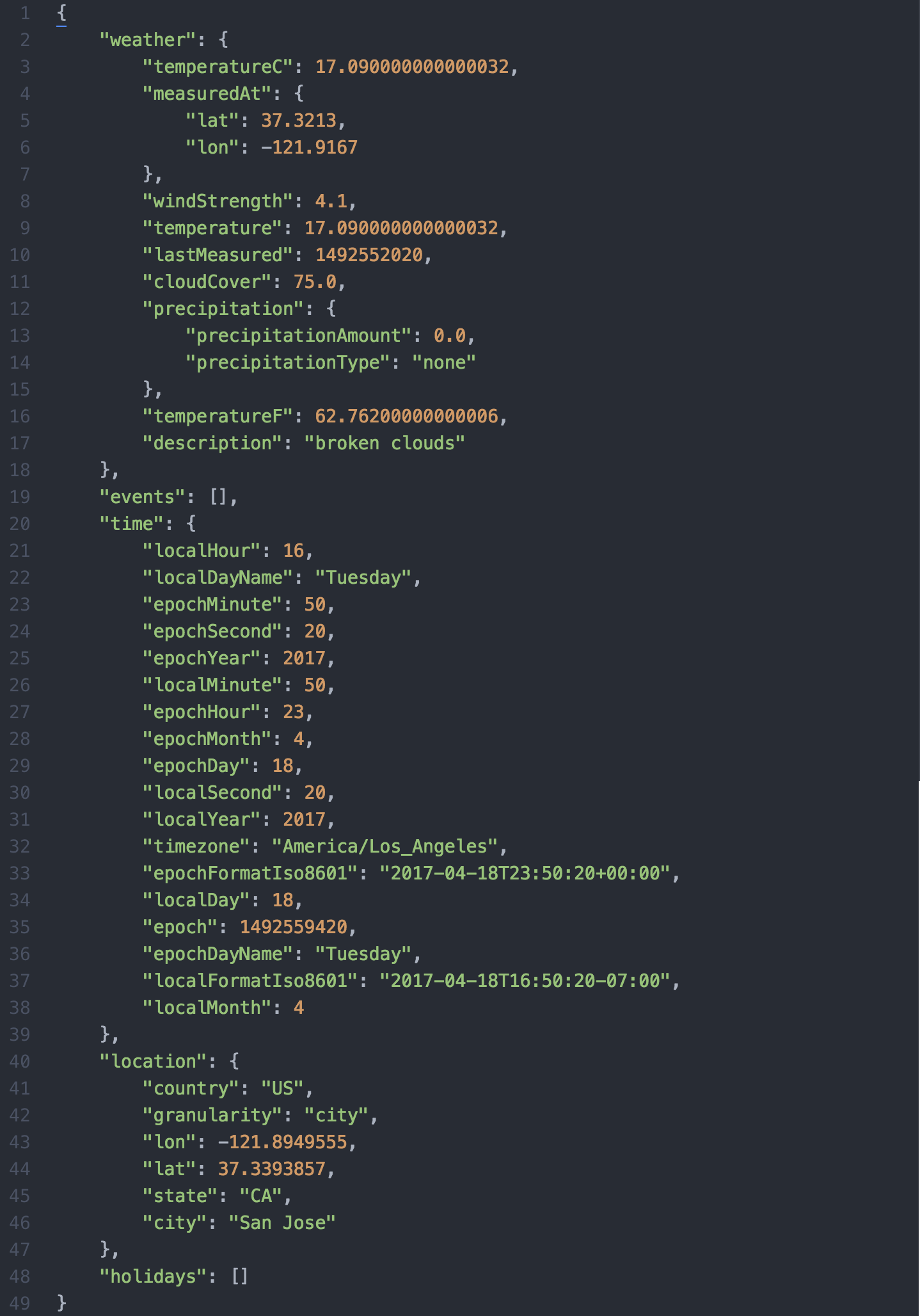
will result in a dictionary of timely information for the location the ip address resolves to (San Jose), for example:
.. code:: python
# Wrap the result in json.dumps() for readability
print(json.dumps(result, indent = 4))
Which will print:
.. raw:: html
Looking up Information About a Location
+++++++++++++++++++++++++++++++++++++++
Instead of looking up information based off a user's location, you can just supply the location's information directly.
For example, you could get yesterday's weather in San Francisco by running:
.. code:: python
from breinify import Breinify
import time
import math
apiKey = "938D-3120-64DD-413F-BB55-6573-90CE-473A"
brein = Breinify(apiKey)
yesterday = math.floor(time.time()) - 24 * 60 * 60
result = brein.temporal_data(location_free_text = "San Francisco, CA",
unixtime = yesterday)
print("Yesterday in %s, the weather was %s with a temperature of %d F."%
(result['location']['city'],
result['weather']['description'],
result['weather']['temperatureF']))
Which will output:
Yesterday in **San Francisco**, the weather was **overcast clouds** with a temperature of **64** F.
Reverse Geocoding
+++++++++++++++++
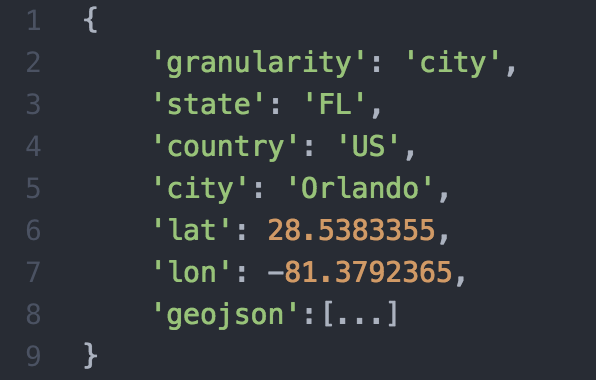
We support looking up locations based on latitude and longitude and provide both information about the location and relevant shape files. For example
.. code::
florida = brein.temporal_data(location_longitude=lon, location_latitude=lat, location_shapes = ["CITY","STATE"])
will return both
.. raw:: html
and the shape file to draw
.. raw:: html
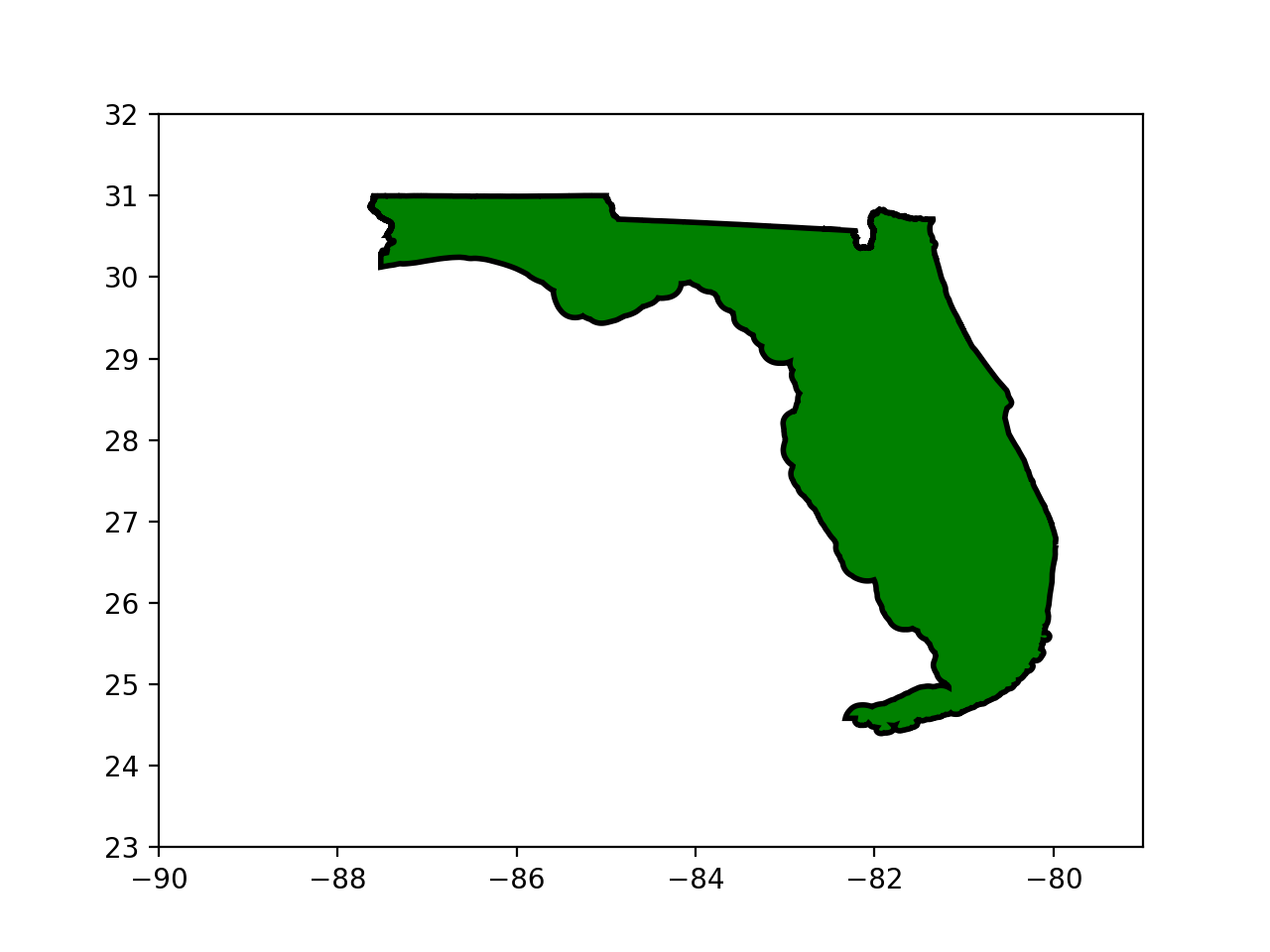
* The full code for this example is available `here`__
.. __: https://github.com/Breinify/brein-api-library-python/blob/master/documentation/additional/point2shape.py
Placing Activity Triggers
^^^^^^^^^^^^^^^^^^^^^^^^^
The API provides support for analytics based on user behavior on your site or app by sending user activities to the `/activity` endpoint. Since the `/activity` endpoint only consumes data, calls to it in the Python library are sent asynchronously.
For this example, pretend that a user named "John Doe" is logged in to your site with his email address, ``john.doe@email.com``, is viewing the page "www.example.com". You can log this by executing:
.. code:: python
from breinify import User
# Create a user you are interested in with their email and last name
example_user = User(email = "john.doe@email.com")
brein.send_activity(example_user, "pageView", url = "www.example.com")
The call will then be run asynchronously in the background.
Further links
-------------
To understand all the capabilities of Breinify's DigitalDNA API, take a look at:
* `Additional Code Samples`__
.. __: https://github.com/Breinify/brein-api-library-python/tree/master/documentation/additional
* `Breinify's Website`__
.. __: https://www.breinify.com