https://github.com/brennanbrown/watery
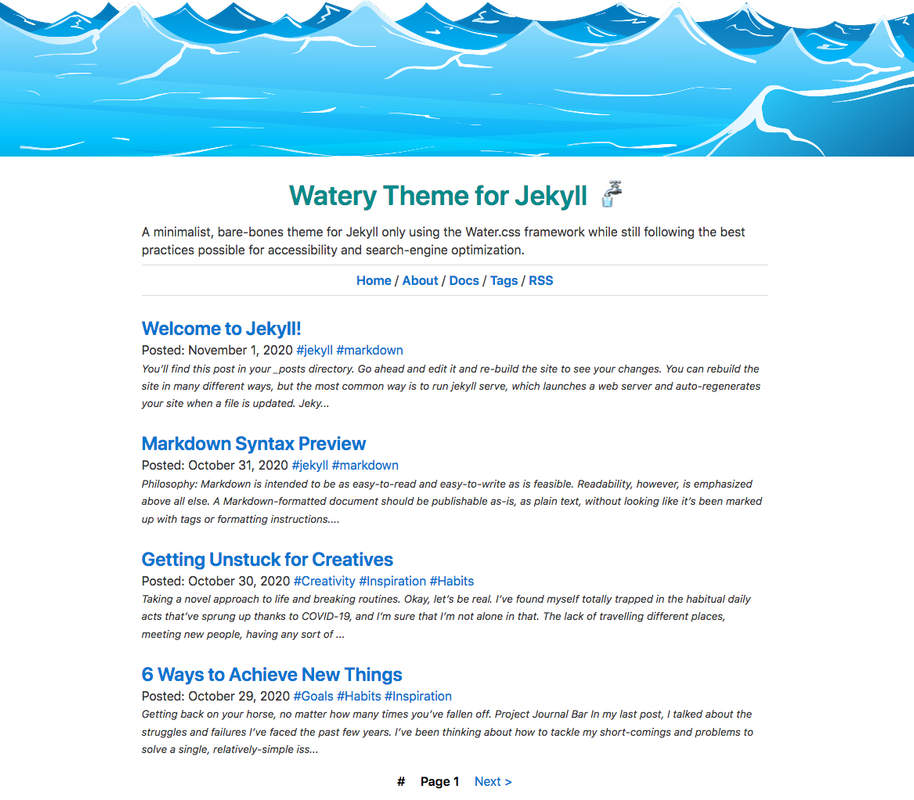
🚰 A minimalist, bare-bones theme for Jekyll only using the Water.css framework while still following the best practices for accessibility and search-engine optimization.
https://github.com/brennanbrown/watery
css jekyll jekyll-theme lighthouse-score template watercss
Last synced: 11 months ago
JSON representation
🚰 A minimalist, bare-bones theme for Jekyll only using the Water.css framework while still following the best practices for accessibility and search-engine optimization.
- Host: GitHub
- URL: https://github.com/brennanbrown/watery
- Owner: brennanbrown
- License: mit
- Created: 2020-11-01T21:58:01.000Z (over 5 years ago)
- Default Branch: main
- Last Pushed: 2025-08-25T14:36:01.000Z (11 months ago)
- Last Synced: 2025-08-25T16:23:22.798Z (11 months ago)
- Topics: css, jekyll, jekyll-theme, lighthouse-score, template, watercss
- Language: HTML
- Homepage: https://watery.netlify.app/
- Size: 120 KB
- Stars: 14
- Watchers: 2
- Forks: 8
- Open Issues: 0
-
Metadata Files:
- Readme: README.md
- Funding: .github/FUNDING.yml
- License: LICENSE
Awesome Lists containing this project
README

Watery Theme for Jekyll
A bare-bones template to help you get started on your next blog or website.
Explore the docs »
View Demo
·
Report Bug
·
Request Feature












[](https://app.netlify.com/start/deploy?repository=https://github.com/brennanbrown/watery)
## Quickstart (theme gem)
Use Watery as a reusable theme in your Jekyll site.
1) Add to your site `Gemfile`:
```ruby
gem "jekyll", "~> 4.3"
gem "watery", "~> 0.1"
group :jekyll_plugins do
gem "jekyll-feed"
gem "jekyll-seo-tag"
gem "jekyll-paginate"
gem "jekyll-sitemap"
end
```
2) Configure your site `_config.yml`:
```yml
theme: watery
plugins:
- jekyll-feed
- jekyll-seo-tag
- jekyll-paginate
- jekyll-sitemap
paginate: 5
paginate_path: "/page/:num/"
```
3) Build and serve:
```bash
bundle install
bundle exec jekyll serve
```
### Install from RubyGems (optional)
Watery is published on RubyGems:
```bash
gem install watery
```
Ruby projects should prefer adding it to your site `Gemfile` (see Quickstart above).
## About The Project
**Watery** is a minimalist, bare-bones theme for the popular JAMstack file-based CMS Jekyll that only uses the `<80kb` [**Water.css** framework](https://github.com/kognise/water.css) (hence the name!), while still following the best practices possible for accessibility and search-engine optimization.
I created this because I wasn't able to find an up-to-date starter/skeleton theme for Jekyll. Even the default theme, Minima, uses the large Bootstrap framework.
This project is aimed towards those curious about using Jekyll for the first time, and want to build from as close to scratch as possible. Alternatively, it still has all the features required for creating a hassle-free, informational website or blog in just a few clicks.
As of November 1st, 2020, with >70 posts on Watery, the website scores a perfect 100 in Performance, Accessibility, Best Practices, and SEO on an audit with [**Google Lighthouse**](https://developers.google.com/web/tools/lighthouse).
For an example, you can view my blog, [**Journal.kim/**](https://journal.kim/) using this theme with the [Writ.css](https://writ.cmcenroe.me/) framework.
**New!** Change the CSS framework with a single button, thanks to [**Dropin Minimal CSS**](https://github.com/dohliam/dropin-minimal-css).
### Features
Despite Watery's minimalist nature, there are a few interesting features that have been added:
- A fully customizable and empty `_BLANK_config.yml` to make getting up-and-running easy.
- Having a `_pages` collection for easier organization.
- Auto-generated links in navigation to all pages in `_pages`.
- Auto-generated [tags page](https://watery.netlify.app/tags) that lists all tags used by all posts in chronological order.
- An author bio at the end of each post. (Located in `_inclues/author.html`)
- Full [Rouge](https://github.com/rouge-ruby/rouge) support for syntax code highlighting. (Currently using `base16.solarized.light`)
- Auto-generated RSS feed, sitemap, accessibility features, and search-engine optimization.
## Installation
### Prerequisites
Jekyll requires the following:
- Ruby version **3.0** or higher (3.2+ recommended)
- RubyGems and Bundler
- GCC and Make (build tools)
Note: Ruby 3 no longer bundles Webrick. This project declares `webrick` in the `Gemfile`, so `bundle exec jekyll serve` will work out of the box.
See [Requirements](https://jekyllrb.com/docs/installation/#requirements) for guides and details.
### Instructions
1. Install all [prerequisites](https://jekyllrb.com/docs/installation/).
2. Install the jekyll and bundler [gems](https://jekyllrb.com/docs/ruby-101/#gems).
```
gem install jekyll bundler
```
3. Clone this repository.
```
git clone https://github.com/brennanbrown/watery.git
```
4. Change into your new directory.
```
cd watery
```
5. Install gems from the `Gemfile`.
```
bundle install
```
On macOS/Linux, this will regenerate `Gemfile.lock` for your platform (the repo previously contained a Windows-specific lockfile). Commit the updated lockfile.
6. Build the site and make it available on a local server.
```
bundle exec jekyll serve
```
7. Browse to [http://localhost:4000](http://localhost:4000)
If you encounter any errors during this process, check that you have installed all the prerequisites in [Requirements](https://jekyllrb.com/docs/installation/#requirements).
If you still have issues, see [Troubleshooting](https://jekyllrb.com/docs/troubleshooting/#configuration-problems).
## Getting Started
Once you have Jekyll up-and-running, there are only a few steps needed to make this theme your own:
1. Fill out the `_BLANK_config.yml` configuration file and replace the current `_config.yml`
2. Remove the `example_posts` folder in `_posts` and start writing your own!
3. Modify or remove the pages in `_pages` to however you see fit.
4. _(Optional)_ Modify or remove this `README.md` with information about your own project or blog.
5. _(Optional)_ Modify the CSS files in the `assets` folder to customize the site.
6. _(Optional)_ Remove `switcher.js` from the `assets` folder, choose [**another framework**](https://github.com/dbohdan/classless-css) to use!
### Optional extras
- Optional link checking in CI with Lychee. See `.github/workflows/link-check.yml` and `.lycheeignore`.
- Optional Sass scaffolding (no requirement): see `assets/scss/sample.scss` and notes in `Gemfile` comments.
- Optional pagination with `jekyll-paginate-v2` (not GitHub Pages–safe). See `docs/PAGINATION.md`.
## Documentation
- Changelog: `docs/CHANGELOG.md`
- Theme gem guide (extraction/publish playbook): `docs/GEM-THEME-GUIDE.md`
- Pagination options and guidance: `docs/PAGINATION.md`
- Collections usage notes: `docs/COLLECTIONS.md`
Also see `theme/README.md` for gem-specific consumer instructions.
## Roadmap
There are several features that I'm still planning to create and integrate, including:
- Create a [Theme Gem](https://jekyllrb.com/docs/themes/#publishing-your-theme)
- Add easy and automatic buttons to ["Deploy to Netlify"](https://docs.netlify.com/site-deploys/create-deploys/#deploy-to-netlify-button), Heroku, etc.
- Add Travis continious integration checks
- Add additional documentation for creating custom collections and auto generated pages
- Add the following files: `robots.txt`, `asset-manifest.json`, `light.css.map`
- Add more example posts and articles
See the [open issues](https://github.com/othneildrew/Best-README-Template/issues) for a list of proposed features (and known issues).
## Contributing
Contributions are what make the open source community such an amazing place to be learn, inspire, and create. Any contributions you make are **greatly appreciated**.
1. Fork the Project
2. Create your Feature Branch (`git checkout -b feature/AmazingFeature`)
3. Commit your Changes (`git commit -m 'Add some AmazingFeature'`)
4. Push to the Branch (`git push origin feature/AmazingFeature`)
5. Open a Pull Request
## License
Distributed under the MIT License. You can use this project however you see fit without needing to give attribution.
See `LICENSE` for more information.
[](https://app.fossa.com/projects/git%2Bgithub.com%2Fbrennanbrown%2Fwatery?ref=badge_large)
## Resources
While creating this theme, I came across a lot of helpful and hard-to-find resources. If you'd like to dive deeper into Jekyll, check them out:
- Jumping Into Jekyll:
- Jekyll Cheatsheet:
- Course on Jekyll:
- Jekyll for Designers:
- Dynamic Copyright on Jekyll:
- Creating breadcrumbs in Jekyll:
- Display all items from ALL collections:
### Other Resources
- For markdown previews:
- Case Study on webfont performance:
- An extensive `.gitignore`:
- The inspriation for this project:
## Credit
[**Water.css**](https://watercss.kognise.dev/) was created by [Kognise](https://github.com/kognise).
[**Dropin Minimal CSS**](https://github.com/dohliam/dropin-minimal-css) was created by [Dohliam](https://github.com/dohliam).