https://github.com/browseen/chrome
chrome plugin
https://github.com/browseen/chrome
automation browse browser selenium
Last synced: about 1 month ago
JSON representation
chrome plugin
- Host: GitHub
- URL: https://github.com/browseen/chrome
- Owner: browseen
- Created: 2025-03-13T09:15:46.000Z (over 1 year ago)
- Default Branch: main
- Last Pushed: 2025-03-13T10:24:04.000Z (over 1 year ago)
- Last Synced: 2025-10-09T15:51:23.640Z (9 months ago)
- Topics: automation, browse, browser, selenium
- Language: JavaScript
- Homepage: http://chrome.browseen.com/
- Size: 59.6 KB
- Stars: 0
- Watchers: 1
- Forks: 0
- Open Issues: 0
-
Metadata Files:
- Readme: README.md
Awesome Lists containing this project
README
# Browseen: Universal Web Interaction Language
## Overview
Browseen is an innovative Chrome extension that introduces a universal Web Interaction Language, allowing users to perform actions on any website through semantic commands rather than specific HTML structures. This approach brings a level of consistency and reliability to web automation that traditional methods cannot achieve.
## Key Features
1. **Intent-Based Commands**: Focus on what you want to do, not how to do it
2. **Platform Agnostic**: Works consistently across different websites
3. **Resilient to Changes**: Not affected by site redesigns or HTML structure changes
4. **Accessibility-Focused**: Designed for both manual input and voice commands
5. **Intuitive Syntax**: Simple command structure that's easy to learn and remember
## Installation
To use Browseen:
1. Download the extension files from the repository
2. Load the unpacked extension in Chrome developer mode
3. Access Browseen through the browser toolbar icon
4. Start issuing commands to interact with any website
## Test Scenarios
Below are 100 test scenarios covering a wide range of web interactions across different platforms and site types:
Now let's create detailed implementation instructions for developers who want to extend Browseen for their own applications:
## Project Summary
Browseen represents a significant leap forward in web interaction technology by introducing a universal way to interact with any website through semantic commands. This approach addresses the common problem of web automation breaking when sites update their HTML structure.
### Implemented Components
1. **Core Extension Files:**
- manifest.json - Extension configuration
- background.js - Background service worker
- content.js - Command execution engine
- popup.html/js - User interface
2. **Command Engine:**
- Command parser with regex patterns
- Element finder with multiple strategies
- Action executor for web interactions
- Context-aware command execution
3. **Test Environment:**
- Test page with common web elements
- 100 test scenarios across different platforms
- Full testing framework
4. **Documentation:**
- User guide with examples
- Developer documentation for extensions
- Installation and usage instructions
### Key Innovations
1. **Intent-Based Commands:** Browseen focuses on user intent (what they want to do) rather than specific DOM manipulation. This makes it more intuitive and reliable.
2. **Multi-Strategy Element Finding:** The extension uses multiple approaches to find elements, including text content, attributes, roles, and context.
3. **Adaptability:** Browseen can adapt to different websites automatically, without requiring site-specific modifications.
4. **Voice Integration Capability:** The extension is designed to work with voice commands through a natural language processing layer.
### Testing the Extension
The test scenarios cover a wide range of interactions across various types of websites:
- Social media engagement
- E-commerce transactions
- Content consumption
- Productivity tasks
- Banking operations
- Travel bookings
- Job applications
Each scenario is designed to test both the command parser and the element finder in real-world contexts.
### Future Potential
Browseen has significant potential for various applications:
1. **Accessibility:** Helping users with disabilities navigate websites more easily
2. **Automation:** Simplifying repetitive web tasks
3. **Voice Computing:** Enabling voice-controlled web browsing
4. **Cross-platform Consistency:** Providing a unified interaction model across different websites
5. **Testing:** Streamlining web application testing with human-readable commands
The extension's architecture is modular and extensible, allowing developers to build upon it for specialized applications.
To get started with Browseen, download the extension files, load them into Chrome in developer mode, and begin exploring the power of universal web interaction language.
## Another projects
[Scrape Table](https://www.scrapetable.com/pricing)
[How I Get UNLIMITED Apollo Leads For FREE: UPDATED 2025 - YouTube](https://www.youtube.com/watch?v=CvXhIsGO2Xo)
[The Best Open Source Web Scraping Tools & Libraries](https://www.browserless.io/blog/web-automation-tools-open-source)
> ### Puppeteer
>
> [Puppeteer](https://pptr.dev/) is a widespread Open Source web automation JavaScript library released in 2017. It counts more than [79K stars on GitHub](https://github.com/puppeteer/puppeteer/stargazers) and is actively maintained. At the time of this writing, close to 100 people have contributed to its codebase. The project was initially bootstrapped by the [Chrome DevTools team](https://developer.chrome.com/docs/devtools/) and is backed by Google. The library can drive Chrome, Chromium (the open-source version of Chrome), or Firefox. It is distributed as an NPM package with more than [3.5 million monthly downloads](https://www.npmjs.com/package/puppeteer).
>
> Puppeteer comes bundled with a Chromium browser, but in case we do not need a local browser instance, the [puppeteer-core](https://www.npmjs.com/package/puppeteer-core) package provides all the functionalities without downloading the browser, resulting in reduced dependencies.
>
> **Key features:**
>
> - A Javascript web-automation library, created to be task agnostic.
> - It is highly performant; the library communicates with the browser through a simple WebSocket client.
> - Google and many other contributors maintain it.
> - It can drive Chrome, Chromium-based browsers, and Firefox.
> - It gets more than 3.5 million downloads monthly.
> - It is actively developed, with new releases every couple of weeks.
>
> It provides [excellent documentation](https://pptr.dev/), and the community is strong, ensuring you will quickly get the answers to your problems.
>
> ### Playwright
>
> [Playwright](https://playwright.dev/) is another popular web automation library. Microsoft released it in 2020, and it is considered the spiritual successor to puppeteer (it started as its fork!). As a result, the API interface and the underlying design are very similar. Many of the original contributors of puppeteer moved to Microsoft and now support this new library. It counts more than [41K stars on GitHub](https://github.com/microsoft/playwright/stargazers) and is actively developed.
>
> Playwright can drive most modern browsers such as Chrome, Chromium-based browsers such as Edge, in addition to Firefox, and Safari (through Apple’s [WebKit](https://en.wikipedia.org/wiki/WebKit) engine). A key selling point is that playwright provides official implementations on popular programming languages aside from Javascript (Node.js through NPM): Python, Java, and C#.
>
> **Key features:**
>
> - A spiritual successor to puppeteer, with almost the same API.
> - Official implementations on popular programming languages like Javascript, Python, Java, and C#.
> - It allows cross-browser web automation testing.
> - Actively developed; backed by Microsoft.
> - More than [700K of monthly downloads](https://www.npmjs.com/package/playwright) on the NPM registry.
> - A solid choice for end-to-end testing with many great features like multiple tab support, performant test runs, and bidirectional events to communicate easily with the browser.
> - Enthusiastic community of talented contributors.
>
> By the way, if you want to take a look at [Playwright vs Puppeteer comparison, check out this article](https://www.browserless.io/blog/playwright-vs-puppeteer).
>
> ### Selenium
>
> [Selenium](https://www.selenium.dev/) was one of the first pioneers in the testing automation landscape. Originating in 2004 at [ThoughtWorks](https://www.thoughtworks.com/) in Chicago, it started as a small JavaScript program for testing web-based applications. Later it was open sourced, and nowadays it is an umbrella software for various tools and libraries that support browser automation. It is a powerhouse for web automation with a complete tool ecosystem that provides a rich development experience. It offers official implementations in many languages like Python, Java, C#, Ruby, and Javascript. For those who would like a more codeless experience, Selenium offers an IDE that allows anyone to quickly playback tests on the browser.
>
> **Key features:**
>
> - Multi-browser support (Chrome, Safari, IE, Opera, Edge, and Firefox)
> - Multi-language support (Python, Java, C#, Ruby and Javascript) through WebDriver.
> - IDE that supports codeless test creations and execution.
> - Selenium Grid allows parallel test execution on multiple browsers, reducing time and increasing test efficiency.
> - Robust software with many years in commercial production environments.
>
> The main project repository counts almost [25K GitHub stars](https://github.com/SeleniumHQ/selenium/stargazers).
>
> ### Capybara
>
> Here is an interesting one: [Capybara](https://teamcapybara.github.io/capybara/). It is a web automation library for Ruby with over [150M downloads](https://rubygems.org/gems/capybara). The exciting part is its agnostic nature to the driver used to communicate with the underlying browser engine. It supports Selenium WebDriver, Webkit, Rack::Test (default), or other pure Ruby drivers. It counts nearly [10K stars on GitHub](https://github.com/teamcapybara/capybara/stargazers), and its release cycle is twice yearly. Despite lacking a more active release schedule, the community is very responsive to new issues and maintaining the project. At the time of this writing, more than [1000 issues have been successfully resolved](https://github.com/teamcapybara/capybara/pulls?q=is%3Apr+is%3Aclosed), and only three are active. That shows the high engagement factor of the maintainers with the community.
>
> **Key features:**
>
> - It is a solid choice if your project relies on Ruby to run.
> - Driver-agnostic with support for Selenium WebDriver, WebKit, and pure Ruby drivers.
> - It pairs nicely with popular Ruby testing frameworks such as [Cucumber](https://github.com/cucumber/cucumber-ruby), [RSpec](https://github.com/rspec/rspec-metagem), [Minitest](https://github.com/minitest/minitest), and the [Rails](https://rubyonrails.org/) ecosystem.
> - It is well maintained, with the maintainers actively engaging with the community.
>
> It includes a development-friendly [Domain Specific Language](https://github.com/teamcapybara/capybara#the-dsl) for interacting with the browser.
>
> ### Rod
>
> Let's dive into the Go ecosystem. [Rod](https://go-rod.github.io/#/) is a high-level driver for [DevTools Protocol](https://chromedevtools.github.io/devtools-protocol/), and it's widely used for web automation and scraping. Rod can automate most things the browser can do manually, like capturing page screenshots, end-to-end testing, auto-fill forms, and any other case you can think of. It appeared in early 2020 and currently counts [more than 85 releases](https://github.com/go-rod/rod/releases/tag/v0.109.3%5C), approximately one release per month. It hasn't reached version 1.0, but it includes nearly everything you might want from a web automation library.
>
> **Key features:**
>
> - A full-featured web automation library for Golang.
> - Clean API and good documentation [examples](https://go-rod.github.io/#/).
> - 100% test coverage through extensive [CI pipelines](https://github.com/go-rod/rod/actions) to ensure robustness in production environments.
> - Nearly [3K stars](https://github.com/go-rod/rod/stargazers) on the main GitHub repository.
>
> Actively developed with frequent [releases](https://github.com/go-rod/rod/releases/tag/v0.109.3).
>
> ### Chromedp
>
> The last entry comes again from the Golang ecosystem. Chromedp is a production-ready web scraping library that originated back in 2017. It utilizes the Chrome [DevTools protocol](https://chromedevtools.github.io/devtools-protocol/) (like Rod does) to offer a fast and straightforward way to drive the web browser. It exposes complete, low-level control over the browser while providing high-level API bindings. More than [2.1K projects](https://github.com/chromedp/chromedp/network/dependents?package_id=UGFja2FnZS0yMjY0ODI4ODk4) use the library, which is actively developed.
>
> **Key features:**
>
> - Production-ready Golang library with more than [8.1K stars](https://github.com/chromedp/chromedp/stargazers) on GitHub.
> - Built for web scraping and automation purposes.
> - [Multiple examples to get started.](https://github.com/chromedp/examples)
> - More than 2.1K projects use it.
>
> ## Bonus: web automation with browserless
>
> If you are ready to dive into the world of web automation and take advantage of the various libraries we presented today, we can make setup easier by utilizing the free web automation platform, Browserless. Browserless provides free browser instances to connect to applications. This way, you do not have to spend time on further configurations, which would be necessary if going through setting up a local browser instance.
> [Browserless](https://www.browserless.io/?utm_source=blog&utm_medium=puppeteer-vs-playwright) is an online headless automation platform that provides fast, scalable, reliable web browser automation, ideal for data analysis and web scraping. It’s open source with more than [7.2K stars](https://github.com/browserless/chrome) on GitHub. Some of the largest companies worldwide use it daily for web automation tasks.
>
> [The platform offers free plans,](https://www.browserless.io/pricing) and paid plans if we need more powerful processing power. The free tier offers up to 6 hours of usage, which is more than enough for evaluating the platform capabilities or simple use cases.
>
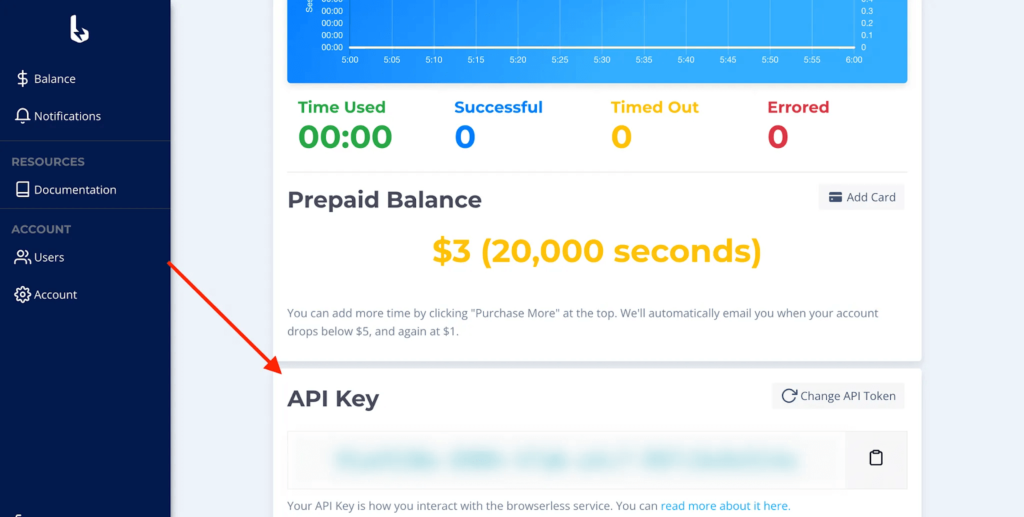
> After completing the registration process, the platform supplies us with an API key. We will use this key to access the Browserless services later on.
>
> All of the above libraries are supported by the platform. Head to the [documentation page](https://docs.browserless.io/v1/) to learn how to get started today.
>
> 
>
> ## Conclusion
>
> This "best open source web automation tools" article covered powerful open source web automation libraries for various programming languages like Node, C#, Java, Go, and Ruby. There are many other excellent libraries, but we believe these to be the best. If you want to learn more about how to get started with those libraries and Browserless, you can check out our other articles and be sure to subscribe for more educational content.
>
> P.S.
>
> If you like this article about open source web scraping tools, you can check out our best guides on this topic:
>
> - [Getting started on web scraping with Selenium WebDriver and Python](https://www.browserless.io/blog/selenium-web-scraping)
> - [Zillow scraper guide | How to build your own Zillow web scraping tool](https://www.browserless.io/blog/zillow-scraper)
> - [Getting started with Website Test Automation | Browserless guide](https://www.browserless.io/blog/website-test-automation)
>
Compared to a paid alternative, an open-source browser automation tool eliminates the need to purchase expensive subscriptions or licenses. You can access the source code, making it possible to modify and customize a tool's functionality to your liking. However, there is a catch!
Even though an open-source web automation tool may eliminate the risk of vendor lock-in, it is built and maintained by different communities with different goals. So, selecting one for automated testing, website monitoring, bot development, form submission, or web scraping may be challenging.
Worry less because selecting a suitable open-source tool for web browser automation is about to get way more manageable. Here are:
7 Best Open Source Tools for Web Browser Automation
TestCafe
If you desire a web browser automation tool to test a web application integrated into a Continuous Integration (CI) and Continuous Deployment (CD) pipeline, TestCafe is your go-to tool. It is an open-source tool designed for end-to-end testing of web applications, ensuring they function properly across all core browsers, including Edge, Chrome, Firefox, and Safari.
Setting up TestCafe is straightforward, especially if you are a JavaScript or TypeScript veteran. It can operate without browser plugins, reducing complexity. Moreover, there is a vast and active community, plus documentation to reference in case you get stuck.
Puppeteer
Puppeteer excels at web scraping. You can also use it to test web application user interfaces and capture web page screenshots.
Regarding web scraping, Puppeteer can automate data collection from dynamic websites. You can set it up to navigate web pages, click on various elements, capture the desired data, and return it to you.
To mitigate web scraping hurdles like scaling up and anti-scraping measures, you can integrate Puppeteer with an automated browser for website unlocking and project scaling.
Thanks to its intuitive and straightforward API (Application Programming Interface), Puppeteer can generally be operated with minimal code. Its rich API provides a comprehensive set of functions for interacting with website pages, including screenshot generation, form filling and submission, PDF creation, and network interception.
Despite the rich API, Puppeteer's full potential can only be used within Chromium or Chrome. It does not natively support browsers like Firefox and Safari.
Cypress
How about a web browser automation tool for real-time testing? Yes, with Cypress, you can write tests and watch them run in real-time. This speeds up the debugging and development process, helping you catch issues and errors in time.
Besides real-time testing and debugging, you can use Cypress for UI (User Interface) testing to ensure the UI is intuitive and easy to navigate. You can also test applications' integration points to verify whether the components interact as expected.
Unlike Puppeteer, Cypress supports major browsers like Edge, Firefox, and Chrome. However, Cypress is also limited to Javascript and TypeScript, just like Puppeteer.
Advantageously, Cypress’ API comes with built-in commands for frequently used commands, reducing the need for you to write custom code as much.
Playwright
Need a browser automation tool for cross-browser testing? Then, Playwright is the tool for you. With Playwright, you can test a web app’s functionality across several browsers, including Safari, Firefox, and Chrome.
You can simulate user interactions, from simple navigation to complex workflows, to verify that a web application's components work consistently across various devices and browsers.
Besides being a robust tool for cross-browser and end-to-end testing, Playwright supports popular programming languages like C#, Python, TypeScript, and JavaScript. It has a modern API to simplify the setup process and clear documentation to simplify test creation and maintenance.
Selenium
Some call it the de facto industry -standard web browser automation framework. Why? You can use Selenium for extensive web testing, including acceptance, functional, and regression testing.
If you want to test the reliability and quality of a web application, Selenium can help you cut the time required by half.
Apart from web application testing, you can use Selenium to scrape and submit forms. It has features to peruse through web pages, locate specified elements, and extract target data. Moreover, if you want to validate a form, test user registration, or form data entry, Selenium makes the whole automation process a breeze.
Despite all you can do with Selenium, note that it has a steep learning curve compared to the other automation tools. For example, to set up Selenium, you must configure browser dependencies and drivers, which can be overwhelming if you are a beginner.
Scrapy
Scrapy is widely used for website scraping. You can use it to extract data for content aggregation, competitor analysis, market research, and more. Its ability to scale allows you to build massive data sets through concurrent scraping. This means you can use it to scrape large-scale websites like E-commerce sites.
While Scrapy is powerful, its learning curve may be steep if you are not conversant with Python. Rather than operating at the browser level, Scrapy interacts directly with web servers, and you must understand how to set up scraping via HTTP requests.
Watir
Lastly, there is Watir, a Ruby library designed for web browser automation. Since it is exclusively developed for Ruby, you have to learn the ins and outs of Ruby.
In most cases, Watir is handy for web testing and script automation. You can use it to simulate user actions like filling out forms and clicking buttons to test the reliability and quality of a web app. Moreover, you can write automated web scraping scripts within Watir or scripts to help with repetitive tasks.
Adapting to Watir is pretty easy because it has a simple API. Ruby’s straightforward syntax makes writing automation scripts easy to learn. You can give it a shot if you want to start leveraging the power of Ruby libraries, frameworks, and tools.
Out of web browser automation tools comes the ability to automate web scraping, browser interactions, web application testing, and more. Running a business would be costly, and growth would be delayed if all these were done manually.
Now, with the help of this blog post, take your time to select a web automation tool based on your needs. Remember, there is support from the communities and contributors who are effortlessly working on these open-source tools for web browser automation.