https://github.com/bruj0/vault-kv-backup
Unofficial HashiCorp Vault utility that backups a KV backend and other configuration, encrypting it via the transit secret engine
https://github.com/bruj0/vault-kv-backup
backup encryption hashicorp hashicorp-vault python-3 vault
Last synced: over 1 year ago
JSON representation
Unofficial HashiCorp Vault utility that backups a KV backend and other configuration, encrypting it via the transit secret engine
- Host: GitHub
- URL: https://github.com/bruj0/vault-kv-backup
- Owner: bruj0
- License: mit
- Created: 2019-11-25T15:22:17.000Z (over 6 years ago)
- Default Branch: master
- Last Pushed: 2021-05-14T13:54:05.000Z (about 5 years ago)
- Last Synced: 2025-03-24T00:11:46.416Z (over 1 year ago)
- Topics: backup, encryption, hashicorp, hashicorp-vault, python-3, vault
- Language: Python
- Size: 27.3 KB
- Stars: 4
- Watchers: 1
- Forks: 3
- Open Issues: 0
-
Metadata Files:
- Readme: README.md
- License: LICENSE
Awesome Lists containing this project
README
# Disclaimer
This is not an official HashiCorp tool and its currently in POC stage
# What is it
Its an utility to backup the contents of a KV-v2 secret engine from a HashiCorp Vault using its **Transit secret engine**
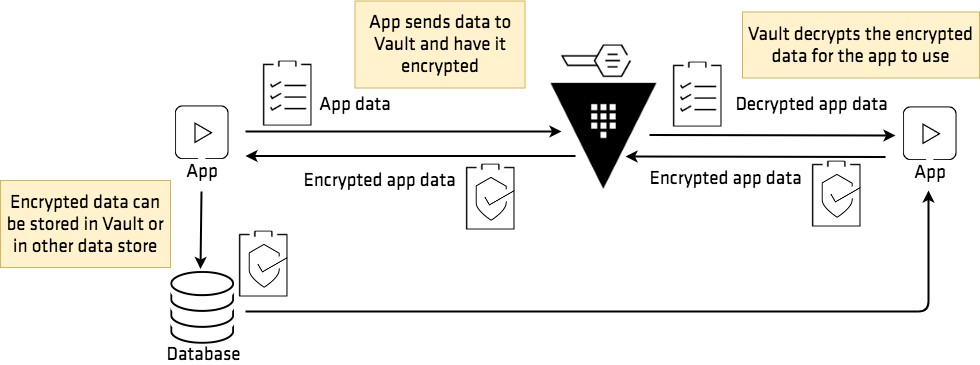
The idea is that we can move the data in json format while being encrypted at rest with a key stored in a different location.
More information on how the Transit secrent engine works: https://learn.hashicorp.com/vault/encryption-as-a-service/eaas-transit
# How to use it
## Clone this repository
```
$ git clone https://github.com/bruj0/vault-kv-backup.git
```
## Optional: Use the provided docker-compose to start Vault
```
$ cd .docker
$ docker-compose up -d
$ export VAULT_ADDR="http://127.0.0.1:8300"
$ vault operator init -key-shares=1 -key-threshold=1
$ vault operator unseal
```
Save the unseal keys and root token for later use.
It is configured to use a filesystem storage in the directory `.docker/data` and the configuration from `.docker/config/vault.hcl`
## Enable the transit engine in Vault
```
$ vault secrets enable transit
$ vault write -f transit/keys/backup
```
## Set the environment variables
```
$ export VAULT_ADDR="http://127.0.0.1:8300"
$ export VAULT_TOKEN=
```
## Run the application
This will read the env. variables and write the encrypted data to `encrypted.json`.
```c
$ vmb --debug encrypted.json
2021-05-14 09:43:51,299 [Main][INFO] (vmb.main:14)
Starting vmb 0.0.1
2021-05-14 09:43:51,300 [Main][INFO] (vmb.main:28)
Trying to login with Token
2021-05-14 09:43:51,300 [Main][DEBUG] (vmb.main:29)
Debug enabled
2021-05-14 09:43:51,319 [Transit encryption][INFO] (vmb.transit:19)
Starting transit encryption with key=backup mount=transit
2021-05-14 09:43:51,320 [KV Store][INFO] (vmb.kvstore:18)
Getting KV data from mount=kv
2021-05-14 09:43:51,321 [KV Store][INFO] (vmb.kvstore:32)
Getting secrets for mount: kv
2021-05-14 09:43:51,329 [KV Store][DEBUG] (vmb.kvstore:59)
Found a folder: kv/
2021-05-14 09:43:51,337 [KV Store][DEBUG] (vmb.kvstore:59)
Found a folder: kv/a/
2021-05-14 09:43:51,343 [KV Store][DEBUG] (vmb.kvstore:92)
Found an entity dict_keys(['c']) with
2021-05-14 09:43:51,351 [Transit encryption][DEBUG] (vmb.transit:39)
Encrypted response:
{'request_id': '751fd033-c512-184f-c43c-83e845d6af06', 'lease_id': '', 'renewable': False, 'lease_duration': 0, 'data': {'ciphertext': 'vault:v1:PUr6Qcs+GBOVMzv1yZRyJ0qcoSZM3+XBbiMKkKZn9RLMOIDOlb7DmQFlcUXSj1oYJUF1x6DUedz6PfgXsLhYnFdtGLTTGWfNec5E', 'key_version': 1}, 'wrap_info': None, 'warnings': None, 'auth': None}
2021-05-14 09:43:51,356 [KV Store][DEBUG] (vmb.kvstore:92)
Found an entity dict_keys(['e']) with
2021-05-14 09:43:51,362 [Transit encryption][DEBUG] (vmb.transit:39)
Encrypted response:
{'request_id': '62a2d048-6326-5ca8-54d2-8ff88b0a4e1e', 'lease_id': '', 'renewable': False, 'lease_duration': 0, 'data': {'ciphertext': 'vault:v1:tfhB2aCyhMhCSpDa2uHwrFM26pOAfDPRy0o1fpsu+/kDMTUw5Co9gbkuYEOTs9v7MQjxZfpUE/NsHZPhRRYpJKwbCWQG1eH5dA==', 'key_version': 1}, 'wrap_info': None, 'warnings': None, 'auth': None}
2021-05-14 09:43:51,364 [Main][INFO] (vmb.main:45)
Finished encrypting and writting data to encrypted.json
2021-05-14 09:43:51,384 [Main][INFO] (vmb.main:49)
Finished encrypting and writting data to backup.key
```
This will give you 2 things:
1. A file in json with all the encrypted key->value text, ie:
```json
{
"a/": {
"b": "vault:v1:qzQ9JnPuiRK8rs2mWVeABa1MnrI113tVlws/ez0UyXblaXG7byMqH8SySSg06uglJ9NwyTz3KJAMlDxXHNYFgRWwCW6uwrdjA8LY"
},
"d": "vault:v1:dct+5E/xQv51XDdkZpPtQHXdEFZmjKmZacTaqm+YLiTQghzufzj0wb9ggOanaFGeDKq2gx2CA+KN30xe/4qgY4559aQv43qteA=="
}
```
1. The Transit key used as returned by the `export` API: https://www.vaultproject.io/api/secret/transit/index.html#export-key and can be used to restore it.
The idea is to keep the data encrypted and the key in different physical places in case one is breached.
### TODO
* Automation of included Vault instance
* Restoring
* Packaging to pypi
* Configuration