(λmacs)
Emacs for Clojure development on macOS X.
(λmacs) is Emacs for Clojure development on macOS X.

- Check documentation online.
- Check the code on Github.
Intro
Motivation
For a number of years I've been using Emacs as my primary/only IDE. I
used a number of "distributions" readily available on internet such
as emacs-live and Prelude of which I made my own extension Preludex,
and I watched the birth of Spacemacs and the new challenger
doom-emacs.
Over time each of these distributions grew larger and larger
and it became hard to keep the configuration up-to-date
but still minimal (just what you need).
So I decided to build my own out of the best pieces of all of them.
If you are new to Emacs, it is probably best if you start with one of
the more popular distributions so that you get enough community
support. If only you need is to develop Clojure, and have enough
tooling support feel free to use my configuration.
Installation
- Download and install Emacs For Mac OS X if you don't have it yet!
Alternatively you can install it via:
sudo mkdir /usr/local/Frameworks
sudo chown $(whoami):admin /usr/local/Frameworks
brew tap d12frosted/emacs-plus
brew install emacs-plus@30 --with-no-frame-refocus --with-xwidgets --with-imagemagick --with-native-comp --with-elrumo2-icon
You can check github://d12frosted/homebrew-emacs-plus what each option does.
NOTE: you can choose your icon here and replace the last argument with the one you want
- Backup your previous installation:
mv ~/.emacs.d ~/.emacs.d-backup
- Clone
(λmacs)
git clone https://github.com/BrunoBonacci/lambdamacs.git ~/.emacs.d
- Install platform tools
Some platform tools are used to enhance the user experience and to
support some features.
brew install the_silver_searcher aspell fd clojure-lsp/brew/clojure-lsp-native
- That's all, start hacking!
If you want you can customize your configuration (see next section).
Configuration
There are a number of configurable options to setup (λmacs) just
right for your environment.
To change the configuration file edit config/user-config.el.
- First configure your name and email:
;; add your name and email address
(setq user-full-name "Firstname Lastname"
user-mail-address "your-email@email.org")
- Install a nice looking font and pick a size:
Here some suggestions:
(setq lambdamacs/default-font "Roboto Mono Thin for Powerline")
(setq lambdamacs/default-font-size 150)
- Select your favorite theme
There are a number a themes already installed see the full list and
see theme screenshots. I'd recommend to pick your favorite as default
and use a light theme as alternative. It can be useful sometimes to
switch to the alternative for example if you make a
presentation. Light themes work better with projectors.
(setq lambdamacs/default-theme 'doom-moonlight)
(setq lambdamacs/alternative-theme 'doom-one-light)
You can switch between themes by typing M-x lambdamacs/switch-theme-to-alternative
and switch back to the default theme with M-x lambdamacs/switch-theme-to-default
Structure
(λmacs) has the following project structure:
.emacs.d
├── init.el - main emacs init file
├── config/ - user configuration and other settings
├── modules/ - packages which are not available in MELPA
├── src/ - packages installation and configuration
├── assets/ - Assets for this project (images, css, etc)
├── yas/ - Custom Yasnippets
└── .save/ - Locally saved items (history, items etc.)
Packages installed
Package
Purpose
avy
Jump where you want (like ace-jump)
bm
Bookmarks management
bookmarks
Code bookmarks
browse-at-remote
Browse selected files or lines on Github (and other repos)
carbon-now-sh
Generate images from code snippets, useful for presentations.
cider
CIDER the best IDE for Clojude development
clj-refactor
Cider companion for refactoring
command-log
Displays a buffer with the keys and commands you type
doom-modeline
cool minimalistic modeline
doom-theme
a collection of well curated themes
emmet
shorthand expansions for HTML and CSS
flycheck
Run checks on the fly
flymd
Live preview for Markdown editing
flyspell
Spell checking
forge
Magit extension for Pull Requests and Issues
google-this
Quickly Google something at point
gptel
extentsion to connect to various local and remote LLMs like ChatGPT
impatient
live preview for HTML editing
impatient-showdown
live preview for Markdown editing
magit
Git controls
markdown
Markdown mode support with TOC and Live preview (via flymd)
multiple-cursors
Multiple cursors for editing
outline-presentation
Use org-mode to make a presentation
paradox
A package manager which makes very easy to update your installation
paredit
Can't develop Clojure without structural editing
password-generator
Generate strong random passwords
perspective
Group buffers into projects and swtich between them
prodigy
Local process management
projectile
Useful functions for working with projecs
restclient
Turn simple text buffer into HTTP REST calls
sticky-windows
Stick windows in place (no auto close)
switch-java
Enables to select the JVM version while inside emacs
undo-tree
Powerful multi-state undo
vertico
minibuffer completion
wgrep
Editable search buffers
witespace
To clean trailing whitespaces in the code
wsd
WebSequenceDiagrams
yas-snippet
Code snippets
- TODO:
-
[ ]wsd -
[ ]code rtf pygments -
[ ]repl image hack
Keybindings
Here is the list of keybindings which are added by this configuration.
All standard keybindings are valid, plus the default keybindings of
the pacakge installed.
Here is how to read the keybindings:
-
C-x- meansCtrl+x -
C-x 1- meansCtrl+xfollowed by1 -
M-x- meansMeta+xorAlt+xorOption+x -
s-x- meansSuper+xorCommand ⌘+x -
SPC- is space bar -
RET- is reutrn key
Here the keybindings added/defined by (λmacs):
Mode or group
Key
Action
Module
clojure-mode
M-SPC
Removes all the blanks between two forms except one
(λmacs)
clojure-mode
s-b
Adds a nice comment box with current line.
(λmacs)
clojure-mode
C-c C-r
Prefix for Clojure refactoring functions
clj-refactor
cider-mode
C-c C-{
Decompiles the previous form (into Java code)
clj-decompiler
emmet-mode
C-j or C-u C-j
Expand emmet' style abbreviations
emmet
editor
M-y
Browse the content of the kill-ring
browse-kill-ring
editor
C-a
Smart beginning of the line (non blank)
crux
editor
⌘-c
Copy selected region (like macOS - more natural)
cua-mode
editor
⌘-v
Paste selected region (like macOS - more natural)
cua-mode
editor
C-RET
Toggle rectangular selection
cua-mode
editor
C-=
Expands the selection to the larger surrounding form.
expand-region
editor
M-/ or s-/
Hippie expansion (completion)
hippie
editor
C->
multi-cursor mark next like this
multiple-cursors
editor
C-<
multi-cursor mark previous like this
multiple-cursors
editor
C-c C-<
multi-cursor mark all like this
multiple-cursors
editor
C-M-s-. C-M-s-.
Adds a cursor on each line of a multi-line selection
multiple-cursors
editor
C-x j
Jump to section in buffer (depends on current mode)
counsel
editor
s-j + char
Jumps to the word starting with the given char
avy
editor
s-. + char
Jumps to the location selected with the given char
avy
editor
s-w + char
Jumps to the window selected with the given char
avy
editor
C-c C-w
Opens the selected file in Github
browse-at-remote
editor
C-c C-S-w
Copy the link of the selected file in Github in kill-ring
browse-at-remote
editor
⌘-←
Restore previous window layout
winner
editor
⌘-→
Redo previous window layout
winner
editor
M-s-c
Calls carbon-now-sh and generate an image with your code
carbon-now-sh
bookmarks
s-1
Toggle bookmark
bm
bookmarks
s-2
Cycle previous bookmarks
bm
bookmarks
s-3
Cycle next bookmarks
bm
bookmarks
s-5
Create bookmarks by regex
bm
bookmarks
s-0
Clear all bookmarks in this buffer
bm
bookmarks
s-S-0
Clear all bookmarks in all buffers
bm
files/buffers
C-x C-/
Open dired explorer for the current file.
(λmacs)
files/buffers
C-c t
Open a shell terminal
crux
files/buffers
s-r
Open a recently opened file
crux
files/buffers
C-u C-x 0
Closes a locked window (via C-x 9)
sticky-windows
files/buffers
M-s- + ← → ↑ ↓
Move between windows (same keys as iTerm)
(λmacs)
windows
C-S- + ← → ↑ ↓
Resize current window using keybindings
windsize
processes
C-x p
Open Prodigy's status buffer (start/stop processes)
prodigy
project
C-x g
Open Magit status
magit
project
C-x M-g
Minibuffer popup with Magit dispatch functions
magit
project
C-x g + C-o
Open the current project in Github
magit
project
C-c p or s-p
Projectile's prefix
projectile
project
C-x 9
Locks the window in place so that it can't be closed.
sticky-windows
all
s-g
Google word or region at point
google-this
all
C-c C-RET
Send to gptel, use prefix for options
gptel
Features
Here some features implemented/available in (λmacs)
Switch Java version
(λmacs) focus is on Clojure development. Clojure is a JVM hosted
language. JVM release process has been traditionally quite slow, but
in the recent years Oracle and OpenJDK have speed up the release
process to roughly every 6 months.
For this reason it is common to having the need to use/try different
version of the underlying JVM while working on a Clojure project.
Emacs doesn't have a facility to do this and, to my knowledge, there
is package that handles this. For this reason I wrote a module that
offers this possibility and described the solution in this blog post:
Switching between multiple Java JDK versions in Emacs.
You can read more about the solution in the blog post but here I will
only describe how it works.
Firstly you need to tell (λmacs) where your JDKs are installed.
Typically on a macOS the default location is:
/Library/Java/JavaVirtualMachines.
If this is the location where are your JDK versions are installed then
you don't need to change the configuration, otherwise select the
appropriate folder in the config/user-config.el file.
;; base directory where all the JDK versions are installed
;; use `M-x switch-java' to select the JVM to use
(setq JAVA_BASE "/Library/Java/JavaVirtualMachines")
Once you set the base directory where all your JDKs are installed and
evaluated the form, to select a JVM to use you can just run: M-x
which will show the list of available JVMs. Once you
switch-java
select one JDK, it will update the $JVM_HOME environment variable
and use it whenever you start a new REPL or java application.
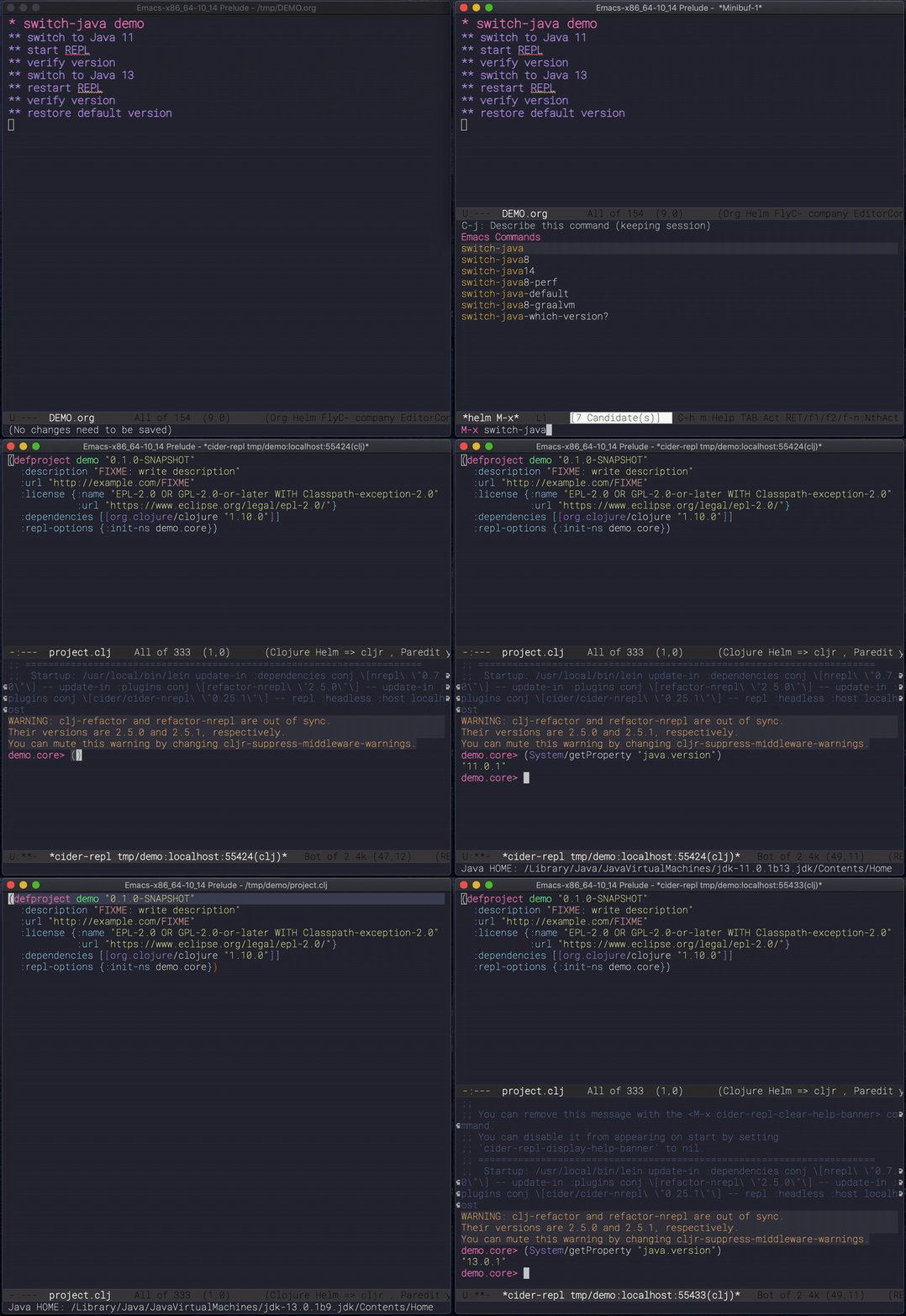
Here other commands you can run:
-
M-x switch-javaselect a JDK from a list of available ones -
M-x switch-java-defaultwill select the system default JDK (the
one in use prior any selection) -
M-x switch-java-which-version?displays the JDK currently in use.
You can see a usage demo here:
Custom yasnippets
yasnippets is a templating minor-mode with allows to define code
templates and complete them with a few keystrokes. Think about the
repetitve structures in your code. Check out this demo on Youtube. It
works across languages and there are plenty of predefine templates
Here the is a list of all most of the boundled snippets.
However if you want to define your own snippets you can drop them in
~/.emacs.d/yas folder divided by major-mode. If you are unfamiliar
with the templating language used by yasnippet you can check
the official online documentation.
Restclient
If you do RESTful services development restclient is going to be
your best companion.
restclient turns normal text buffers into executable HTTP requests
ideal to tests your webservices.
For example, create an empty buffer, activate the move via M-x
then write your HTTP requests like:
restclient-mode
#
# retrieve your current IP address
#
GET http://ifconfig.co/ip#
# retrieve the geolocation city info
#
GET http://ifconfig.co/city
Accept: text/plain#
# retrieve all as json
#
GET http://ifconfig.co/json
Content-Type: application/json
After each request try to press C-c C-v to execute the request and
see the response.
All *.rest files are in restclient-mode by default.
Here a list of all the keybindings for this mode:
-
C-c C-c: runs the query under the cursor, tries to pretty-print the response (if possible) -
C-c C-r: same, but doesn't do anything with the response, just shows the buffer -
C-c C-v: same asC-c C-c, but doesn't switch focus to other window -
C-c C-p: jump to the previous query -
C-c C-n: jump to the next query -
C-c C-.: mark the query under the cursor -
C-c C-u: copy query under the cursor as a curl command -
C-c C-g: start a [helm](https://emacs-helm.github.io/helm/) session with sources for variables and requests (if helm is available, of course) -
C-c n n: narrow to region of current request (including headers) -
TAB: hide/show current request body, only if -
C-c C-a: show all collapsed regions -
C-c C-i: show information on resclient variables at point
cljfmt auto-format
The way Cider formats the code isn't particularly nice. To format the
code properly you need to have a repl running and the code needs to be
loaded. Because of this the formatting changes depending on which
state your IDE is. I think it is a bad idea. I rather have a less
appealing formatting, but which can be done without having to
load/compile the code.
(λmacs) performs a reformatting of the code on save with a
definition which doesn't take into account which particular form you
are in. However, there are times this is not convenient, like when
working on someone else code. To disable the code-reformat set the
variable lambdamacs/cljfmt-reformat-on-save to nil in the
configuration.
(setq lambdamacs/cljfmt-reformat-on-save nil)
You can toggle the value with M-x cljfmt-toggle-reformat.
Web development
Start impatient mode on the HTML page your are working on via:
M-x impatient-start- it will open your browser at http://localhost:8888/imp/
- Edit the LIVE HTML and
- use
C-jto expand emmet's abbreviations, useC-u C-jto preview the expansion
Get involved
Contribution
This is my personal setup, I don't mind you using it and I'd
appreciate feedbacks and suggestions on how to improve it!
Issue a PR, and if it works for me, I'll merge it!
References
The code in this repo has is the sum of my personal experience and
the following references:
-
Emacs Prelude - A great Emacs distribution. -
@bbastov .emacs.d - Bozhidar's Emacs config. -
emacs-live - Another Emacs distribution. -
@daviwil dotfiles - David Wilson's Emacs config. - Easily, the most elegant Emacs out there!
-
Get Things Done with Emacs - From which I took the beautiful CSS for org-mode (thanks).
Thank you to all of you!
License
Copyright © 2020-2025 Bruno Bonacci and contributors.
Distributed under the GNU General Public License, version 3.