https://github.com/brutaldev/containerupdater
Automate updating Docker images and the containers that use them.
https://github.com/brutaldev/containerupdater
automation devops docker docker-container docker-image registry
Last synced: 11 months ago
JSON representation
Automate updating Docker images and the containers that use them.
- Host: GitHub
- URL: https://github.com/brutaldev/containerupdater
- Owner: brutaldev
- Created: 2025-03-07T16:28:40.000Z (over 1 year ago)
- Default Branch: main
- Last Pushed: 2025-07-23T12:38:44.000Z (12 months ago)
- Last Synced: 2025-07-23T13:02:30.096Z (12 months ago)
- Topics: automation, devops, docker, docker-container, docker-image, registry
- Language: C#
- Homepage:
- Size: 496 KB
- Stars: 10
- Watchers: 1
- Forks: 0
- Open Issues: 0
-
Metadata Files:
- Readme: README.md
Awesome Lists containing this project
README

# Container Updater

Automate updating Docker images and the containers that use them.
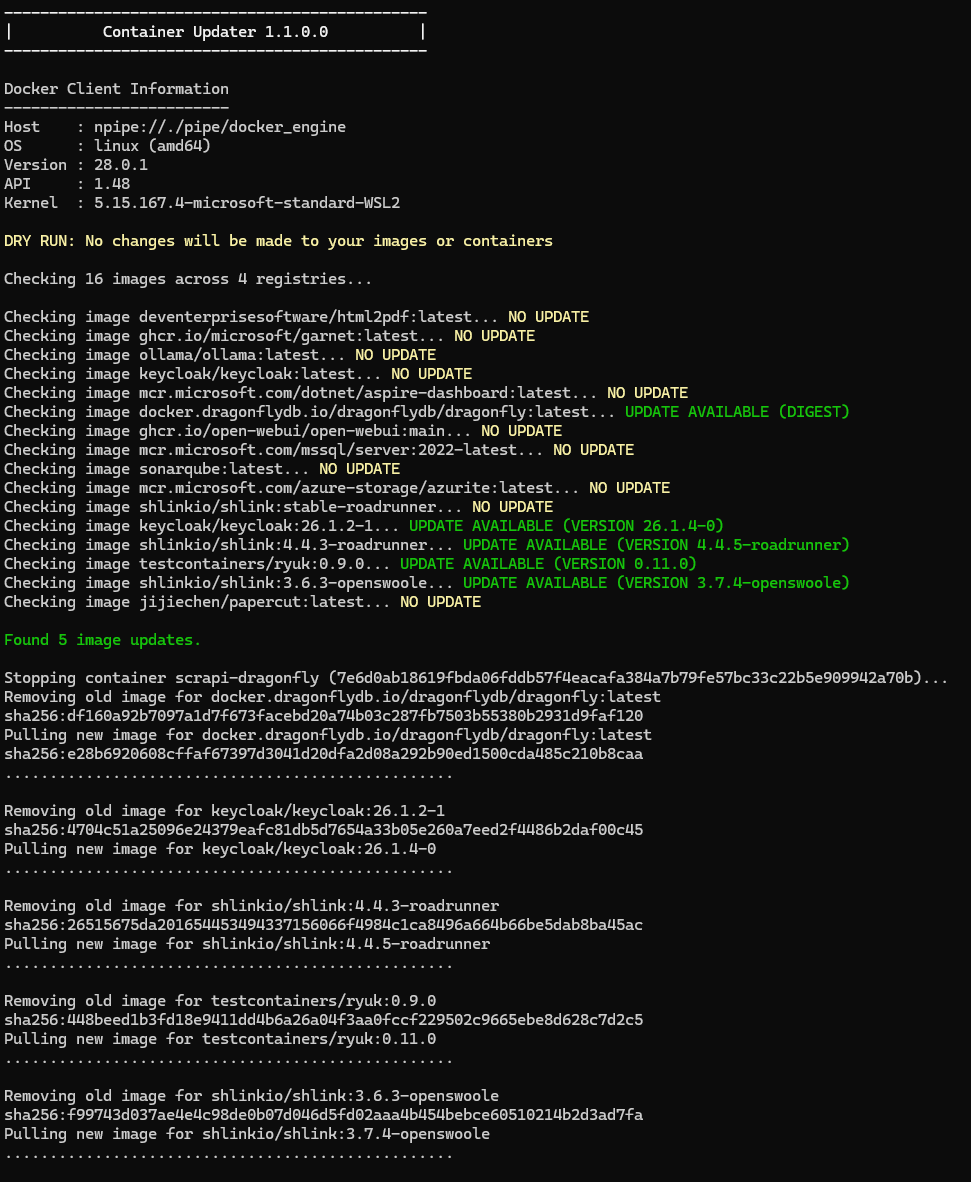
Updating Docker images in-place is a surprisingly complex task that requires multiple steps which are both time consuming and error prone if done manually.
Container Updater completely automates this process in the simplest way possible (just run it).
Container Updater is available as a .NET Core Global Tool:
```bash
dotnet tool install --global ContainerUpdater
```
The latest version can also be downloaded directly from NuGet.org at:
https://www.nuget.org/packages/ContainerUpdater
If you don't have .NET installed you can download the latest version for your operating system here:
https://github.com/brutaldev/ContainerUpdater/releases/latest
### Options
#### Dry Run
If you want to see if there are any updates and what will happen but don't want to make any changes you can use the `--dry-run` option.
```bash
ContainerUpdater --dry-run
```
#### Interactive Mode
If you want to pause at certain steps and choose which images to update you can use the `--interactive` mode option.
```bash
ContainerUpdater --interactive
```
#### Digest Only / Ignore Version Numbers
If you use pinned version numbers and only want to update images with new digests you can use the `--digest-only` option.
```bash
ContainerUpdater --digest-only
```
#### Include / Exclude
If you want to include or exclude certain repository names from update checks, you can pass them in as a lists using the organization, image name or full name.
Excluding takes precedence over include matches.
```bash
# Will exclude images from deventerprisesoftware (https://hub.docker.com/u/deventerprisesoftware) and microsoft/garnet.
ContainerUpdater --exclude deventerprisesoftware garnet
# Include full repository names as well.
ContainerUpdater --include deventerprisesoftware/html2pdf
# Include only images from Microsoft (https://hub.docker.com/u/microsoft).
ContainerUpdater --include microsoft
```
#### Remote Host
Instead of connecting to a local Docker instance, you can connect to a remote host instead using the `--host` option. This needs to be a valid URI.
```bash
ContainerUpdater --host tcp://127.0.0.1:2375
```
#### Credentials
If your Docker instance (local or remote) requires credentials then you can supply those with the `--username` and `--password` options.
```bash
ContainerUpdater --username admin --password secret_sauce
```
### How It Works
1. Get all the current image digests and tags to perform a manifest lookup.
2. Lookup latest manifest and check if it matches the current image digest.
3. If not the latest, get the containers that are using the old/existing image and stop them.
4. Inspect and retain the information to re-install containers.
5. Remove the containers using the old image.
6. Remove the old image.
7. Pull the new image.
8. Re-create the containers from previous inspect data.
9. Start the containers if they were previously running.
### Alternatives
Watchtower (https://github.com/containrrr/watchtower) and Ouroboros (https://github.com/pyouroboros/ouroboros) are both alternatives that perform the same in-place update.
Both these options run as docker containers themselves which actually creates unnecessary complexity.
Container Update was created because these options just take too long to setup effectively as well as requiring their own maintenance.
#### Watchtower Migration/Compatibility
Container Updater is compatible with Watchtower labels so if you have existing containers that were setup with Watchtower labels, Container Updater will respect those labels and only update the containers that are marked for updates.
- `monitor-only` label: https://containrrr.dev/watchtower/container-selection/#monitor_only
- `enable` label: https://containrrr.dev/watchtower/container-selection/#full_exclude
- `no-pull` label: https://containrrr.dev/watchtower/arguments/#without_pulling_new_images
- `depends-on` label: https://containrrr.dev/watchtower/linked-containers
Running an updater outside of Docker is incredibly simple and requires zero setup.
Container Updater also provides the following:
- No installation or configuration, just double-click.
- Works on all operating systems regardless of Docker environment.
- Works with all repositories and manifest versions.
- Improved/reliable update checks using multiple digest lookups.
- Automatically use cached authentication on all operating systems including credential helpers.
- Full restore of containers including all labels and annotations.
### TODO
- [x] Automatically use available cached credentials (cross-platform)
- [x] Handle automatic token generation for different registries
- [x] Handle multiple digest checks using different content types
- [x] Restore all attributes as well (compose groups)
- [x] Support dry run just to check for and show updates
- [x] Support adding image names to include/exclude in checks
- [x] Support selection of images to update (interactive mode)
- [x] Support updating a remote docker host
- [ ] Export container settings to recover from failures
- [ ] Add cross-platform UI to run in the system tray
- [x] Deploy as a .NET global tool
- [x] Write all output to log file
- [x] Detect version numbers and new version tags
- [x] Watchtower label compatibility